OU blog

Personal Blogs

Christopher Douce

TM470 Resources

Visible to anyone in the world
Edited by Christopher Douce, Wednesday 5 November 2025 at 16:42

This post shares some resources that might be useful during the course of your project module. Some of what is presented here may be already familiar to you, having studied earlier modules.

What you will need will, of course, vary depending on your project. You will need to make choices about what you need. In your project report, you also need to say something about why you have chosen what you have chosen. Also, do remember, that what you find might be even more helpful than what is given here.

Diversity, Equality and Inclusion

In the UK, the Equality Act 2010 is an important piece of legislation, which defines a number of protected characteristics.

When it comes to computing projects, the W3C WAI WCAG is an important resource, especially if your software product makes use of web technologies.

Ethics

Software systems affect people and society. Requirements for software systems can come from people and society. Wherever there is people, there is also ethics. Computing professionals must behave in a way that is ethical. To help with the Legal, Social, Ethical and Professional Issues, the following sets of guidelines are considered to be helpful:

Gantt chart tools

As suggested in earlier posts, it is a good idea to create a Gantt chart for your project to create an overview of what you expect will happen and when

It is completely up to you how you create your Gantt chart. You might choose to create one using many of the different spreadsheet templates that are available. Alternatively, you could download a software package, such as Project Libre Desktop which is an alternative to the popular Microsoft Project package.

Another approach would be to use one of the many cloud-based Gantt tools that are available, such as GanttPro. These cloud-based products often offer a trial period, after which you have to pay a monthly fee.

Every tool has its own advantages and disadvantages and will have learning curve if you haven’t used one of these tools before.

Generative AI

GenAI can be considered to be a useful resource, but it must be used with caution. Every student has access to a Microsoft product called CoPilot. If AI is used in the creation of code that is used within a software solution, you must document what prompts have been submitted to which language model. If you use AI as a part of a solution to a wider problem, it is important and necessary to discuss the implications of its use, in terms of risks, ethics and bias.

University level guidance is available through this resource: Generative AI in learning, teaching and assessment at the OU. This provides a link to guidance for students. Guidelines for referencing the use of GenAI can be found, in part, on the CiteThemRight website.

Literature review

The literature review is, as suggested earlier, a summary of all your reading that has contributed to the development and completion of your project. Whatever you mention in your literature review rection should be used or applied in some way.

In addition to some of the skills resources that follow, the following resources may be useful:

An introduction to software development Open Learn Badged Open Course (BOC), which contains a very useful section, Finding and reading academic articles.

Srinivasan Keshav’s article entitled How to read a paper offers some practical guidance about how to read and analyse an academic article.

Project management resources

All the guidance you need to complete your project is presented within the module materials (and within this accompanying guide). There are, of course, other resources in the world that can offer some complementary guidance.

One such resource is the Project Management for IT-Related Projects: 3rd edition, published by the British Computer Society (BCS). You don’t need to buy this text, but you may be able to access parts of it through the OU Library.

Although this text is intended for industry professionals, it may be useful for your project. The guidance about project models reflects some of the advice shared in module materials.

Prototyping tools

There are different approaches to prototyping. One of the simplest and most useful tools is, of course, pencil and paper. It is acceptable to draw prototypes of your software product and share these within your project report. An earlier article, TM470 Considering prototyping offers a bit more guidance about the concept of prototyping.

If you wish to use a tool to help you with your prototyping, the following might be useful:

If you wish to go beyond creating prototypes of user interfaces, you could use other tools to create prototype designs of your software system. One such tool is Visual Paradigm which can be useful with drawing of UML diagrams, and diagrams that describe cloud computing infrastructure. Other cloud-based drawing tools could, of course, be used.

Products such as Balsamiq and Visual Paradigm can be used with an academic licence.

Further academic guidance about prototyping can be found in the following text book:

Sharp, H., Rogers, Y. and Preece, J. (2023) Interaction design : beyond human-computer interaction. 6th edition. Milton: Wiley. 

Which is available through the OU Library

Risk assessment and management

Accompanying the description of the lifecycle model are two useful sections: risk assessment and risk management. Risk assessment concerns with considering what the risks to your project might be. Risk management concerns with approaches to deal with those risks. The risk assessment approach presented in the module is relatively simple. It considers risks in terms of impact and likelihood, which is sufficient for the needs of your project report.

Every project is, however, different in the ways that it need to take account of risk. Some wider issues that might be helpful includes the NIST Cybersecurity Framework. There is also ISO 27001, an international standards which concerns information security. Risks can be managed not just in terms of how technology is used, but also how human processes are applied.

Skills, writing and studying

The following links offer some useful practical guidance about writing and studying:

Within the library pages, the following two pages are particularly helpful:

Do also refer to sections in this guide that refer to the writing of your project report and the appropriate uses of Generative AI.

Software development tools

Your choice of tools will depend, in part, on the characteristics of your project, and what skills you wish to develop. An important tool is the integrated development environment (IDE), which often integrates together a text editor, a debugger, and a way to run your software. IDEs can also be connected with version control software (to keep your software safe) and AI assistants, which help you with your learning. Historically, IDEs used to focus on a single programming language, such as Java or Python. Popular IDEs now work with multiple programming languages.

What follows is a useful summary of some popular IDEs:

Apache Netbeans. Netbeans primarily supports the Java programming language but can be used with other languages through extensions.

Eclipse. Eclipse is an enterprise level ‘cloud native’ IDE that supports a wide variety of languages.

IntelliJ. IntelliJ is a popular commercial IDE that was notable for its usability and functionality. A ‘dev toolkit’ pack is available for students.

Microsoft Visual Studio Code. Visual Studio Code is notably the most popular IDE. It can be used with multiple languages. VS Code is not to be confused with Microsoft Visual Studio, which is a different similarly named product.

PyCharmPyCharm is a Python IDE from JetBrains who also have created IntelliJ. An alternative tool for Python developers is the Jupyter Notebook environment.

Software testing

A thorough project will move through an entire cycle of gathering requirements, implementing those requirements, through to carrying out of testing to make sure that requirements have been implemented correctly.

There are a number of tools that can help with the software testing (which is not to be confused with usability testing).

In terms of source code, there is a unit testing framework which is known as xJunit, where the ‘x’ refer to the initial of a programming language. The xUnit.net site relates to a unit testing framework that can be used with a number of different Microsoft .NET languages. JUnit.org if specifically concerned with unit testing of Java code. There is also PyUnit which concerns the testing of Python code.

Unit testing is testing that operates at a low level. Moving up a level, there are other tools, such as Cucumber. There are other tools out there, such as Selenium, but this takes us beyond the boundaries of a project, and towards testing at an industrial level.

An important point to remember is that the extent of testing that is necessary depends on what the impact of errors might be. Testing is guided by risk.

Version management

It is important to keep the software you create safe. The best way to do this is to use a version management system. The dominant tool used for version management is called Git. Git allows you to save your software into a safe repository called GitHub. The following introductory videos offer some useful explanations:

To begin to use Git, you must install the Git software on your local computer. If you are using Windows, you will install something called a ‘terminal’, MinTTY, which allows you to execute Git commands and upload your code to GitHub. There is also a graphical user interface version, but in terms of gaining practical experience, it is best to use the terminal (unless, of course, you manage to use Git as a part of your IDE).

By way of further information, the following resource is helpful: Ponuthorai, P.K. and Loeliger, J. (2022) Version Control with Git. 3rd edition. O’Reilly Media. Appendix A, History of Git, offers a lot of useful background information, which is worth a read.

Reflections

It is hoped this blog post offers some useful resources to complement what is shared within the module materials. Since your project is intended to be an individual project, I have not covered tools that support collaboration in an agile environment, such as Jira. Similarly, I have not shared resources that concerns covered cloud computing, since there is no need to consider deployment beyond your own personal computer, unless you decided this is an important element of your project.

A key point is that you must choose resources that you feel you need to use and apply within your project. You also should find the time to write about what these are. You should also say something about the skills you need to acquire to use or apply these resources.

A final note: none of the software products mentioned here are official university recommendations; these are personal opinions (which may, or may not, be useful).

Permalink
Share post
Christopher Douce

TM470 Considering prototyping

Visible to anyone in the world

If you decide to build something as a part of your project, you might want to consider building a prototype. The software engineering module defines a prototype as ‘a simplified software system that is a subset of the eventual product’. In fact, a common aim of a project is to create a prototype.

This blog summarises different approaches to prototyping. If you use prototyping within your project, make sure you’re able to justify which approach you adopt and why within your project report.

It is also important to make sure that the different elements of your project are aligned together.  If you choose prototyping, you should choose a project model that works with prototyping. The interaction design project model is one that emphases the building of prototyping, but you can also embed the building of prototypes within other iterative approaches to project management. You also need to consider any risks, any skills you need to develop, and any resources that you may need to apply.

Approaches to prototyping

There are two broad approaches: you can build a prototype which you later throw away; your whole object will be to learn something. Alternatively, you can build a prototype with the aim of incrementally refining it into a potentially usable product.

Through the process of prototyping, you can learn about requirements your product will need. You can do this by asking potential users (or stakeholders) what they think about what you have built. This is the process of evaluation. You should be able to learn new things with every new version of prototype you create.

Types of prototyping

There are two main types of prototyping: horizontal prototyping and vertical prototyping.

A horizontal prototype is a prototype that appears to show all the main functionality of a product, but not in a lot of depth. A horizontal prototype is all about breadth. It allows whoever is evaluating your prototype to get a feel for what a product does or looks like, but it might not work in any meaningful way.

A vertical prototype is a prototype that focuses on depth. It aims to only present a small amount of functionality in a detailed way suggests how a product may operate. In some cases, a vertical prototype may be implemented using software code. A vertical prototype is likely to focus on the essence of what a product does. Users of a vertical prototype will be able get a feel for how a product is likely to work.

Prototyping approaches

Broadly speaking, there are two prototyping approaches: low fidelity and high fidelity.

Low fidelity prototyping is prototyping where the design of a prototype may not directly or substantially resemble the final product. A low fidelity prototype is one that is likely to be thrown away. It is typically used to find out something about the problem. It may reflect an initial design that is to be refined further when it has been evaluated. A low fidelity prototype might not do much, or it might simulate the beginnings of potential interactions.

High fidelity prototypes, on the other hand, go some way to solving the problem. They might be interactive, or they might be a proof of concept demonstrators that has been created using a technology that is different to the technology used in the final version of the software product.

Low fidelity prototyping

Paper prototypes

When you think about paper prototyping, think about pens, paper, scissors and Sellotape.

Paper prototypes should be messy. Messiness is a virtue for a simple reason: they are easy to change. They can be put together quickly. If a design or an idea doesn’t work, they can be thrown away quickly.

If you have spent hours creating a detailed interface design that looks beautiful, your refined design will be harder to change, and throwing it away will become difficult. It is easier to change and to disregard something that appears to have little value. The value with paper prototyping as an approach lies with its scrappiness.

The interaction design text by Preece et al. show different types of sketches that can be considered, in one way or another, a paper prototype:

Storyboards: a simple sketch of the environment in which a product is used, which can be divided into cells, which show a sequence of interactions. The emphasis is on the ‘sketchiness’ of the sketch. Users or stakeholders can be represented using stick figures. The interactions that are depicted has value; the quality of the sketching does not.

Card-based prototypes: a set of options or choices that are made available to the user, shared on a card. A sequence of cards are used to get an understanding of the interactions that are embodied within the product.

Interface sketches: a sketch of a screen or a display. This might include labels or icons, as well as buttons and product logos. Everything is very sketchy. You might create a number of different versions, and carry out an evaluation to choose which of the interfaces is best. Evaluation will be discussed later.

Wireframing

Although paper prototyping has obvious and clear advantages due to its low cost and high speed, senior managers may become confused with the appearance and suggested chaos of a scrappy sketched out design. A middle way between a paper prototype and a high fidelity prototype lies with the creation of wireframes which can be created using dedicated wireframing software, or by creating simple mock-ups using tools that you are familiar with.

One approach to wireframing is to create a series of simple and unrefined HTML pages. Only front-end pages need be created, which can be linked together to suggest an interaction or a connection between different pages.

There are lots of wireframing tools to choose from. Three notable products are:

If you do choose a wireframing product, you need to explain why you have done so, and also explain what you hope to gain from applying it. You should also list it as a resource and say something about your skills.

PowerPoint

Sometimes tools can be used in combination with each other.

PowerPoint is, of course, a popular presentation tool. PowerPoint files can be read and opened by most devices. Rather than showing actual paper prototypes to potential users, you could instead take photographs of your paper prototypes and create a PowerPoint presentation with them. The advantage of doing this is that you could then create sequences of interactions. If you are skilled and confident PowerPoint user, you can also have users jump to slides which show alternative interactions.

You can also use PowerPoint to show a series of wireframes that have been created using wireframing tools, especially if your chosen tool doesn’t have the ability to share a series of interactions.

Wizard of Oz

Creating computer code is expensive. It can take a lot of time. If you want to see whether an idea works or makes sense, one approach is to ‘simulate’ the computer using a variation of the Wizard of Oz experiment.

Imagine you have a paper prototype. On its own, it doesn’t do anything. During an evaluation, you might ask a user the question ‘what are you going to press?’ When they have pointed to a bit of an interface sketch, you could replace one paper prototype ‘screen’ with another, fulfilling the action as if all your bits of paper was a working product. You become the computer, or the product that is to be designed.

High fidelity prototyping

Returning to our earlier definition of a prototype, ‘a simplified software system that is a subset of the eventual product’, a high fidelity prototype might be a bit of a bigger product, but the most important characteristic is does something. Your product might partially solve a problem. Relating back to earlier terms, your high fidelity prototype might be a horizonal prototype or a vertical prototype. Really good projects tend to be vertical prototypes, for the reason that they can demonstrate depth of skill and knowledge.

Physical prototyping

Some projects combine physical design and software design. This may be especially the case for students who may have studied a combination of design and computing. Physical prototyping (in the sense that it is considered here) can be considered to be analogous to paper prototyping. Creative mock artefacts can be created to embody some of the key ideas within a project.

The notion of physical prototyping has been discussed in an earlier blog, TM356 Prototyping Hackathon. Just as elements of paper can be Sellotaped together for a paper based prototypes, physical items can be glued or tied together for a physical prototype. Physical prototyping can add a second meaning to the notion of a card based prototype. A ‘low fidelity’ physical prototype isn’t going to realise any functionality; it is more about expressing and understanding ideas.

Evaluating prototypes

There are different ways to evaluate a prototype.

If you have access to users, you could do some usability testing. If you do this, do consider preparing some useful resources, such as a project information sheet to tell the participant what it is all about, a consent form, a script (to make sure that everyone is asked the same thing), a set of tasks, and a data collection form.

If you don’t have access to participants who are likely to be the intended users, you can always use what are known as ‘proxy users’. These will be participants who pretend to be the users. You might ask friends and family members, for instance.

If you don’t have access to anyone you can ask, it is possible to carry out your own critical evaluations. You could do this by applying techniques such as heuristic evaluations or cognitive walkthroughs. For further information about these approaches, do refer to the interaction design textbook which is mentioned in the resources section.

Resources

Requirements are important in all software projects. How you approach requirements will depend on the aims and objectives of your project. One of the strengths of prototyping is that it can help you to uncover requirements for what you need to build to solve your problem. The blog TM470 requirements revisited also offers some useful guidance. An important point is that how you treat your requirements will very much depend on the character of the problem that you are trying to solve.

An important recommendation is to look to the modules you have previously studied. Prototyping of interface designs is covered in some depth in the school’s interaction design module. The module also makes use of the following set text, which is especially helpful:

Sharp, H., Rogers, Y. and Preece, J. (2023) Interaction design : beyond human-computer interaction. 6th edition. Milton: Wiley. Available at: https://library-search.open.ac.uk/permalink/44OPN_INST/la9sg5/alma9953131933002316

This text also contains a lot of really helpful references, many of which you can find through the OU library.

You might also look to the web technologies module if you wish to create a simple HTML prototype.

Reflections

The project module is all about showing off skills and knowledge gained from earlier studies. Creating a series of prototypes is a really effective way to do this. The best projects that use prototypes show how product designs or software solutions are refined and developed over a series of iterations. Don’t dismiss low fidelity techniques, such as paper prototyping because they may appear to be unprofessional. It isn’t what they look like, it is what they can do.

One of the points I share is: do consider using some of the tools that are highlighted in the interaction design book. There are a lot of useful tools that could be used in addition to prototyping, such as scenarios, personas and use cases. The DECIDE framework is particularly helpful when it comes to making decisions about how to plan and run evaluations. I encourage students to apply tools in a critical way that makes sense in the context of their project.

Permalink
Share post
Christopher Douce

TM470 Considering evaluation

Visible to anyone in the world
Edited by Christopher Douce, Friday 4 October 2024 at 16:04

When planning your project, an important question to ask is: how can I tell if my project has been a success?

The extent of your evaluation very much depends on what you do during your project. For some projects, you might consider asking your stakeholders the question: “does this solve your problem?” You can ask this question in different ways: you could prepare a short survey (if you have a number of stakeholders), carry out an interview, or carry out a usability study.

If you consider design (rather than coding) to be your strong point, you may choose to carry out an interaction design project, where the output may well be a detailed high level prototype that could be presented using a prototyping tool. Since you may sidestep some of the important software development skills that you might otherwise demonstrate, is really important to ensure that you carry out your interaction design project in a really thorough way to clearly satisfy the requirement that your project is all about computing. If you are confident with software development and enjoy this aspect of your studies, you may well want to combine design with an aspect of software development; it is completely up to you.

Most interaction design projects are iterative. In fact, a practical recommendation is that a solid project that is based on the interaction design module should have three different development iterations, or phases. The thinking behind this is that this gives you the best opportunity to demonstrate your skills. When you get to the end you may want to ask the question: has my project solved the problem I set out to solve?

Consider an example of an app that could to pre-order a coffee from a local café, or to book a slot for your dog in a pet grooming parlour (you can choose another example if you prefer). 

Iteration 1: First initial sketches

Designs can be presented (and detailed) using different levels of fidelity, which (of course) relates to the idea of detail. A low fidelity design (or sketch) might be a rough sketch on paper (which is known as a paper-based prototype). A high fidelity design might be a design that closely resembles the final product. There are other terms that you might want to consider too: the idea of a vertical prototype (a prototype that covers a small bit of functionality in a lot of depth), or a horizontal prototype (a prototype that covers all the functionality of a product, but in a small amount of depth).

You might begin your design by creating some low fidelity designs, perhaps using paper-based prototyping. In other words, writing a bunch of sketches. You might want to combine this with other approaches from interaction design, such as the writing of user profiles and scenarios. It is up to you. Whatever you do needs to link back to the requirements of whatever it is you are designing. Different products will treat requirements in different ways.

When you have completed your first round of sketches (which could be made either using a pen or pencil, or using a tool), you should show them to whoever has the problem that needs to be solved (the café owner, or manager of the pet grooming parlour) to carry out your first round of evaluations.

Iteration 2: Wireframes

When you have received feedback, and have further refined your requirements, it is then a good idea to try to flesh out your design. You might have a second round of sketches, or you might move from pencil and paper to a prototyping tool. Choose whatever tool or product works best for you and your project.

When you have completed you second set of designs, go back to your stakeholders to get some further feedback. Here you should get some useful data (information about what works well, and what needs to be looked at in a bit more detail) to further refine you prototype further.

Iteration 3: Higher Fidelity prototypes

A high fidelity prototype is all about showing what a final (or polished) version of a product or system might look like. With this final iteration (or phase) you might get elements of your designing working. You may well develop software and create databases. 

As well as considering prototypes in terms of low and high fidelity, there is another couple of dimensions that can be considered helpful: horizontal and vertical prototypes. A horizontal prototype is a demonstration of a design across all its key functionality, but to a limited depth. A vertical prototype, on the other hand, means that you implement a small amount of functionality in a lot of depth. With a vertical prototype, you may well ‘go deep’ with the technology; you may have to choose appropriate software components and frameworks, and justify your choice.

When it comes to your project report, you should share your high fidelity prototype by walking your examiner through a series of screenshots.

Depending on the aim of your project, you might stop at this point. You may well have demonstrated a lot of technical skill and knowledge in a lot of detail. If your project is less about practical software development and more about design, it would be a good idea to carry out a final evaluation of your prototype to answer the question: does my design do what it supposed to do?

Using the DECIDE framework

The DECIDE framework can help you to plan (and run) an evaluation. It is featured within the interaction design module and its accompanying set text. Taking a letter at a time, here are the components of the framework: 

Determine the goals (of your evaluation): What are you aiming to get from your evaluation? Remember, this isn’t the goals of your project, it is the goals of your evaluation. What do you need to do to determine whether it is a success.

Explore the questions: What questions are you trying to find answers for? Or, alternatively, what questions do you need to ask to carry out an evaluation?

Choose the evaluation approach or paradigm: How are you going to approach your evaluation? You can choose a number of different approaches. You might wish to carry our a heuristic evaluation (which doesn’t involve users), a predictive evaluation (to predict how efficient your design is, perhaps using a cognitive walkthrough approach), or user testing (which can involve real users).

Identify the practical issues: This point relates to the detail of how you run your evaluation. If you need participants, how will you go about recruiting them? How will you ensure they are representative? How will you collect data? Will you be making notes on a data collection form, or if you’re carrying out an interview, will you be using the voice recorder app on your mobile phone? When you have captured data, where will you be storing your data, and how will you be making sure your data is secured.

Decide about the ethical issues: If you involve anyone in your evaluation, you need to think about ethics. Essentially, you need to gain permission, and you need to make sure that everyone knows what your evaluation is all about. An important point to emphasise is that you’re carrying out an evaluation of the performance of a product or a solution rather than the performance of your participants. Remember that your participants are always more important than the task of completing your evaluation. 

Evaluate: With your evaluation all planned, your data collection approach chosen, and permission gained, it is now time to carry out your evaluation. After you’ve gathered your data, it is time to analyse your data, interpret your data and then share your findings. In terms of your project report, this will mean the need to write a summary or conclusion.

Carrying out your evaluation

The DECIDE framework helps you to understand why you intend to carry out your evaluation, what criteria for success you consider to be important, and how you intend to carry out your evaluation.

If your project has an evaluation section, a recommendation is to show what you did in series of step by steps. In other words, adopt a narrative approach. Use a series of appendices to share the resources you may have created during the course of your evaluation. If participants are involved in your evaluations, consider taking a photograph of the environment in which an evaluation takes place, sharing that photograph within the body of your report.

Reflections

Although I have suggested three phrases or iterations is often appropriate for an interaction design project, there are no ‘right’ number of iterations. Every project is different. Whilst carrying you’re your project you may discover that you need more phases, and more evaluations.

References

Rogers, Y., Sharp, H., Preece, J. (2023) Interaction Design: Beyond Human-Computer Interaction, 6th Edition. Wiley.
Permalink Add your comment
Share post
Christopher Douce

AL Development: Sketching and Prototyping, London

Visible to anyone in the world

On the evening of 8 December 2016, my staff tutor colleague, Asma, set up and ran an associate lecturer development event for tutors who were working on a number of design modules. Incidentally, this was also one of the last AL development events that were run in the London regional centre, before it closes at the end of January 2017.

I usually take notes during these AL development events, so I can share some notes to everyone afterwards, but I became pretty busy chatting to everyone which meant that I didn’t have the time. This blog post is, subsequently, a pretty short one, since I’m relying purely on my fallible memory.

The event was advertised to design tutors in two Open University regional areas: in London, and in the South East. Although design tutors were the main ‘target group’, the event was also open to tutors who worked on a module called TM356 Interaction Design and the User Experience (OU website). The aim of the event was to share tips and techniques about prototyping and sketching. These techniques could then, in turn, be shared with students during face to face tutorial sessions.

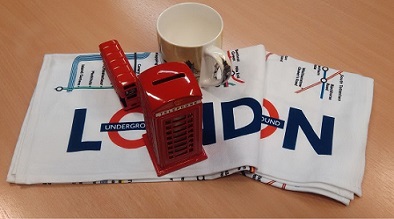
The session was really informal. It was, in essence, a kind of show case. Different activities and demonstrations were placed throughout the room on different tables, and participants were invited to ‘experience’ sets of different activities. One activity was all about sketching using shade, lines and texture (if I remember correctly). Another was a scene where we could practice still life drawing. In fact, we had a choice: a set of shells, or a set of objects which represented our location.

A collection of objects that represent London as a tourist attraction

I remember two other demonstrations or ‘stands’: one was about the creation of physical prototypes and another was a show and tell about how different drawing and sketching techniques could be used to represent different product designs. I was particularly taken by the physical prototyping demonstration: we were shown card, bendy steel wire (which could be easily bought in a hardware store), and masking tape. The wire, we were told, could be used to add structure to physical objects; pieces of wire could be bent and twisted together, and taped onto the back of segments of card, to create the surfaces of objects.

I tried my hand at sketching, but I have to confess that I didn’t get too far: I soon became engaged in discussions about how these different techniques might be useful during a longer tutorial about physical prototyping. Another thought was: how could we replicate these kinds of prototyping and interactive activities when we have to use online tools? Or put another way, how could we run sessions when students can’t physically get to a classroom. It is clear that there no easy answers; I now wish that I had made better notes of all the discussions!

Not only were we all exposed to a number of different techniques, some of the tutors also had an opportunity to catch up with each other and chat about how a new module was going.

An interesting question is: could it be possible to run an online equivalent of this session? The answer is: possibly, but it would be very different, and it would require a huge amount of planning to make it work: things don’t spontaneously happen in the online world like they can during a face to face session.

Although the office is closing, there are different planning groups that are starting up to try to make sure that essential associate lecturer development activities still continue. I’m not sure when there will be another face to face session quite like this, but I do hope we can organise another one.

Permalink Add your comment
Share post

This blog might contain posts that are only visible to logged-in users, or where only logged-in users can comment. If you have an account on the system, please log in for full access.

Total visits to this blog: 3428721