

This ¶ is a pilcrow, AKA a paragraph marker. As an experiment, when marking computing assignment with long code passages, I've been using pilcrows to mark the places where I've inserted feedback. The idea is that the student can easily find my comments by searching for this symbol, which is not one that will appear in computer code normally.
I was vaguely aware of this symbol and its uses, paragraphs and footnotes mainly, and though of it as a printer's mark, without any really idea of its history, so I thought I'd look it up, and was quite surprised to find out it goes back to Ancient Greece. Here's a short version of the story, as I understand it.
Greek scribes, writing on papyrus, might draw a horizontal line in the margin, for various reasons, such as marking places where they thought the text might have become corrupted, or places where a new section started. They called this mark 'by-the-side writing', paragraphos (παράγραφος).
This morphed into Gamma Γ for some reason and then in Roman times to K for kaput, 'head', marking the head of a new section).
The Roman alphabet evolved and K was replaced by C, still pronounced as a hard /k/. Scribes added a couple of short vertical lines, I suppose for emphasis, and then to give it even more oomph people started filling the loop of the C in. So the evolution was something like this
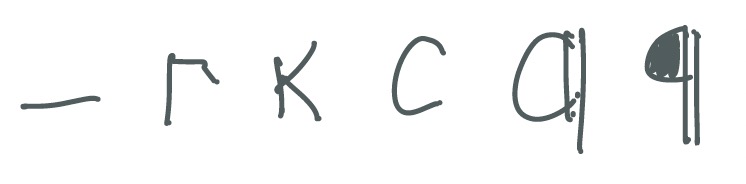
This was still called a paragraphos in Latin but in French became pelagraphe and then from that English got pylcrafte, attested from 1440 according to the OED. By 1580 it had become pilcrowe (OED again) which is essentially the modern form. Why 'crow'? Perhaps people felt it looked like crow but who knows?
Meanwhile the symbol which began as a manuscript annotation became a printer's mark with arrival of that technology and then in the modern age is represented by Unicode U+00B6 ¶ . Interestingly Unicode also defines a reverse pilcrow ⁋ (why is it not called a worclip?) and the exotic and beautiful curved stem pilcrow ❡.
And nowadays the pilcrow has found its way to the Microsoft Word Ribbon, where it sits just to the left of Styles. Click on it and all the paragraph marks, tabs, breaks and other formatting marks are displayed.
And here we end this short history of the pilcrow. As usual Wikipedia has a good article.