OU blog

Personal Blogs

Christopher Douce

TM470 Testing

Visible to anyone in the world
Edited by Christopher Douce, Tuesday 17 November 2026 at 07:14

If you create a software product as a part of your project, a really good project report will describe how you have thoroughly tested what you have built.

Testing can be thought about in two different ways. The first is strategically. In other words, your testing strategy can be considered to be your overall testing approach, and how it relates to the aims and objectives of your software product. The other approach is, perhaps unsurprisingly, tactical. Tactical testing can be thought of the groups of tests that you use to either identify or solve a problem. A test strategy is your overall approach or plan. Tactical tests help you to complete your plan.

Figure 1 also shares a really useful way to think about testing. This figure which has been drawn from a level 1 module, TM113 Computing Fundamentals 2: programming, databases and software engineering.
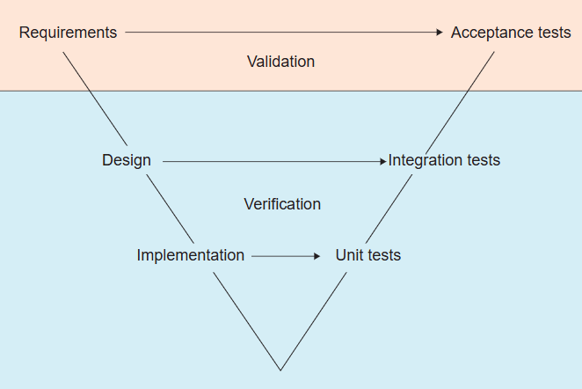
The V model of software testing. The diagram is divided into two parts: validation and verification. There are 3 levels from the top of the V to the bottom: requirements leading to acceptance tests, design leading to integration tests, and implementation leading to unit tests.

Figure 1 Testing v-model

You will clearly see that it is split into two parts. Validation relates to the question of ‘are we building the right thing?’ Verification, on the other hand, relates to the question ‘are we building it right?’ In other words, are we going about our engineering or software development the right way.

Concerning requirements

The term requirements can be seen at the very top of Figure 1. Your requirements should guide what tests you carry out. Your requirements should also be traceable across all the phases of your project; your examiner should be able to see exactly where they have come from. They might come from something that a potential user said during an interview, or from a document you have found – try to be as clear as you can.

A practical tip: create an appendix that contains a single table that contains all your software requirements.  In your requirements table, give each of your requirements a unique identifier or number (perhaps FR1 for a functional requirement, or NFR1 for a non-functional requirement), and use these identifiers throughout your project. In your project report, refer your examiner to your requirements table.

Acceptance testing

In Figure 1, you will see the term acceptance testing, on the opposite side to requirements. If a software product passes a set of acceptance tests, it is deemed to do what it is supposed to do; it is accepted by whoever commissioned it. In your project you are unlikely to carry out an acceptance test, but you may wish to carry out one or more usability evaluations.

If you are interested in the topic of acceptance testing and whether it might apply to your project, a useful tool to look at is Cucumber. Accompanying this tool is a domain specific language which allows you to express high level tests.

Usability evaluations

The aim of a usability evaluation is to determine whether a software product meets the needs of a particular user (or set of users) and helps to solve a particular problem. A usability evaluation could be carried out toward the end of a project to determine whether (or not) the project was a success, or as a part of a series of design and development iterations to gather some useful information about how a design might potentially be improved. Although a usability evaluation can be used to determine whether a product or a design meets a set of requirement, if used well, it can also be used to uncover and identify new requirements, or requirements that had been overlooked.

In very simple terms, there are usability evaluation paradigms (or approaches) that require people, and there are those that do not. Here is a summary of the three paradigms that are highlighted by Preece et al. in their textbook Interaction Design: beyond human-computer interaction:

  • Heuristic evaluation. A heuristic is a rule of thumb. With heuristic evaluation, you scrutinise your user interface design to determine whether it satisfies a set of well know design principles. A heuristic evaluation is typically carried out by a usability expert who is familiar with interface design principles. In terms of your project, you can apply design principles to your own interface design, and comment on what you have learnt.
  • Cognitive Walkthrough. This technique is all about putting yourself in the shoes of a potential user and asking some really simple questions, such as will the user know what to do, and will the user receive effective feedback?
  • Usability testing. Usability testing is where you recruit one or more participants to use your software product to complete a particular task. Whilst a usability test is taking place, you record the actions that the user takes, and any final result.

To do a usability evaluation well, you need to do some planning. To help you to plan, Preece et al. introduce a useful framework which they have called DECIDE. Here is what each of the letters in the DECIDE framework stand for:

  • D: Determine the goals for an evaluation. What is the overall aim of your evaluation? What are its goals?
  • E: Explore the questions. What questions will be you attempting to answer? Are you going to be carrying out an evaluation that determines whether some usability or user experience goals have been met?
  • C: Choose an evaluation paradigm. Usability evaluation can be carried out using different approaches. Which approach will you use? Usability testing is a common approach where you might observe what users do when they use a software product.
  • I: Identify practical issues. How might you go about recruiting participants? What tasks will they perform? How will your record what they do? Will you write things down, or will you use some kind of tool that records their interactions? You will need to create some kind of resources to make sure your evaluation runs smoothly.
  • D: Decide how to deal with ethical issues. When working with real users (or proxy users; people who pretend to be real users) you need to give them as much information as possible, which means that you will need to prepare an information sheet. You will also need a consent form to protect your participant as well as yourself.
  • E: Evaluate, interpret and present the data. This final stage is about figuring out what has happened, and whether you have answered your questions.

To use DECIDE, you should work through each step. Your decision about which evaluation paradigm you adopt may well be guided by the resources that you have available.

Usability testing

If you decide you would like to carry out a usability test, you need to pay attention to step I, identify practical issues, carefully. The first thing that you need to do is to recruit potential participants. It is okay to ask friends and family to help, who could take on the role of proxy users (participants who pretend to be real users).

If your project is linked to your workplace, you may want to ask some co-workers to help with your usability test, but do be aware of the ethical issues of doing this (which is, of course, the next letter in the DECIDE framework).

Three questions to ask are:

  1. Is there any issue regarding power? Are you their line manager?
  2. Will involvement in your project them away from their work in a significant way?
  3. Do you have permission from their line manager to approach them?

A personal recommendation is to avoid recruiting complete strangers. There is a simple reason for this. Although your project is a real demonstration of your skills and abilities, it remains artificial in the sense that it is primarily a vehicle for academic study and personal development.  Involving a wider group of participants exposes you to risks, which can only be address through a more rigorous and formal ethics process.

When preparing for your usability test, it is important to create some materials:

  • Prepare an information sheet. The aim of this is to tell the participant what will happen during the usability test. Send each participant a copy of this single page summary before the evaluation begins.
  • Prepare a consent form.  This is a short form is used to gain consent from your participant to carry out your usability test. In the form, tell them that their participation is entirely voluntary and they can stop the usability test at any point without any consequences or judgement. Do highlight the different ways that data is collected, and how it will be used.
  • Prepare a list of tasks or instructions. You might even need to write a short script to tell your participant what to do. This is to ensure that every participant is asked exactly the same questions.
  • Prepare a data collection form. A form can be useful to structure any notes that you might take during a usability test. You might use a table. On the left there might be a summary of the task, on the right might be space to make some notes.

In your project report, you should share all the resources you have created in your report. You might provide an example in the body of your report, or provide one or more appendices; it is up to you.

Although user testing is often thought of a technique that can be applied to a functioning system or product, it can also be applied to evaluate a prototype or an interim design. It is possible to carry out user tests using mock-ups of interfaces created using tools such as PowerPoint, or even using paper sketches of interfaces. Rather than having a computer present the next step in an interaction sequence, you could pretend to be the computer or mobile device, presenting a participant with the next steps.

After you have completed a usability test, you need to find some way to summarise and then to analyse your data. You might provide a sample of the data in the body of your report, and provide all the important or notable data in an appendix, potentially following any appendices that you may have used to share your resources. You might want to comment on limitation of your evaluation, such as, the demographics of any friendly and willing participants you have recruited.

In terms of resources, some really useful guidance is provided within Preece et al.’s Interaction Design text. Useful ethical guidance has been published by the ACM Code of Ethics and Professional Conduct (ACM, 2006) Practice, and the British Computer Society (BCS, 2026).

Accessibility testing

The term accessibility refers to whether a software product can be used by people who have a disability; people who may have sensory or cognitive impairments. Every user-facing software product should have a requirement to be accessible.

If you are creating a product that makes use of web technology, a really useful resource is the Web Content Accessibility Guidelines (WCAG) from the W3C, the organisation that publishes and maintains web standard. Since web pages can be interactive and dynamic, there is also a suite of standards known as WAI-ARIA, the Web Accessibility Initiative Accessible Rich Internet Applications.

Accessibility testing is a specialised version of usability testing. Ideally, every software product should be evaluated by real people, but since this is not always possible, it is important that you consider alternative ways of carrying out accessibility tests.

Here are some practical suggestions of some accessibility tests you could use:

  • Using a screen reader to determine whether your user interface can be sensibly converted to speech, so it can be used by someone who has a visual impairment.
  • Using a colour contrast checker to determine whether the your interface can be seen or navigated by someone who has a visual impairment.
  • Using a keyboard, rather than a mouse or touch screen, to determine whether your interface can be used by someone who has a mobility impairment.
  • Using an online checking tool to determine whether your interface conforms to the W3C WCAG guidelines.

The W3C has published a useful list of Web Accessibility Evaluation Tools, which you may find useful if you need to carry out an accessibility evaluation. If you use any of these tools, please explain why you have chosen one over another, and also share the details of any output that has been created, perhaps by using an appendix. You should also explain what the output from the tool has told you.

Unit testing

Returning to Figure 1, Unit Testing can be found in the bottom right of the diagram.  The diagram shows a firm connection between the software code that you create and unit tests. A unit test can be thought of as a formal requirements specification that is expressed in the language of the programming language that is used to create your software. A unit test typically tests the operation of a function, or group of functions, to make sure they do exactly what is expected of them.

A software development approach that emphasises the importance of testing is called Test-Driven Development (Beck, 2023). The idea is simple. Before you write any code, you begin by writing a test. You then run your tests to check to see that everything fails as expected. You then add code that satisfies your tests. Your unit tests are intended to provide helpful feedback about the state of your software.

One of the benefits of unit testing is that it helps with regression testing. A regression test is a set of tests that are carried out to make sure that a change has not inadvertently introduced any errors or mistakes. If you have a suite of well-designed tests, you can run your tests to make sure that any update or modification has not broken anything.

The most popular unit testing framework is called xUnit, where the letter ‘x’ refers to a different programming language. There is likely to be a unit testing framework for whatever language you choose.

If the creation of software is a priority in your project, it is important to share evidence of unit testing, or to justify why you have decided against it. A practical suggestion is to provide an example of one or more unit tests in the body of your report (to perhaps show you have you tested particularly difficult bits of code), and a screenshot that shows the running of unit tests.  You need to also explain what you are testing, and why. The more practical detail you provide in your project report. the happier your examiner will become.

To find out more about unit testing, a good starting place is xUnit. There is also JUnit for Java and PyUnit for Python.

Integration testing

Integration testing is about making sure the different bits of your software system work together. If you are creating a software system that contains one or more microservice, a useful question to ask is: how can I test my microservices? There are some bits of terminology that might be useful. A mock is a bit of software that pretends to be another bit of software. There is also the idea of a test harness, which can exercise bit of software before it is then later integrated with, or connected to other bits of software.

If you create any bits of code that tests other bits of code, do remember to discuss what they are, what you did, and what you learnt. Also remember to share any test harness code within an appendix, along with any configuration files or test data you needed to create.

Integration testing is harder to write about, since every software project is made up of different components. This said, there are some tools that might be useful to look at, such as Wiremock or Playwright if you need to understand more about how to test the different elements of your software product.

Security testing

It is easier to carry out tests against functional requirements than it is to test whether a software product satisfies non-functional requirements. A difficult requirement to test is security.

As useful way to think about security testing is whether test can be performed by people, or whether tests can be automated. Here are two sets of tests that relate to security that people can carry out:

  • Code reviews. A code review is where a fellow software engineer examines a bit of software before it is formally accepted into a software product.
  • Pen testing (short penetration testing); a technique where a tester deliberately attempts to gain access to a software product or system. Pen testing is a significant subject in its own right, and requires a lot of specialist knowledge.

There are some automated tools that could be used to help with security testing:

  • Linters. A linter is a static analysis tool that examines your software code that has been written before it is run. A lint roller will pick up annoying bits of fluff, or lint, from your clothing. A linter is a program that will pick up, or identifies points that might need to be attended to.  

If you have studied TM113 Computing Fundamentals 2, you will be already familiar with the idea of a linter, which introduced a tool called Ruff. Linters have been made for different programming languages and different problems. In some automated deployment processes, new program code may be required to be run through linter software before it could be put into production.

If security is an important non-functional requirement, discuss what approach you might take to test your product. If you run aspects of your code through a static analysis tool, do share the results from that tool, and comment on the results you have gathered.

Performance testing

Another important non-functional requirement that you might have considered is performance; you may need your software product to respond with a certain amount of time. Since your project is likely only involve a small number of users, the necessity to address or explore performance isn’t as important as some of the other non-requirements you may have defined.

A beginning point to begin to think about performance is the programming language or languages you may be using. This can dictate the tools you may choose. There is, of course, a link between performance and your chosen software architecture.  Some architectures may enable your design to more efficiently respond to changes in demand.

If your software solution makes use of the Java language, a well-known tool is JMeter. JMeter can also be used with the Python language, through PyMeter. The operating system of your computer, and services provided by your cloud computing provider also provides tools to monitor and check performance. You may also wish to find a way to instrument your code; to take some measurements of how long it might take to carry out particular operations.

If performance is a real issue, you may well turn to the topic of debugging. In turn, you may look to the topic of refactoring, and ask whether you need to refactor your code, or even refactor (or change) your software architecture. A final point is that it is important to take measurements to understand what you have, what you may need to change, and the consequence of any changes that you might make. If you take any measurements within your own project, remember to share them in your project report. Your examiner always wants to see your thinking.

Resources

The following blog posts, which relate to other project module topics, might also be helpful:

Reflections

Testing is a big subject. There are entire suites of industrial qualifications that are dedicated to it. It impossible to test everything in a software project. You need to make practical decisions about what to test, and when to test. In your project report, you need to explain why you have chosen a particular testing strategy, and also show the examiner very clearly what you have done. Do add appendices to share evidence of the tests that you have designed, and the results you have gained; the more detailed they are, the better. The best reports connect testing back to your project requirements. One testing approach will not be enough. You need to study your software system from a number of different perspectives.

References

ACM (2026) ACM Code of Ethics and Professional Conduct. Available at: https://www.acm.org/code-of-ethics (Accessed 16/11/26)

BCS (2026) BCS Code of Conduct https://www.bcs.org/membership-and-registrations/become-a-member/bcs-code-of-conduct/ (Accessed 16/11/26)

Beck, K. (2021) Test Driven Development: By Example. First edition. Pearson Education.

NCSE (2006) Secure development and deployment guidance. Available at: https://www.ncsc.gov.uk/collection/developers-collection (Accessed 16/11/26)

Sharp, H., Rogers, Y. and Preece, J. (2023) Interaction design: beyond human-computer interaction. 6th edition. Wiley.

W3C (2026a) WCAG 2 Overview. Available at: https://www.w3.org/WAI/standards-guidelines/wcag/ (Accessed 16/11/26)

W3C (2026b) WAI-ARIA Overview. Available at: https://www.w3.org/WAI/standards-guidelines/aria/ (Accessed 16/11/26)

Acknowledgements

Figure 1 the Testing v-model has been drawn from TM113 Computing Fundamentals 2: programming, databases and software engineering. Thanks are extended to the TM113 module team, as well as the TM356 Interaction Design and the User Experience module team. It is through the predecessor module that I first gained awareness of the very helpful DECIDE framework.

Permalink Add your comment
Share post
Christopher Douce

TM470 Resources

Visible to anyone in the world
Edited by Christopher Douce, Wednesday 4 November 2026 at 15:22

This post shares some resources that might be useful during the course of your project module. Some of what is presented here may be already familiar to you, having studied earlier modules.

What you will need will, of course, vary depending on your project. You will need to make choices about what you need. In your project report, you also need to say something about why you have chosen what you have chosen. Also, do remember, that what you find might be even more helpful than what is given here.

Diversity, Equality and Inclusion

In the UK, the Equality Act 2010 is an important piece of legislation, which defines a number of protected characteristics.

When it comes to computing projects, the W3C WAI WCAG is an important resource, especially if your software product makes use of web technologies.

Ethics

Software systems affect people and society. Requirements for software systems can come from people and society. Wherever there is people, there is also ethics. Computing professionals must behave in a way that is ethical. To help with the Legal, Social, Ethical and Professional Issues, the following sets of guidelines are considered to be helpful:

Gantt chart tools

As suggested in earlier posts, it is a good idea to create a Gantt chart for your project to create an overview of what you expect will happen and when

It is completely up to you how you create your Gantt chart. You might choose to create one using many of the different spreadsheet templates that are available. Alternatively, you could download a software package, such as Project Libre Desktop which is an alternative to the popular Microsoft Project package.

Another approach would be to use one of the many cloud-based Gantt tools that are available, such as GanttPro. These cloud-based products often offer a trial period, after which you have to pay a monthly fee.

Every tool has its own advantages and disadvantages and will have learning curve if you haven’t used one of these tools before.

Generative AI

GenAI can be considered to be a useful resource, but it must be used with caution. Every student has access to a Microsoft product called CoPilot. If AI is used in the creation of code that is used within a software solution, you must document what prompts have been submitted to which language model. If you use AI as a part of a solution to a wider problem, it is important and necessary to discuss the implications of its use, in terms of risks, ethics and bias.

University level guidance is available through this resource: Generative AI in learning, teaching and assessment at the OU. This provides a link to guidance for students. Guidelines for referencing the use of GenAI can be found, in part, on the CiteThemRight website.

Literature review

The literature review is, as suggested earlier, a summary of all your reading that has contributed to the development and completion of your project. Whatever you mention in your literature review rection should be used or applied in some way.

In addition to some of the skills resources that follow, the following resources may be useful:

An introduction to software development Open Learn Badged Open Course (BOC), which contains a very useful section, Finding and reading academic articles.

Srinivasan Keshav’s article entitled How to read a paper offers some practical guidance about how to read and analyse an academic article.

Project management resources

All the guidance you need to complete your project is presented within the module materials (and within this accompanying guide). There are, of course, other resources in the world that can offer some complementary guidance.

One such resource is the Project Management for IT-Related Projects: 3rd edition, published by the British Computer Society (BCS). You don’t need to buy this text, but you may be able to access parts of it through the OU Library.

Although this text is intended for industry professionals, it may be useful for your project. The guidance about project models reflects some of the advice shared in module materials.

Prototyping tools

There are different approaches to prototyping. One of the simplest and most useful tools is, of course, pencil and paper. It is acceptable to draw prototypes of your software product and share these within your project report. An earlier article, TM470 Considering prototyping offers a bit more guidance about the concept of prototyping.

If you wish to use a tool to help you with your prototyping, the following might be useful:

If you wish to go beyond creating prototypes of user interfaces, you could use other tools to create prototype designs of your software system. One such tool is Visual Paradigm which can be useful with drawing of UML diagrams, and diagrams that describe cloud computing infrastructure. Other cloud-based drawing tools could, of course, be used.

Products such as Balsamiq and Visual Paradigm can be used with an academic licence.

Further academic guidance about prototyping can be found in the following text book:

Sharp, H., Rogers, Y. and Preece, J. (2023) Interaction design : beyond human-computer interaction. 6th edition. Milton: Wiley. 

Which is available through the OU Library. 

Risk assessment and management

Accompanying the description of the lifecycle model are two useful sections: risk assessment and risk management. Risk assessment concerns with considering what the risks to your project might be. Risk management concerns with approaches to deal with those risks. The risk assessment approach presented in the module is relatively simple. It considers risks in terms of impact and likelihood, which is sufficient for the needs of your project report.

Every project is, however, different in the ways that it need to take account of risk. Some wider issues that might be helpful includes the NIST Cybersecurity Framework. There is also ISO 27001, an international standards which concerns information security. Risks can be managed not just in terms of how technology is used, but also how human processes are applied.

Skills, writing and studying

The following links offer some useful practical guidance about writing and studying:

Within the library pages, the following two pages are particularly helpful:

Do also refer to sections in this guide that refer to the writing of your project report and the appropriate uses of Generative AI.

Software development tools

Your choice of tools will depend, in part, on the characteristics of your project, and what skills you wish to develop. An important tool is the integrated development environment (IDE), which often integrates together a text editor, a debugger, and a way to run your software. IDEs can also be connected with version control software (to keep your software safe) and AI assistants, which help you with your learning. Historically, IDEs used to focus on a single programming language, such as Java or Python. Popular IDEs now work with multiple programming languages.

What follows is a useful summary of some popular IDEs:

Apache Netbeans. Netbeans primarily supports the Java programming language but can be used with other languages through extensions.

Eclipse. Eclipse is an enterprise level ‘cloud native’ IDE that supports a wide variety of languages.

IntelliJ. IntelliJ is a popular commercial IDE that was notable for its usability and functionality. A ‘dev toolkit’ pack is available for students.

Microsoft Visual Studio Code. Visual Studio Code is notably the most popular IDE. It can be used with multiple languages. VS Code is not to be confused with Microsoft Visual Studio, which is a different similarly named product.

PyCharm. PyCharm is a Python IDE from JetBrains who also have created IntelliJ. An alternative tool for Python developers is the Jupyter Notebook environment.

Software testing

A thorough project will move through an entire cycle of gathering requirements, implementing those requirements, through to carrying out of testing to make sure that requirements have been implemented correctly.

There are a number of tools that can help with the software testing (which is not to be confused with usability testing).

In terms of source code, there is a unit testing framework which is known as xJunit, where the ‘x’ refer to the initial of a programming language. The xUnit.net site relates to a unit testing framework that can be used with a number of different Microsoft .NET languages. JUnit.org if specifically concerned with unit testing of Java code. There is also PyUnit which concerns the testing of Python code.

Unit testing is testing that operates at a low level. Moving up a level, there are other tools, such as Cucumber. There are other tools out there, such as Selenium, but this takes us beyond the boundaries of a project, and towards testing at an industrial level.

An important point to remember is that the extent of testing that is necessary depends on what the impact of errors might be. Testing is guided by risk.

Version management

It is important to keep the software you create safe. The best way to do this is to use a version management system. The dominant tool used for version management is called Git. Git allows you to save your software into a safe repository called GitHub. The following introductory videos offer some useful explanations:

To begin to use Git, you must install the Git software on your local computer. If you are using Windows, you will install something called a ‘terminal’, MinTTY, which allows you to execute Git commands and upload your code to GitHub. There is also a graphical user interface version, but in terms of gaining practical experience, it is best to use the terminal (unless, of course, you manage to use Git as a part of your IDE).

By way of further information, the following resource is helpful: Ponuthorai, P.K. and Loeliger, J. (2022) Version Control with Git. 3rd edition. O’Reilly Media. Appendix A, History of Git, offers a lot of useful background information, which is worth a read.

Reflections

It is hoped this blog post offers some useful resources to complement what is shared within the module materials. Since your project is intended to be an individual project, I have not covered tools that support collaboration in an agile environment, such as Jira. Similarly, I have not shared resources that concerns covered cloud computing, since there is no need to consider deployment beyond your own personal computer, unless you decided this is an important element of your project.

A key point is that you must choose resources that you feel you need to use and apply within your project. You also should find the time to write about what these are. You should also say something about the skills you need to acquire to use or apply these resources.

A final note: none of the software products mentioned here are official university recommendations; these are personal opinions (which may, or may not, be useful).

Permalink
Share post
Christopher Douce

Software Engineering Radio: Testing

Visible to anyone in the world
Edited by Christopher Douce, Thursday 2 October 2025 at 13:28

The term ‘software testing’ can be associated with a very simple yet essential question: ‘does it do what it supposed to do?’

There is, of course, a clear and obvious link to the topic of requirements, which express what software should do from the perspective of different stakeholders. A complexity lies in the fact that different stakeholders can have requirements that can sometimes conflict with each other.

Ideally it should be possible to trace software requirements all the way through to software code. The extent to which formal traceability is required, and the types of tests you need to carry out will depend on the character of the software that you are building. The tests that you need for a real-time healthcare monitor will be quite different to the tests you need for a consumer website.

Due to the differences in the scale, type and character of software, software testing is a large topic in software engineering. Chapter 5 of SWEBOK v4, the software engineering body of knowledge highlights different levels of test: unit testing, integration testing, system testing, and acceptance testing. It also highlights different types of test: conformance, compliance, installation, alpha and beta, regression, prioritization, non-functional, security, privacy, API, configuration, and usability.

In the article, The Practical Test Pyramid, Ham Vocke describes a simple model: a test pyramid.  At the bottom of the pyramid are unit tests that test code. These unit tests run quickly. At the top, there are user interface tests, which can take time to complete. In the middle there is something called service tests (which can also be known as component tests). Vocke’s article is pretty long, and quickly gets into a lot of technical detail.

What follows are some highlights from some Software Engineering radio episodes that are about testing. A couple of these podcasts mention this test pyramid. Although testing is a broad subject, the podcasts that I’ve chosen emphasise unit testing.

The first podcast concerns the history of unit testing. The last podcast featured in this article offers some thoughts about where the practice of ‘testing’ may be heading. Before sharing some personal reflections, some other types of test are briefly mentioned.

The History of JUnit and the Future of Testing

Returning to the opening question, how do you know your software does what it supposed to do? A simple answer is: you get your software to do things, and then check to see if it has done what you expect. It is this principle that underpins a testing framework called JUnit, which is used with software written using the Java programming language.

The episode SE Radio 167: The History of JUnit and the Future of Testing with Kent Beck begins with a short history of the JUnit framework (3:20). The simple idea of JUnit is that you are able to write tests as code; one bit of code tests another. All tests are run by a test framework which tells you which tests pass and which tests fail. An important reflection by Beck is that when you read a test, it should tell you a story. Beck goes on to say that someone reading a test should understand something important about the software code. Tests are also about communication; “if you have a test and it doesn’t help your understanding … it is probably a useless test”.

Beck is asked to explain the concept of Test Driven Development (TDD) (14:00). He describes it as “a crazy idea that when you want to code, you write a test that fails”. The test only passes when that code that does what the test expects. The podcast discussion suggests that a product might contain thousands of tiny tests, with the implication that there might be as much testing code as production code; the code that implements features and solves problems.

When considering the future of testing (45:20) there was the suggestion that “tests will become as important to programming as the compiler”. This implies that tests give the engineers useful feedback. This may be especially significant during periods of maintenance, when code begins to adapt and change. There was also an expression of the notion that engineers could “design for testability” which means that unit tests have more value.

Although the podcast presents a helpful summary of unit testing, there is an obvious question which needs asking, which is: what unit tests should engineers be creating? One school of thought is that engineers should create tests that cover as much of the software code as possible, also known as code coverage. Chapter 5 of SWEBOK shares a large number of useful test techniques that can help with the creation of tests (5-10).

Since errors can sometimes creep into conditional statement and loops, a well known technique is known as boundary-value analysis. Put more simply, given a problem, such as choosing a number of an item from a menu, does the software do what it supposed to do if the highest number is selected (say, 50)? Also, does it continue to work if the highest number just before a boundary is selected (say, 49)?

Working Effectively with Unit Tests

Another podcast on unit testing is SE Radio 256: Jay Fields on Working Effectively with Unit Tests. Between 30:00 and 33:00, there is an interesting discussion that highlights some of the terms that feature within Vocke’s article. A test that doesn’t cross any boundaries and focus on a single class could be termed a ‘solitary unit test’. This can be contrasted with a ‘sociable unit test’, where tests work together with each other; one test may influence another. Other terms are introduced, such as stubs and mocks, which are again mentioned by Vocke.

Automated Testing with Generative AI

To deliberately mix a metaphor, a glimpse of the (potential) future can be heard within SE Radio 633: Itamar Friedman on Automated Testing with Generative AI. The big (and simple) idea is to have AI helper to have a look at your software and ask it to generate test cases for you. A tool called CoverAgent was mentioned, along with an article entitled Automated Unit Test Improvement using Large Language Models at Meta (2024). A point is: you still need a software engineer to sense check what is created. AI tools will not solve your problems, since these automated code centric tools know nothing of your software requirements and your software engineering priorities.

Since we are beginning to consider artificial intelligence, this leads onto another obvious question, which is: how do we go about testing AI? Also, how do we make sure they do not embody or perpetuate biases or security risks, especially if they are used to help solve software engineering problems.

Different types of testing

The SWEBOK states that “software testing is usually performed at different levels throughout development and maintenance” (p.5-6). The key levels are: unit, integration, system and acceptance.

Unit testing is carried out on individual “subprograms or components” and is “typically, but not always, the person who wrote the code” (p.5-6). Integration testing “verifies the interaction among” system under test components. This is testing where different parts of the system are brought together. This may need different test objectives to be completed. System testing goes even wider and “is usually considered appropriate for assessing non-functional system requirements, such as security, privacy, speed, accuracy, and reliability” (p.5-7). Acceptance testing is all about whether it is accepted by key stakeholders, and relate back to key requirements. In other words, “it is run by or with the end-users to perform those functions and tasks for which the software was built”.

To complete a ‘test level’ a number of test objectives may need to be satisfied or completed. The SWEBOK presents 12 of these. I will have a quick look at two of them: regression tests, and usability testing.

Regression testing is defined as “selective retesting of a SUT to verify that modifications have not caused unintended effects and that the SUT still complies with its specified requirements” (5-8). SUT is, of course, an abbreviation for ‘system under test’. Put another way a regression test check to make sure that any change you have made hasn’t messed anything up. One of the benefits of unit testing frameworks such as JUnit is that it is possible to quickly and easily run a series of unit tests, to carry out a regression test.

Usability testing is defined as “testing the software functions that support user tasks, the documentation that aids users, and the system’s ability to recover from user errors” (5-10), and sits at the top of the test pyramid. User testing should involve real users. In addition to user testing there are, of course, automated tools that help software engineers to make sure that a product deployment works with different brewers and devices.

Reflections

When I worked as a software engineer, I used JUnit to solve a very particular problem. I needed to create a data structure that is known as a circular queue. I wouldn’t need to write it in the same way these days since Java now has more useful libraries. At the time, I needed to make sure that my queue code did what I expected it to. To give me confidence in the code I had created, I wrote a bunch of tests. I enjoyed seeing the tests pass whenever I recompiled my code.

I liked JUnit. I specifically liked the declarative nature of the tests that I created. My code did something, but my tests described what my code did. Creating a test was a bit like writing a specification. I remember applying a variety of techniques. I used boundary-value analysis to look at the status of my queue when it was in different states: when it was nearly full, and when it was full.

Reflecting Beck, I appreciated that my tests also told a story. I also appreciated that these tests might not only be for me, but might be useful for other developers who might have the misfortune of working with my code in the future.

The other aspect of unit testing that I liked was that it proactively added friction to the code. If I started to maintain it, pulling apart function and classes, the tests would begin to break. The tests became statements of ‘what should be’. I didn’t view tests in terms of their code coverage (to make sure that every single bit of software was evaluated) but in terms of simple practical tools that gave alternative expressions of the purpose of my software. In turn, they helped me to move forward.

It is interesting and useful to reflect on the differences between the test pyramid and the SWEBOK test levels. In some respect, the UI testing of the pyramid can be aligned with acceptance testing of the SWEBOK. I do consider the integration and system testing to be helpful.

An important point that I haven’t discussed is the question of when should a software engineer carry out testing? A simple answer is, of course, as soon as practically possible. The longer it takes to identify an issue, the more significant the impact and the greater the economic cost. The ideal of early testing (or early problem detection) is reflected in the term ‘shift-left’ testing, which essentially means ‘try to carry out testing towards the left hand side of your project plan’. Put even more simply: the earlier the better.

Returning to the overriding aim of software testing, testing isn’t just about figuring out whether your software does what it supposed to do. It is also about managing risk. If there are significant societal, environmental, institutional and individual impacts if software doesn’t work, you or your organisation needs to do whatever it can to ensure that everything is as correct and as effective as possible. Another point is that sometimes the weak spot isn’t the code, but in the spaces where people and technology intersects. Testing is socio-technical.

To conclude, it is worth asking a final question. Where is the software testing heading? Some of these podcasts suggest some pointers. In the recently past, we have seen the emergence of automation and the engineering of software development pipelines to facilitate continual deployment or delivery of software. I do expect that artificial intelligence, in one form or another, will influence testing practice, but AI tools can’t know everything about our requirements. There will be testing using artificial intelligence and testing of artificial intelligence. As software reaches into so many different areas of society, there will also be testing for sustainability.

Resources

JUnit is one of many bits of technology that can help to automate software testing. Two other  tools s I have heard of are called Cucumber which implements a language called Gherkin, a formal but human-readable language which is used to describe test cases. I’m also aware of something called Selenium which is “a suite of tools for automating web browsers”.

Since software testing is such an important specialism within software engineering, there are a series of industrial certifications that have been created by the International Software Testing Qualifications Board (ISTQB). As well as offering foundation level certifications, there are also certifications for specialisms such as agile, security and usability. Many of the topics mentioned in the certifications are also mentioned in Chapter 5 of SWEBOK v4.

I was alerted to a site called the Ministry of Testing which shares details of UK conferences and events about testing and software quality.

One of the points that I picked up from the podcasts was the point that, when working at forefront of an engineering subject, there is a lot of sharing that takes place through blogs. A name that was mentioned was Dan North who has written two articles that resonate: We need to talk about testing (or how programmers and testers can work together for a happy and fulfilling life), and Introducing BDD (BDD being an abbreviation for Behaviour Driven Development).

Acknowledgements

Many thanks to Josh King, a fellow TM354 tutor, who was kind enough to share some useful resources about testing.

Permalink Add your comment
Share post
Christopher Douce

CISSE Cyber Security Education and Employability Forum: November 2022

Visible to anyone in the world
Edited by Christopher Douce, Wednesday 4 November 2026 at 15:21

On 16 November 2022 I participated an online Cyber Security Education and Employability Forum, which was hosted by CISSE, the UK chapter of the Colloquium for Information Systems Security, and facilitated in collaboration with colleagues from the University of Roehampton School of Arts and Digital Industries and the OU School of Computing and Communications.

The forum was described as “an opportunity to share your knowledge and experience with the cyber education community, and to informally network with colleagues in other institutions who are involved with cyber security learning, teaching and employability.”

Since the event was not recorded, this blog aims to present a summary of what was discussed within the event. It is broadly intended for the 40 delegates who attended the session, but it might be of interest to anyone who may have an interest in cyber security. In some ways, this event follows on from an earlier CISSE Cyber Security Education Workshop that took place in 2021. This blog can also be viewed alongside other OU cyber security blogs.

The event began with an introduction by Charles Clarke, from the University of Roehampton.

Cyber Springboard

The first session was presented by Alex Collins, who presents a tool called Cyber Springboard. Clicking on this link takes you to a page which clearly summarises the aim of Cyber Springboard, which is to help students to “build and evidence the skills to get a job in cyber security”. The site also presents “activities and ideas for you to get curious about to build fluency in cyber skills”. 

Alex told us that he sits on certification panels, and his work on Cyber Springboard comes from 20 years of working in industry.

Alex made some important points that were reflected throughout the session. He emphasised that cyber is more than pen testing (penetration testing), more than forensics, and more than risk management; a career in ‘cyber’ is more than one of those things. An interesting reflection is that each of these areas have different stereotypes, in terms of the type of work that is performed within each area. The point is clear: cyber is broad. There are 21 Knowledge areas within the cyber security body of knowledge, the CyBOK; it’s a broad area. 

Cyber Springboard enables users to find what they like and don’t like. I made a note that there are 301 cards and activities which are connected to the CyBok knowledge areas. When registered, users can tick off cards. Each card contributes to a shape of a cyber knowledge profile, which can be shared on a personal profile or a CV. The next steps are to consider courses and pathways, developing improvements to the structure of Cyber Springboard, and increasing Cybok coverage.

Alex was asked an interesting question about how it is possible to move to cyber security. The question was answered in terms of building practical skills, finding time to learn what you enjoy, and evidence what you have achieved. An important point was: demonstrate enthusiasm. Also, consider providing a Github link on your CV. Sharing something will give you something to talk about in an interview.

Routes into cyber education: discussion and sharing

Next up was an informal session by Phil Hackett and myself, facilitated by Charles Clarke. The aim of the session was to discuss routes into cyber security teaching through a discussion, and sharing of resources.

One of the themes to emerge from this session was the notion of transitions. Phil began as an OU student, and then became a computing teacher at a secondary school. From there, he had ‘crossed the floor’ to work within the university, where he is involved with modules such as M269 Algorithms, data structures and computability.

My own story is a bit different. I moved from the university sector (where I carried out some research which was about the practice of computer programming), to industry, and back again. One thing that Phil and I have in common is that we’re both tutors; he teaches on M269, and I tutor on a Java module that has the title M250 Object-oriented Java Programming. Another commonality is that we have both had to deal with different types of cyber security incident. These incidents connect to the importance of having knowledge of controls and technical knowledge.

One thing that is common to transitions is the importance of evidence, and having a story; points which relate nicely to Alex’s presentation about Cyber Springboard. In terms of moving from industry to academia, one thing that we didn’t have time to share was a short Badged Open Course, which helps potential applicants understand more about the role of an OU tutor: Being an OU tutor in STEM. Anyone completing this course will be providing evidence that they understand what it means to be a distance learning tutor.

Another point that I think I made was about the important contributions industrial professionals can make to teaching. Importantly, and significantly, their industrial experience can help to make module materials come alive.

I made a note of two questions that were asked. The first question was about how to gain access to internships. Some thoughts were: make sure you have a good LinkedIn profile, know what you’re interested in, and don’t be afraid to be cheeky. What I mean by this is: don’t be afraid to get in touch with people and companies.

The second question was an interesting and challenging question: is it really necessary to have strong publication record if you want to be in academia? There are different roles within academia, and different institutions have different requirements. The short answer is: no, it isn’t really necessary, but you may have to choose where to apply to, and what you wish to do. Just like with cyber jobs, evidencing experience is really important. I’ll conclude by saying that becoming an OU tutor is a really great way to evidence your cyber teaching skills, and is a great way to join academia.

CyberFirst

The penultimate session was by Patrick from CyberFirst which is a part of the UK Government National Cyber Security Centre.

CyberFirst aims to “identify and nurture a diverse range of talented young people into a cyber security career”. As well as providing activities to “inspire and encourage students from all backgrounds to consider a career in cyber security”. CyberFirst also offers bursaries to undergraduates and degree apprenticeship students. (As an aside, the OU also offers cyber security analyst digital technology solutions degree apprenticeships for employers who want to support the development of their workforce).

For those working within the schools sector, CyberFirst is divided into a number of UK regions. CyberFirst is “working on ways to build a diverse and sufficient talent pipeline into the cyber sector (in all its forms) no matter what students have studied before”. Linking to the earlier presentations, some related questions are: how do we get people to use Alex’s tools, and how do we encourage students to study cyber security (and related subjects) at the OU?

An important point Patrick made was that “every job is a tech job” and that “our skills gap is pretty much everyone in the UK” given that technology is so interwoven into our lives. There are some fundamental issues that need to be address, such as 80% of cyber security employees are male. It is important to address how to increase the diversity in the sector.

In earlier presentations about cyber security, the ‘leaky skills’ pipeline was highlighted. In this presentation, Patrick offered a brief summary that explains this. If computer science was the only gateway subject into cyber security, it would begin with 300k students going through KS1 through 4. Looking towards the secondary sector, 12% of students study computer science, and only 9% of those are girls. Overall, only 2.5% of students then move on to study computer science at A level.

One way to begin to address diversity is to make people aware of the different career structure that makes up cyber security (which, again, connects to the earlier Cyber Springboard presentation). This of course, links to the earlier question posed in the last session: how do learners get to have a go ‘at some stuff’ to find what they’re good at?

Faced with these challenges, Patrick suggested that it might be instructive to look to other domains to see what they do, such as sport and medicine. A question is: how do you find out what things people are good at? In terms of sport, the answer might be to let people have a go at something and then coach and train people to their full potential. For medicine, give students the time to make informed choices and after they’ve tried different things, only then do learners move into specialism.

A rhetorical question was: what do we do in the security cyber space? How might a “sports model” be applied to cyber? There is a diversity of people, and many of them have not studied computer science. There are non-techies with a little cyber awareness, techies with limited cyber awareness, and techies with a genuine interest in cyber.

Patrick shared an idea of a talent pipeline, which begins with scale and diversity, moved onto learners and people making their own decisions about the subject, engagement and learning, and then directed activity which leads into employment, roles and responsibility.

Towards the end of this session, there was a reference to something called the CISSE UK problem book, which is intended to help educators not just in terms of education and teaching, but also for outreach and engagement.

In the question answer, I noted down two questions. The first question was: “does a degree title matter? How important is the label?” His response was: “we don’t mind the degree title, but it’s more about what the degree enables you to do. Your degree may well help you into the next step; knowing things about yourself is important”. A further point was: it is really important do show and demonstrate passion in an interview. 

The second question was about experience: “as a post-graduate student now doing a part-time masters’ in computer science with cybersecurity, what sort of work experience can I gain whilst doing this degree and where would I look for these opportunities?” In the context of the OU, and other universities there are the career services, which students should feel free to consult. Also, if you want to move into cyber it is possible to do your own thing to build evidence and demonstrate capability. Look to see if there’s some open source projects you can get involved with. Find a way to build a narrative that you can take to potential employers. As was mentioned earlier, consider adding a link to a GitHub repository on your CV, to give yourself something to talk about during interviews.

Academia and industry certifications aligned: An Open University case study

The final presentation of the day was by Lee Campbell from the OU. Lee is the module chair of TM359 Systems Penetration Testing which is due to be presented for the first time in February 2023. TM359 is a part of the OU BSc (Honours) Cyber Security. Lee takes us through a set of slides which presents the background context and much of the rationale for the module.

Why create a penetration testing module?

Business have a skills gap; they need more people with cyber security skills. Plus cyber security issues is a UK government tier 1 threat to national security. Also, students have been requesting a penetration testing module, and there is a need to complete the OU cyber security qualification. 

A really interesting aspect of both cyber security and pen testing is that they cover so many different areas of computing, such as programming, databases, and networking (which are all aspects which have been studied, in one form or another, during earlier modules).

OU options to build a pen test module

There are two key choices: build something in house, or outsource. One key need was to create (or to find) a technical environment that would be used by 600 students that would be separated from the OU technical environment. There are, always challenges; these were the resources that were available and the time.

The key considerations (or requirements) that I noted down from Lee’s presentation were costs, student access, the need for a web-based solution (to avoid the use of virtual machines), ease of integration with university education systems, and scalability. In light of all these considerations, a decision was made to look around to find a solution from an external supplier.

Lee made a point about education philosophy: both education and training is needed “to develop and adapt to society’s needs”. As an aside, training is about how to do things, whereas education is about when and why to do things. Any solution must amalgamate both perspectives.

Why align with a certification body?

If the decision is to outsource, which provider should the university go with? Lee highlighted a number of certifications that relate to pen testing and ethical hacking, such as CompTIA PenTest+, CPSA, Offensive OSCP, and Certified Ethical Hacker (CEH). There are also a number of laboratory tools, such as HackTheBox, TryHackMe and NDG Netlab+.

In the end, the Certified Ethical Hacker (CEH) from EC-Council was chosen, which is one of the leading certification bodies and is one of the top 10 certifications that relate to the subject.

There are a lot of CEH resources. There are up to 20 modules, and each module relates to a subject area. Each module has a dedicated video that presents an overview. There are eBooks, and a browser based lab called iLabs. There is also something called the CyberQ platform where students can carry out a pentest.

Integrating the new module

The TM359 module has integrated many of these resources over 31 weeks of study to enable the materials to be delivered through the OU VLE. Significantly, TM359 covers most of the areas in Cybok 1.1. Also, efforts have clearly been made to ensure the module is clearly about education rather than training.

Students study a module per week. Every week begins with an introductory video, and there are additional materials and tools to help students to make notes. There are five blocks. Block 1 is an introduction to the module and the subject; block 2 concerns reconnaissance, scanning and enumeration; block 3 is about system hacking, gaining, maintaining access and clearing tracks; block 4 concerns stakeholder engagement and automation; block 5 covers countermeasures and mitigation.

Question and Answer session

I made a note of three questions. 

The first question relates to the challenges that accompany using a vendor certification within an undergraduate programme. Lee emphasised that the materials explain important concepts and it is hoped and expected that there is a good balance between developing technical understanding and academic learning. A further reflection from this question is that the OU already has substantial experience of linking academic study and appropriate vendor qualification through its connection with Cisco, through the modules TM257 Cisco networking (CCNA) part 1 and TM357 Cisco networking (CCNA) part 2.

A follow up question relates to how the module team deals with iterations or changes. The university has a formal process following the launch of any module. Some of the changes occur through the vendor, and there are clear benefits in using a web-based platform in the sense that the extent that changes can be managed.

The final question was more of a comment. Rather than seeking an industrial provider, one alternative may have been to facilitate a greater level of collaboration with other higher education institutions to facilitate sharing of resources. A challenge that had to be faced was, of course, timescales. A further reflection is that the CISSE community may well have a role to play in facilitating the understanding of needs for cyber security educators.

Plenary discussion and next steps

During the forum, through a link shared in text chat, participants were encouraged to share something about their background and to say something about priorities for the community. Students made up the biggest group, with 19 participants. The other participants were academics, tutors, or members of government.

The priorities were ranked as follows: 

  1. How can we ensure students get access to work experience?
  2. How can we improve the quality of learning resources in academia?
  3. How do we get more cyber security lecturers in academia?
  4. What are the alternatives to placements and internships?
  5. Alternatives to CVs?
  6. What should be in a cyber education problem book?
  7. How can job descriptions be improved?
  8. The significance of cyber learning hubs between institutions

Regarding the first point, academics have a responsibility to speak with the careers teams or department, to make sure they are fully aware of the diversity of cyber security roles. 

Another important priority, which reflected earlier discussions, is the need to increase gender diversity within cyber security. This led to a discussion about the lack of women computer science teachers. Some accompanying questions were: why is this the case? Also, what can we do to change that? One reflection concerned the language used in job descriptions is an issue. For example, adverts which contain references to “rock star developers” might be attractive to one group, and not another.

The final point I noted down was about cyber security recruitment. Here is the final paraphrased question which I think was presented by Patrick: “how do we get recruiters to engage with the person, rather than asking the technical questions that need to be asked?”.

Perhaps the answer is to take the technical questions out of the interview, leaving space and time for the important question of: which aspect of cyber security do you feel you are best suited to?

Reflections

What was significant about this event was the practical focus of some of the questions that were asked, and also how each of the sessions linked to each other. A key question was: how do I go about gaining practical cyber security experience? There are different ways to answer this: network to gain contacts, be bold when it comes to asking about opportunities, seek advice from your university’s career service (if this is an option open to you), and try to find ways to develop and demonstrate your skills on your own terms.

The lack of gender diversity was a theme that emerged a number of times. Within the OU there is a plan to setup a new OU Women in STEM conference. Linked to this is the importance of role models and teachers which was mentioned by one of the speakers.

The biggest take away point that I took away from this event also related to diversity, diversity of roles that exist within cyber security. Looking to future CISSE sessions, it will be interesting to learn how this aspect of diversity can be expressed and embedded within the ‘problem book’ that the community is working on.

Acknowledgements

This blog post has morphed from a set of notes I made whilst attending the forum. Subsequently, many of the words presented within this blog come from each of the speakers, who all gave fabulous presentations. The idea for running this event came from Charles, who proposed themes, managed the registrations and worked through all the idiosyncrasies of MS Teams to make for a successful event. Thanks are also extended to Charles for his excellent proofreading. Finally, Jill Shaw helped with some of the technology admin on the day.

Permalink Add your comment
Share post

This blog might contain posts that are only visible to logged-in users, or where only logged-in users can comment. If you have an account on the system, please log in for full access.

Total visits to this blog: 4611515