OU blog

Personal Blogs

Christopher Douce

TM470 Testing

Visible to anyone in the world
Edited by Christopher Douce, Monday 16 November 2026 at 21:03

If you create a software product as a part of your project, a really good project report will describe how you have thoroughly tested what you have built.

Testing can be thought about in two different ways. The first is strategically. In other words, your testing strategy can be considered to be your overall testing approach, and how it relates to the aims and objectives of your software product. The other approach is, perhaps unsurprisingly, tactical. Tactical testing can be thought of the groups of tests that you use to either identify or solve a problem. A test strategy is your overall approach or plan. Tactical tests help you to complete your plan.

Figure 1 also shares a really useful way to think about testing. This figure which has been drawn from a level 1 module, TM113 Computing Fundamentals 2: programming, databases and software engineering.
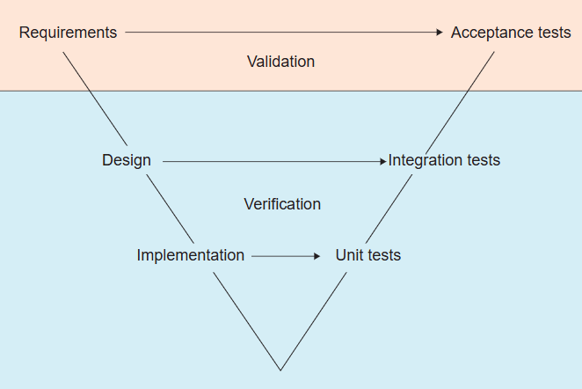
The V model of software testing. The diagram is divided into two parts: validation and verification. There are 3 levels from the top of the V to the bottom: requirements leading to acceptance tests, design leading to integration tests, and implementation leading to unit tests.

Figure 1 Testing v-model

You will clearly see that it is split into two parts. Validation relates to the question of ‘are we building the right thing?’ Verification, on the other hand, relates to the question ‘are we building it right?’ In other words, are we going about our engineering or software development the right way.

Concerning requirements

The term requirements can be seen at the very top of Figure 1. Your requirements should guide what tests you carry out. Your requirements should also be traceable across all the phases of your project; your examiner should be able to see exactly where they have come from. They might come from something that a potential user said during an interview, or from a document you have found – try to be as clear as you can.

A practical tip: create an appendix that contains a single table that contains all your software requirements.  In your requirements table, give each of your requirements a unique identifier or number (perhaps FR1 for a functional requirement, or NFR1 for a non-functional requirement), and use these identifiers throughout your project. In your project report, refer your examiner to your requirements table.

Acceptance testing

In Figure 1, you will see the term acceptance testing, on the opposite side to requirements. If a software product passes a set of acceptance tests, it is deemed to do what it is supposed to do; it is accepted by whoever commissioned it. In your project you are unlikely to carry out an acceptance test, but you may wish to carry out one or more usability evaluations.

If you are interested in the topic of acceptance testing and whether it might apply to your project, a useful tool to look at is Cucumber. Accompanying this tool is a domain specific language which allows you to express high level tests.

Usability evaluations

The aim of a usability evaluation is to determine whether a software product meets the needs of a particular user (or set of users) and helps to solve a particular problem. A usability evaluation could be carried out toward the end of a project to determine whether (or not) the project was a success, or as a part of a series of design and development iterations to gather some useful information about how a design might potentially be improved. Although a usability evaluation can be used to determine whether a product or a design meets a set of requirement, if used well, it can also be used to uncover and identify new requirements, or requirements that had been overlooked.

In very simple terms, there are usability evaluation paradigms (or approaches) that require people, and there are those that do not. Here is a summary of the three paradigms that are highlighted by Preece et al. in their textbook Interaction Design: beyond human-computer interaction:

  • Heuristic evaluation. A heuristic is a rule of thumb. With heuristic evaluation, you scrutinise your user interface design to determine whether it satisfies a set of well know design principles. A heuristic evaluation is typically carried out by a usability expert who is familiar with interface design principles. In terms of your project, you can apply design principles to your own interface design, and comment on what you have learnt.
  • Cognitive Walkthrough. This technique is all about putting yourself in the shoes of a potential user and asking some really simple questions, such as will the user know what to do, and will the user receive effective feedback?
  • Usability testing. Usability testing is where you recruit one or more participants to use your software product to complete a particular task. Whilst a usability test is taking place, you record the actions that the user takes, and any final result.

To do a usability evaluation well, you need to do some planning. To help you to plan, Preece et al. introduce a useful framework which they have called DECIDE. Here is what each of the letters in the DECIDE framework stand for:

  • D: Determine the goals for an evaluation. What is the overall aim of your evaluation? What are its goals?
  • E: Explore the questions. What questions will be you attempting to answer? Are you going to be carrying out an evaluation that determines whether some usability or user experience goals have been met?
  • C: Choose an evaluation paradigm. Usability evaluation can be carried out using different approaches. Which approach will you use? Usability testing is a common approach where you might observe what users do when they use a software product.
  • I: Identify practical issues. How might you go about recruiting participants? What tasks will they perform? How will your record what they do? Will you write things down, or will you use some kind of tool that records their interactions? You will need to create some kind of resources to make sure your evaluation runs smoothly.
  • D: Decide how to deal with ethical issues. When working with real users (or proxy users; people who pretend to be real users) you need to give them as much information as possible, which means that you will need to prepare an information sheet. You will also need a consent form to protect your participant as well as yourself.
  • E: Evaluate, interpret and present the data. This final stage is about figuring out what has happened, and whether you have answered your questions.

To use DECIDE, you should work through each step. Your decision about which evaluation paradigm you adopt may well be guided by the resources that you have available.

Usability testing

If you decide you would like to carry out a usability test, you need to pay attention to step I, identify practical issues, carefully. The first thing that you need to do is to recruit potential participants. It is okay to ask friends and family to help, who could take on the role of proxy users (participants who pretend to be real users).

If your project is linked to your workplace, you may want to ask some co-workers to help with your usability test, but do be aware of the ethical issues of doing this (which is, of course, the next letter in the DECIDE framework).

Three questions to ask are:

  1. Is there any issue regarding power? Are you their line manager?
  2. Will involvement in your project them away from their work in a significant way?
  3. Do you have permission from their line manager to approach them?

A personal recommendation is to avoid recruiting complete strangers. There is a simple reason for this. Although your project is a real demonstration of your skills and abilities, it remains artificial in the sense that it is primarily a vehicle for academic study and personal development.  Involving a wider group of participants exposes you to risks, which can only be address through a more rigorous and formal ethics process.

When preparing for your usability test, it is important to create some materials:

  • Prepare an information sheet. The aim of this is to tell the participant what will happen during the usability test. Send each participant a copy of this single page summary before the evaluation begins.
  • Prepare a consent form.  This is a short form is used to gain consent from your participant to carry out your usability test. In the form, tell them that their participation is entirely voluntary and they can stop the usability test at any point without any consequences or judgement. Do highlight the different ways that data is collected, and how it will be used.
  • Prepare a list of tasks or instructions. You might even need to write a short script to tell your participant what to do. This is to ensure that every participant is asked exactly the same questions.
  • Prepare a data collection form. A form can be useful to structure any notes that you might take during a usability test. You might use a table. On the left there might be a summary of the task, on the right might be space to make some notes.

In your project report, you should share all the resources you have created in your report. You might provide an example in the body of your report, or provide one or more appendices; it is up to you.

Although user testing is often thought of a technique that can be applied to a functioning system or product, it can also be applied to evaluate a prototype or an interim design. It is possible to carry out user tests using mock-ups of interfaces created using tools such as PowerPoint, or even using paper sketches of interfaces. Rather than having a computer present the next step in an interaction sequence, you could pretend to be the computer or mobile device, presenting a participant with the next steps.

After you have completed a usability test, you need to find some way to summarise and then to analyse your data. You might provide a sample of the data in the body of your report, and provide all the important or notable data in an appendix, potentially following any appendices that you may have used to share your resources. You might want to comment on limitation of your evaluation, such as, the demographics of any friendly and willing participants you have recruited.

In terms of resources, some really useful guidance is provided within Preece et al.’s Interaction Design text. Useful ethical guidance has been published by the ACM Code of Ethics and Professional Conduct (ACM, 2006) Practice, and the British Computer Society (BCS, 2026).

Accessibility testing

The term accessibility refers to whether a software product can be used by people who have a disability; people who may have sensory or cognitive impairments. Every user-facing software product should have a requirement to be accessible.

If you are creating a product that makes use of web technology, a really useful resource is the Web Content Accessibility Guidelines (WCAG) from the W3C, the organisation that publishes and maintains web standard. Since web pages can be interactive and dynamic, there is also a suite of standards known as WAI-ARIA, the Web Accessibility Initiative Accessible Rich Internet Applications.

Accessibility testing is a specialised version of usability testing. Ideally, every software product should be evaluated by real people, but since this is not always possible, it is important that you consider alternative ways of carrying out accessibility tests.

Here are some practical suggestions of some accessibility tests you could use:

  • Using a screen reader to determine whether your user interface can be sensibly converted to speech, so it can be used by someone who has a visual impairment.
  • Using a colour contrast checker to determine whether the your interface can be seen or navigated by someone who has a visual impairment.
  • Using a keyboard, rather than a mouse or touch screen, to determine whether your interface can be used by someone who has a mobility impairment.
  • Using an online checking tool to determine whether your interface conforms to the W3C WCAG guidelines.

The W3C has published a useful list of Web Accessibility Evaluation Tools, which you may find useful if you need to carry out an accessibility evaluation. If you use any of these tools, please explain why you have chosen one over another, and also share the details of any output that has been created, perhaps by using an appendix. You should also explain what the output from the tool has told you.

Unit testing

Returning to Figure 1, Unit Testing can be found in the bottom right of the diagram.  The diagram shows a firm connection between the software code that you create and unit tests. A unit test can be thought of as a formal requirements specification that is expressed in the language of the programming language that is used to create your software. A unit test typically tests the operation of a function, or group of functions, to make sure they do exactly what is expected of them.

A software development approach that emphasises the importance of testing is called Test-Driven Development (Beck, 2023). The idea is simple. Before you write any code, you begin by writing a test. You then run your tests to check to see that everything fails as expected. You then add code that satisfies your tests. Your unit tests are intended to provide helpful feedback about the state of your software.

One of the benefits of unit testing is that it helps with regression testing. A regression test is a set of tests that are carried out to make sure that a change has not inadvertently introduced any errors or mistakes. If you have a suite of well-designed tests, you can run your tests to make sure that any update or modification has not broken anything.

The most popular unit testing framework is called xUnit, where the letter ‘x’ refers to a different programming language. There is likely to be a unit testing framework for whatever language you choose.

If the creation of software is a priority in your project, it is important to share evidence of unit testing, or to justify why you have decided against it. A practical suggestion is to provide an example of one or more unit tests in the body of your report (to perhaps show you have you tested particularly difficult bits of code), and a screenshot that shows the running of unit tests.  You need to also explain what you are testing, and why. The more practical detail you provide in your project report. the happier your examiner will become.

To find out more about unit testing, a good starting place is xUnit. There is also JUnit for Java and PyUnit for Python.

Integration testing

Integration testing is about making sure the different bits of your software system work together. If you are creating a software system that contains one or more microservice, a useful question to ask is: how can I test my microservices? There are some bits of terminology that might be useful. A mock is a bit of software that pretends to be another bit of software. There is also the idea of a test harness, which can exercise bit of software before it is then later integrated with, or connected to other bits of software.

If you create any bits of code that tests other bits of code, do remember to discuss what they are, what you did, and what you learnt. Also remember to share any test harness code within an appendix, along with any configuration files or test data you needed to create.

Integration testing is harder to write about, since every software project is made up of different components. This said, there are some tools that might be useful to look at, such as Wiremock or Playwright if you need to understand more about how to test the different elements of your software product.

Security testing

It is easier to carry out tests against functional requirements than it is to test whether a software product satisfies non-functional requirements. A difficult requirement to test is security.

As useful way to think about security testing is whether test can be performed by people, or whether tests can be automated. Here are two sets of tests that relate to security that people can carry out:

  • Code reviews. A code review is where a fellow software engineer examines a bit of software before it is formally accepted into a software product.
  • Pen testing (short penetration testing); a technique where a tester deliberately attempts to gain access to a software product or system. Pen testing is a significant subject in its own right, and requires a lot of specialist knowledge.

There are some automated tools that could be used to help with security testing:

  • Linters. A linter is a static analysis tool that examines your software code that has been written before it is run. A lint roller will pick up annoying bits of fluff, or lint, from your clothing. A linter is a program that will pick up, or identifies points that might need to be attended to.  

If you have studied TM113 Computing Fundamentals 2, you will be already familiar with the idea of a linter, which introduced a tool called Ruff. Linters have been made for different programming languages and different problems. In some automated deployment processes, new program code may be required to be run through linter software before it could be put into production.

If security is an important non-functional requirement, discuss what approach you might take to test your product. If you run aspects of your code through a static analysis tool, do share the results from that tool, and comment on the results you have gathered.

Performance testing

Another important non-functional requirement that you might have considered is performance; you may need your software product to respond with a certain amount of time. Since your project is likely only involve a small number of users, the necessity to address or explore performance isn’t as important as some of the other non-requirements you may have defined.

A beginning point to begin to think about performance is the programming language or languages you may be using. This can dictate the tools you may choose. There is, of course, a link between performance and your chosen software architecture.  Some architectures may enable your design to more efficiently respond to changes in demand.

If your software solution makes use of the Java language, a well-known tool is JMeter. JMeter can also be used with the Python language, through PyMeter. The operating system of your computer, and services provided by your cloud computing provider also provides tools to monitor and check performance. You may also wish to find a way to instrument your code; to take some measurements of how long it might take to carry out particular operations.

If performance is a real issue, you may well turn to the topic of debugging. In turn, you may look to the topic of refactoring, and ask whether you need to refactor your code, or even refactor (or change) your software architecture. A final point is that it is important to take measurements to understand what you have, what you may need to change, and the consequence of any changes that you might make. If you take any measurements within your own project, remember to share them in your project report. Your examiner always wants to see your thinking.

Resources

The following blog posts, which relate to other project module topics, might also be helpful:

Reflections

Testing is a big subject. There are entire suites of industrial qualifications that are dedicated to it. It impossible to test everything in a software project. You need to make practical decisions about what to test, and when to test. In your project report, you need to explain why you have chosen a particular testing strategy, and also show the examiner very clearly what you have done. Do add appendices to share evidence of the tests that you have designed, and the results you have gained; the more detailed they are, the better. The best reports connect testing back to your project requirements. One testing approach will not be enough. You need to study your software system from a number of different perspectives.

References

ACM (2026) ACM Code of Ethics and Professional Conduct. Available at: https://www.acm.org/code-of-ethics (Accessed 16/11/26)

BCS (2026) BCS Code of Conduct https://www.bcs.org/membership-and-registrations/become-a-member/bcs-code-of-conduct/ (Accessed 16/11/26)

Beck, K. (2021) Test Driven Development: By Example. First edition. Pearson Education.

NCSE (2006) Secure development and deployment guidance. Available at: https://www.ncsc.gov.uk/collection/developers-collection (Accessed 16/11/26)

Sharp, H., Rogers, Y. and Preece, J. (2023) Interaction design: beyond human-computer interaction. 6th edition. Wiley.

W3C (2026a) WCAG 2 Overview. Available at: https://www.w3.org/WAI/standards-guidelines/wcag/ (Accessed 16/11/26)

W3C (2026b) WAI-ARIA Overview. Available at: https://www.w3.org/WAI/standards-guidelines/aria/ (Accessed 16/11/26)

Acknowledgements

Figure 1 the Testing v-model has been drawn from TM113 Computing Fundamentals 2: programming, databases and software engineering. Thanks are extended to the TM113 module team, as well as the TM356 Interaction Design and the User Experience module team. It is through the predecessor module that I first gained awareness of the very helpful DECIDE framework.
Permalink Add your comment
Share post
Christopher Douce

TM470 Considering Software Architecture

Visible to anyone in the world

If you have decided to create a software product, you need to think about your software architecture. In your project report, you need to say something about the architectural design decisions you have made, and find an efficient way to describe the architecture that you have chosen.

Considering Requirements

One useful way to think about architecture is to begin by understanding the requirements of your product - what it needs to do, and who needs to use it. Requirements can be functional (what your software product should do), and non-functional (the qualities it must have).

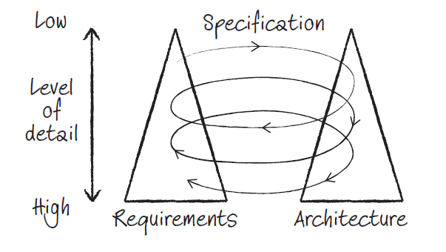
Although some requirements may guide you towards certain architectural choices (such as, the computing platform you need to work with), there is a more complicated relationship between what you need to do, and your architectural choices. This complexity is neatly explained using the Twin Peaks model, created by Nuseibeh.

A spiral is presented between two peaks; one representing software requirements, the other representing software architecture. There is a movement of the spiral from a low level of detail to a high level of detail.

Figure 1 Twin-peaks model (adapted from Nuseibeh, 2001)

The model shows a series of cycles, where requirements are considered along with architecture.

There is an important connection between the software architecture and software non-functional requirements. If your project emphasises the significance of security and availability, it is likely that you will choose an architecture that enables you to meet those requirements.

When thinking about software architecture, a useful idea is the notion of the architectural style, which you may have been introduced to if you have studied the software engineering module.

Architectural styles

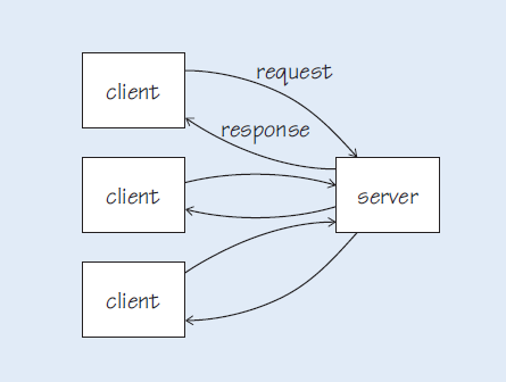
One of the more important (and useful) architectural style, is the client-server style- although it might be sometimes referred to using slightly different terms, such as ‘consumer-provider’ or ‘request-response’.

There are three clients (but there could be many more) sending requests to a single server process, which sends a response to each client.

Figure 2 Client–server architectural style

When thinking about your architecture, you will also begin to think about what bits of software support the client, and what bis of software support the server.

If your software product is to be run through a web browser, you might be looking to use a browser-based interpreted language, such as Javascript (or its more strongly typed equivalent), with a popular framework, such as React or Node.js.

On the server side, to support a web-based application you might also wish to use a server-side language, such as PHP, Python or Java/Typescript, with a server-side framework. The exact choice of your framework will, of course, depend on your problem, and your requirements.

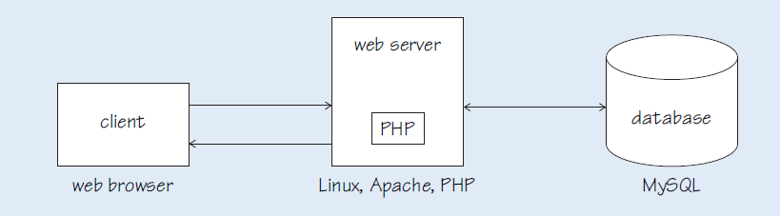
 A diagram with 3 components: a web browser (also called a client), a web server (which is running a web server called Apache, and a language called PHP, on top of the Linux operating system), and a MySQL database.

Figure 3 Component of a LAMP stack

To get you started, figure 3 shows the component of  common architecture bundle which comprises of different bits of software that often work well together - a LAMP stack. which is an abbreviation for Linux (the operating system), Apache (the webserver), MySQL (a popular database), and PHP (the server side programming language). You can readily download the software for a LAMP stack. You can also add additional frameworks to this, such as WordPress or Joomla, if this helps you to solve your problem. You should, of course, always explain why you have made particular architectural choices.

LAMP is one of a number of different technology combinations you might use. There is also WAMP (with W referring to Windows), and a Javascript stack called MEAN, which is an abbreviation for MongoDB, Express.js, Angular, and Node.js.

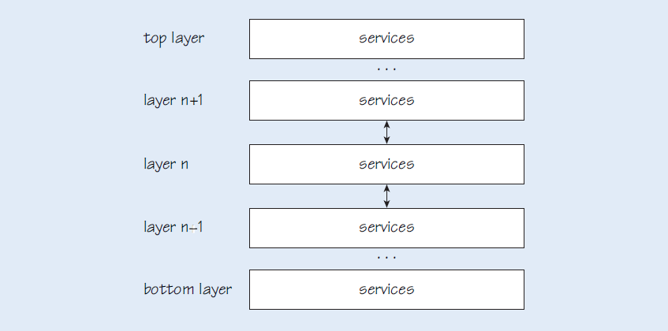
One important aspect of software architecture is that it helps to manage complexity. A powerful technique that helps you to do this is the idea of software layers; an idea that is presented within figure 4.

A diagram showing the layering of software. There are 5 layers shown, but there could be any number of layers. Each layer provides services to other layers.

Figure 4 Layered architectural style

Some bits of software that you choose will already be structured in layers. To make your software understandable and maintainable (which may be an important non-functional requirement) you might wish to create your own layers.

Layers can be considered to be abstractions. An abstraction is, of course, the essential characteristics of a problem. Creating a software system may involve solving a series of problems, and these can be combined together in layers.

Monoliths and microservices

Another useful way to think about software architecture is in terms of how big the pieces are. To help us think about this, there are two useful terms; the monolith, and the microservice. A software product that has everything in one place can be thought of a monolith. An advantage of a monolith is that it could run quickly, since there isn’t the need to call on external products or services. The disadvantage of a monolith is that it might lack flexibility. To change a monolith (a single bit bit of software) you would have to replace it in its entirety. If you have a non-functional requirement of high levels of availability (you need your software to operate all the time), this may be undesirable.

A microservice architecture is the opposite of a monolith; it is a software architecture that is comprised of different services that are used together, to form a service-oriented architecture. The idea is that different components solve different problems. In a business system, you might get customer information from one service, for example, and use another service to record an order.

 A diagram that shows the element of a microservice. There is a client, a service that provides what the client needs, and a connection between the service and a database. Figure 5 Components of a service
 Figure 5 shows some important elements of a service. The client can be a web browser client, running on a personal computer, or a mobile device. You might also be using a Javascript framework such as React or Node.js to present bit of a user interface. Web requests can be created using a standard format called JSON, which is an abbreviation for JavaScript Object Notation, and sent using something called the Hypertext transfer protocol. This message is then received by a server, which processes it. In the diagram, REST is an abbreviation for Representational State Transfer, a well known architectural style for distributed systems.

The REST API may be a self-contained service that could be running on either your own computer, or another computer that could be located in the cloud. This service would endeavour to respond to the request, potentially extracting data from a database, or adding records to a database.

In your project, you need to consider trade-offs. The advantage of a microservices approach is that it could give you flexibility (which could be a non-functional requirement). The downside of a microservices approach is that a solution can be more complex and might be slower (which might be important if you have a non-functional requirement that emphasises responsiveness).

Considering the cloud

A useful concept that you might come across is the idea of a container. A container can contain bits of software, such as a service. A container can be run on your own computer, or it can be deployed to ‘the cloud’. One or more containers could work together to solve a bigger problem.

During your project you may need to make a practical decision about how and where to deploy your software product. If you are creating a prototype, probably won’t have to worry too much; you might just deploy your software to your laptop. If you wish to show higher level of skills and abilities, you might think about deploying your software to a cloud infrastructure.

There are two really important points to consider:

  1. Cloud software architecture is an entire subject of its own. You need to be aware that a cloud provider will likely use its own terms and concepts, and offer a range of different services. You need to share your understanding of the services that a cloud provider offers, and explain your choices in a clear way to an examiner who may be unfamiliar with the services that a cloud provider offers.
  2. Be aware that cloud providers often charge for the use of their services. Do be aware of any costs that you might potentially incur. The university will not be liable for these costs. When you have finished your project, you should consider taking down any software you may have deployed to the cloud.

When describing any software architecture decisions that you have made, do remember to describe them clearly and thoroughly. You will impress an examiner if you clearly identify and discuss trade-offs.

Patterns

So far, we have looked at software architecture from a high level; bits of software that work together to solve a problem. Before looking at other resources that might be useful, it is worth saying something about design patterns, which relate to software architecture at the code level.

A design pattern is a recognised approach to solve a known problem. If you sense that you might have to do a lot of coding, a recommendation is to look at the Gang of Four Design Patterns book. Sometimes, bits of software that you choose for your architecture will mention concepts that are featured within this important text.

Related resources

The IEEE software engineering podcast, which features interviews with industrial practitioners is a really useful resource. These two blog posts offer some guidance about what might be useful to listen to:

The following TM470 specific blogs may offer some useful guidance about requirements:

You should also look after, and keep track of your software architecture. Anything that you create, whether it is code or configuration files, can be stored safely in a version control system. The following article offers a bit of helpful guidance:

Reflections

Software architecture is a big (and very interesting) subject. There is a lot of detail in this post, and this might seem overwhelming. An important aspect of your project is about managing risk. Whilst it can be interesting to try to learn something new, there is much to be said for drawing on your existing knowledge and skills. If you are a keen Python programmer, and would like to use your project to further refine your Python skills, consider choosing a software architecture which allows you to use (and to show off) your Python skills.

What is really important in your project is that you explain your technical choices in a way that will make sense for the examiner. Draw some diagrams, and the explain your diagrams. If you are a Python programmer, do bear in mind that your examiner’s favourite language might be Java. Do reference widely to educate them about the benefits (and trade-offs) that lie at the heart of your architectural design.

References

Fielding, R. T. (2000) Architectural Styles and the Design of Network-based Software Architectures. University of California, Irvine. Available at: https://ics.uci.edu/~fielding/pubs/dissertation/top.htm (Accessed 15 November 2026)

Gamma, E. et al. (1995) Design patterns : elements of reusable object-oriented software. Addison Wesley.

Nuseibeh, B. (2001) ‘Weaving Together Requirements and Architectures’, Computer, 34(3), pp. 115–119. Available at: https://doi.org/10.1109/2.910904.

The Open University (2025) Block 3 Units 9–12 From architecture to product - TM354 Software engineering. The Open University.

Acknowledgements

Figures 1 through 5 have been drawn from the TM354 Software Engineering module.

Permalink Add your comment
Share post
Christopher Douce

TM470 Using Version control

Visible to anyone in the world

If you build a software product or system as a part of your project, you might want to use some form of version control.

If you don’t know what version control (or version management) is, the idea will probably be familiar to you from your previous experiences of writing and submitting TMAs. You probably begin with a rough draft (or even a plan), then move to an initial draft, and then to a final proof-read final draft; each draft is a version, and you might well give them different names. Version control, or version management, is a similar idea, but it applies to software code, with additional functionality that is designed to make your life easier and to protect the integrity of your software. When used well, version control tool can help you to manage project risks and protect you from your own mistakes.

Introducing Git

The world’s most popular version management tool is Git. If you intend to work as a professional software developer or engineer, you need to know about it.

Git is a bit of software that works with a software repository, which keep your source code safe. Git is is now so important and widely recognised within the computing industry that it is now common practice is to include a link to your personal Git repository on your CV or LinkedIn profile.

With Git being so important and useful, a practical suggestion is to consider using it as a part of your project. Not only does this provide an opportunity to learn how to use Git, but can also take the opportunity to create a code repository that can be shared with your project examiner, and any potential employer.

Key components

Git – this is the core software. As mentioned on the Git website, Git is accompanied by an ecosystem of hosting services and GUIs.

GitHub – this is the most popular repository hosting service. For your project, you could set up a private repository. If you wish to share your work with an examiner or an employer, you may wish to create a public repository.

GitLab – this is another hosting service, but one that offers a richer set of functions for the building and delivery of large software products.

GitHub Desktop – since Git was historically a command line tool, GitHub Desktop is a graphical user interface that simplifies its use.

GitHub and GitLab are code repositories. If you were to ever work on commercial software, you might find yourself working on a corporate or institutional repository which is hosted on private servers. For your project, a good place to start, is GitHub.

Reflecting the point about an ecosystem, Git can be also connected to popular integrated development environments, such as Microsoft Visual Studio Code.

Advantages of using Git

Although one of the biggest advantages of Git is that it allows many different people to work collaboratively, it can also be useful if you are working on your own, on a single project. One really important advantage is that it provides a way to maintain a secure backup of your software; you create software on your computer, and then push what you have done to your Git repository.

Git also allows you to keep multiple versions of your software. This can be really useful when you are trying to debug your software, and understand the cause and effect between different changes. Git also helps you to create defined builds of your software. It helps you to keep track of what bits of software (what versions) contribute to what releases. In other words, it helps you to manage complexity.

Using evidence from Git in your project

The examiner will be looking for evidence of consistent work throughout your project. The official way to provide this evidence is by sharing a project log, which is a regular set of notes that you have made throughout your project. If you use Git, you can also include an appendix where you can share copies (screenshot) of your Git logs, to provide clear evidence of what code commits you have made, and when. The more evidence you leave the examiner, the more impressed they will be with your project.

Further resources

These accompanying blog posts might be useful:

Reflections

Git is mentioned in TM113 Computing Fundamentals 2, and will be used by students studying TM253 Object-oriented software engineering. Rather than saying why it might be a good idea to use Git in your project, an alternative question should be ‘why am I not choosing to use Git?’ If you’re not going to use Git, what else are you going to do instead? Version management (and Git) is an integral and important part of modern software engineering and software development.

As a project examiner, if you have created some software, one of the questions I always ask myself is: how have they managed their source code?

There is, of course, an overhead that accompanies the use of any sophisticated and powerful tool. You’re not expected to become a Git master by the end of your project, but the project examiner will also be looking to see what you have done, what you have learnt, and what problems you have solved.

Permalink Add your comment
Share post
Christopher Douce

TM470 Referencing

Visible to anyone in the world

Referencing is really important in any academic project, and it is especially important in your final project.

This short blog post offers some practical guidance about what you should reference, and how you should go about it. It is intended to complement many of the resources that you already have access to.

Referencing fundamentals

There are a number of reasons why referencing is important:

  • It is assessed as a part of the learning outcomes for your project. In the project module, this is learning outcome number 7, which is all about effective communication.
  • It demonstrates the extent of your knowledge.
  • It demonstrates the extent of your reading and how you have applied your reading (and knowledge) to the solving of a problem.
  • It provides useful information that an examiner could use to find out more about the ideas, tools and technologies that you have used.
  • It demonstrates knowledge of academic practices for your discipline.
  • It prevents you from being inadvertently accused of plagiarism.

There are two key concepts that are really important:

  1. A citation. This is when you refer to something in the body of your project report. You might, for example, include a citation in a paragraph of text, to show the examiner where an idea (or some other resource) has come from, or how an idea is used. You might use a citation with a diagram or a figure.
  2. A reference. This is an entry within the references section that you can find towards the end of your report. This gives precise information about the resource (an article, a book, or some software) that you have used, along with where the reader (or examiner) might be able to find it if they want to find out more.

A useful principle to bear in mind is that anything that exists in the world can be referenced, and cited. It is possible to reference a personal email, as well as a museum artefact, such as a vase. A related principle is that a reference should be unique, and be able to be unambigiously identified. What you need to practically reference will be different depending on your academic discipline. This means that a referencing approach for engineering will be different to what is required for English literature.

Since computing draws on a variety of different subjects, you may come across articles that use different referencing formats; each have their own advantages and disadvantages. Journals and conferences published by the Institute of Electrical and Electronics Engineers (IEEE) use a referencing format where articles are given numbered. Whilst this helps to create articles that are relatively short, it detracts from the readability and understandability of articles. A more friendly approach is the Harvard style, which is the one that you should use for your project report.

Examples

Your ‘go to’ resource for everything that relates to referencing is the Cite Them Right website. From the choose referencing style menu, you should then click on Harvard.

Here is a prototype of a Harvard reference:

Surname, Initial (year) ‘Title of article’, Title of publication. Volume number(Issue number), Page range. Available at: URL. (Accessed: today’s date).

Note the writing convention of putting the title of a publication in italics. This also applies to when you are writing the body of your report. Page numbers are expressed using the format ‘pp. 100-110’, where ‘pp.’ is used to begin a range of pages.

The URL should ideally be what is known as a DOI, which is an abbreviation for Digital Object Identifier (Wikipedia) which is a stable web address for a published article. DOIs are typically used to refer to journal articles. If you don’t have a DOI for an article but you have a web address, you can leave that, but you should then leave the accessed date. The reason for this is that links that are not DOIs can age.

Here’s an example of a citation, that you leave within the body of your report:

(Surname, 2026, p. 32)

If you refer to the author a number of times within a paragraph, you could just include the page reference, which saves a bit of typing, and helps with the clarity.

If you need to, you could also combine references together in a small list:

(Surname1, 2026; Surname2, 2025)

More extensive guidance is provided within Quick guide to Harvard referencing (Cite Them Right).

What follows are some examples of referencing that you will typically wish to use in your project.

Module materials

There is an expectation that you will demonstrate a connection between your project,and your previous studies. To do this well, it is important that you take the time to materials from your earlier studies.

There are different types of module materials: printed books, module websites, and booklets (such as ‘readers’ that accompany module materials). Given that an important principle of referencing is the need to unambiguously refer to sources, an important question to ask is: ‘does the resource I am using have an easily identifiable author?’ It it does, you should use the name of the author. If not, you should reference the author as The Open University.

For a module that has printed books, you might include the following references:

The Open University (2025a) Block 1 Units 1-4 From domain to requirements: TM354 Software Engineering. Third edition. The Open University.

The Open University (2025b) Block 2 Units 5-8 From analysis to design: TM354 Software Engineering. Third edition. The Open University.

The second mention of The Open University refers to the name of the book publisher.

You might cite the first text as follows:

‘(The Open University, 2025a, p.32)’

For materials located on a module website, you might provide a reference similar to the following:

The Open University (2026) ‘Unit 9 Architecture, patterns and reuse’, TM354 Software Engineering. Available at: https://learn2.open.ac.uk/mod/oucontent/view.php?id=... (Accessed: date).

Since there is no page number, you should cite the reference as follows:

‘(The Open University, 2026)’

Academic articles

During your project there is an expectation that you will read beyond your module materials and look to original source materials, and academic articles that may potentially inform or influence the work that you do within your project.

Here is an example of how to reference a famous software engineering article:

Parnas, D. (1972) ‘On the criteria to be used in decomposing systems into modules’, Communications of the ACM, 15(12), pp. 1053-1058. Available at: https://doi.org/10.1145/361598.361623

No date of access is needed to be given, since the DOI is understood to be stable.

It can be cited as follows:

‘Parnas (1972) stated … (p.1052).’

Books

If you create a software product during your project, you will usually refer to reference texts. A really useful library source is the O’Reilly Safari library. You might reference a programming text as follows:

Lutz, M. (2026) Learning Python. Sixth Edition. O'Reilly Media, Inc.

You make cite it using the form:

‘A useful resource was the chapter on Lists and Dictionaries found in Learning Python (Lutz, 2026).’

If you only consult an electronic version of a text, you may not have a explicit page number, but do demonstrate both your reading and understanding by referring to specific section numbers.

Edited books

Useful articles can often be found within edited books. Best practice is to provide references to specific chapters rather than an entire text:

Müller, V.C. (2023) ‘The History of Digital Ethics’, in C. Véliz (ed.) Oxford Handbook of Digital Ethics. Oxford University Press, pp.18-38. Available at: https://doi.org/10.1093/oxfordhb/9780198857815.013.1.

An article that has been downloaded from a repository might have its own page number, rather than the page numbers of the edited text. If this is the case, a practical approach is to reference the page numbers from the article. For example:

‘Müller begins with Babbage’s analytical engine (Müller, 2023, p.4)’

Software

You should provide a reference to practically every software product you have used. This might include element of your software architecture, or software development environments you have used to create your software product.

You should give the name of the author, which might be the organisation that created the software. Software if often referred to in terms of their websites. The Cite Them Right website offers some useful guidance.

Here is a practical example:

Apache.org (2026) Apache Netbeans (Version 31) [Computer program]. Available at: https://netbeans.apache.org/front/main/index.html (Accessed: 13 November 2026)

A citation example:

‘During the project, I made extensive use of Netbeans (Apache.org, 2026).

Websites

You might refer to websites if you wish to show your examiner how you have made use of documentation during your project. For example:

Python.org (2026a) 5. Data Structures. Available at: https://docs.python.org/3/tutorial/datastructures.html (Accessed 13 November 2026)

Python.org (2026b) 9. Classes¶. Available at: https://docs.python.org/3/tutorial/classes.html (Accessed 13 November 2026)

If there is no visible or distinguishable year of publication, do give the current year. If there is the need to provide several references to a single website, add letters, i.e. ‘a’, ‘b’, ‘c’ etc. after the year to provide a way to make each reference unambigious.

The first reference could be cited as follows:

‘A useful illustration about how to use a list as a stack could be found in Python language documentation (Python.org, 2026a)’.

When using and referring to resources, avoid the use of blog posts (except this one, of course), since they may not be reliable. Prioritise the use of module materials, academic articles and reputable textbooks.

Generative AI

My advice about Generative AI is simple - avoid using it. This said, some projects might focus on the exploration and application of AI tools and products. Whilst it is permissible to use AI within a project module, if you do use it, it is necessary to justify and explain its use.

An important aspect of referencing within academic writing is all about helping your examiner to understand what your sources were, why you have chosen them and how they are applied in the context of your project.

From a practical perspective, to reference your use of generative AI, you should:

  • Provide a clear reference to the tool you have used.
  • Provide an exact copy of the prompt that you have used with that tool.
  • Provide a complete copy of response gained in response to your prompt.

Since specific guidance about how to reference generative AI is likely to change as practices become more refined, it is best to consult the CiteThemRight website. This said, here is a very simply practical example that begins with a citation, and then offers a reference.

In text citation:

‘Copilot was used to interrogate my choice of framework (Microsoft, 2026)’.

Reference:

Microsoft (2026) AI-generated text by Copilot with prompt ‘List the 5 most popular PHP frameworks and their most significant advantage and disadvantages’, 13 November 2026, Transcript presented in Appendix 1.

Assuming the project report is not to be made publicly accessible and is only to be used as a part of a formal assessment, it is acceptable to keep the response from the AI product within the boundaries of the project report. There must be sufficient to enable the examiner to make an informed judgement about how you have critically evaluated and have made use of any responses.

Keeping track of your resources

Whilst working on an essay or project, I need to keep track of a lot of different sources. To address this challenge, there are bits of software known as reference management tools (blog article). These software products help you to keep a record of all your sources, and can also help you with adding citations and references to your documents. In some cases, these tools may help you to move between referencing formats if this is something you need to do. There is, of course, a learning curve and an administrative overhead which accompanies the use of these tools. You also need to ask yourself the question of whether using a reference management tool is worth the investment of your time.

My personal preference is to use a low tech approach. I create a folder where I store all my references. In this folder, I save everything that relates to my project. I use a really simple system for everything I add to the folder. I give each document an author name, followed by a title of the article. If you prefer, you can also add the year of publication. If I need to reference a website, I also create a hyperlink (I right click with the mouse, and then click on ‘new’ followed by ‘shortcut’). This simple approach not only helps me to easily find articles after I have downloaded them, but it helps me to check my references list.

Points to remember

The following points might be useful:

  • If you use something, or refer to something in the body of your report, ask whether you need to provide a citation, and a reference. If you are referring to a bit of software may times, a practical approach is to refer to it once, which is, where you first refer to it in your report.
  • Don’t finish a paragraph with a citation. If you are using a writing framework, such as PEEL (an abbreviation for Point, Evidence, Explain, Link), the final sentence should be either a linking sentence to another paragraph, or a concluding sentence.
  • Only include a references section in your project report. You don’t need to provide a bibliography section.
  • For every reference you provide in your references section, there should be one or more citations.
  • When providing a citation, do provide a page number, if it is appropriate to do so. Page numbers signal to the examiner that you have closely read your source materials.
  • You must organise your reference list alphabetically, in order of surname.
  • Never mix referencing formats; this will just confuse your examiner, and it also looks as if you have copy/pasted from somewhere. It is important that your references section is consistent.
  • Give a DOI reference if you have one.
  • If you’re unsure about how to reference something, ask your tutor.

Other blog posts

In addition to the earlier article about referencing tools, the following blog posts might be useful:

Library resources

The following resources might be helpful:

I've found the browser extension particularly useful, since it allows you to access articles without having to explicitly login to the library website.

Reflections

When I am a project report examiner, one of the first thing I do is to look to the references section. This section gives me a good idea of what the project is going to be about. I come to it with a set of questions:

  • What module materials are referenced, and how have they contributed to this project?
  • What software products have been used?
  • Is there evidence of significant further reading beyond the boundaries of the module?

I also look for how the references section is formatted. Is it in alphabetical order? Is it well presented? What is the mix of resources that are used? From my examiner’s perspective, the reference section shows off the extent of your knowledge, and the extent of your reading.

There are two other thoughts that cross my mind with respect to referencing. Good referencing demonstrates good academic practice. It also provides good evidence of good academic conduct.

From the perspective of your project, the references section might be one of the last sections that you edit, but from the examiner’s perspective, it might be one of the first sections they read.

Permalink Add your comment
Share post
Christopher Douce

Comedy and performance: a short course for postgraduate research students

Visible to anyone in the world
Edited by Christopher Douce, Thursday 12 November 2026 at 12:23

This short experiential online six week course introduces postgraduate researchers to stand-up comedy performance techniques, which can be used to create engaging, dynamic and funny presentations, which can help participants to share their research aims and outputs with a variety of different audiences.

The course will adopt a toolkit approach, introducing participants to creative and writing techniques which aim to identify ‘the funny’ that exists both within the participants, and within the subject they are investigating.

These techniques will draw on practices from established stand-up comics. The course will also explore and critically analyse theories of comedy and comedy performance. Towards the end of the course, participants will have an opportunity to practice and refine presentations, and gain constructive criticism from a supportive community. During the course, participants will occasionally be asked to complete short homework tasks.

Each session will last for up to two hours and will take place using MS Teams. Each session will include a break of at least 15 minutes. There is a strict limit of 12 participants. Please register early to avoid disappointment. When you have registered, please add all event dates and times to your diary. Participants should ideally be able to attend all sessions.

The course will end just before the start of the postgraduate research conference which will take place in Milton Keynes.

Learning outcomes

Through this course, you will:

  • Understand how your subject could be presented in a comedic way with the intent of enhancing the impact of both your research outputs and your professional activity.
  • Understand what is meant by ‘attitude’ in comedy performance and develop aspects of your own performance persona.
  • Learn about the boundaries of what is considered to be acceptable and unacceptable to a professional audience.
  • Learn about what is meant by ‘the comedy circuit’ and how this relates to the development of comedy performance.
  • Gain experience of sharing your research aims and objectives with others.
  • Understand some key theories of humour and stand-up comedy, and differences between those theories.
  • Learn about principles of joke writing.
  • Learn about the practices of writing and how games can be used to drive your creativity.
  • Understand how your subject could be presented in a comedic way with the intent of enhancing the impact of both your research outputs and your professional activity.
  • Learn about editing and how to refine, critique and develop your presentation and performance.
  • Learn how to perform a five minute ‘set’ and deliver that set to a friendly and supportive audience.

Programme

Week 1: 16 March 27, 14:00 – 16:00, Introduction, objectives and ground rules

In this session, you will be introduced to the course, its aims and ground rules. The session will include an activity that explores how you may be perceived by an audience that is unfamiliar with you and your research. You will also be introduced by what is meant by ‘attitude’ and the concept of ‘the circuit’. Useful key tools will be highlighted: the notepad and the recording features on your mobile phone.

Week 2: 23 March 27, 14:00 – 16:00, Comedy theory

In this week, you will be introduced to different ideas and conceptions of ‘comedy theory’, and will begin to share something about your research aims and objectives with the group (if you feel comfortable doing so). You will gain a further understanding of principles of performance and introduced to some writing games in anticipation of the weeks that follow. Particular attention will be given towards how to share feedback with others.

Week 3: 6 April 27, 14:00 – 16:00, Writing (attitude)

This session is concerned with performance and the development of attitude. It will begin with the belief that everyone is funny. This perspective is linked to the notion of what is meant by a ‘comedy persona’ and how it relates to status, and how this is linked to the often ambiguous position of the doctoral researcher. You will also be introduced to some further writing games and techniques.

Week 4: 11 May 27, 14:00 – 16:00, Writing (content)

With the previous week relating to the theme of identity, status and performance, this week turns more directly to your research topic. During this week, you will be introduced to further games and techniques to explore ‘the funny’ that exists within your topic and your discipline. You will be asked to share ideas for material for fellow participants and offer positive constructive criticism.

Week 5: 25 May 27, 14:00 – 16:00, Editing

In this session, themes from previous session will be brought together: comedy theory, the researcher, and the research with a view to combining everything together into ‘a set’. A key concept in joke writing and comedy writing is concision. You will be introduced the ideas from comedy theorist and performer Adam Bloom, where you will learn techniques that can help you edit and refine your material.

Week 6: 1 June 27, 14:00 – 16:00, Performing

This session will provide an opportunity to deliver a five minute performance about your research project in a friendly and supportive environment. After each session, there will be a structured feedback and Q&A session.

The contents of each session may change, depending on the needs of individual students.

About the facilitator

Chris Douce is a Senior Lecturer in Computing (which is funnier than it sounds). In addition to teaching on the OU’s software engineering module Chris has been performing comedy for ten years. Between 2019 and 2024 he was a producer and host for Catford Mews Comedy Club, based in South East London. He has also hosted and ran comedy events at the OU London regional centre, and ran a one-off comedy event at the OU’s cellar bar. In 2016 he wrote, produced and performed a show called Meetup101. In addition to comedy performance, his research interest include distance learning pedagogy, and the connections between storytelling, sustainability and software engineering.

Further reading

Bloom, A. (2023) Finding your comic genius: an in-depth guide to the art of stand-up comedy. Self-published.

Double, O. (2014) Getting the Joke: The inner workings of stand-up comedy. Second edition. Bloomsbury.

Holloway, S. (2010) The Serious Guide to Joke Writing. Bookshaker.

Murray, L. (2007) Teach yourself: Stand-up Comedy. McGraw-Hill.

Robinson, H. (2026) SEDA Academic Humour Toolkit. Available at: https://drhannahrobinson.org.uk/downloads/2026-08-18_Full_CoCreated_Humour_Toolkit_for_Higher_Education.pdf

Acknowledgements

Acknowledgements are duly shared with the facilitators of various courses I have attended over the last fifteen years. Three notable courses have included Barry Fern’s MC course, Ivor Dembina’s comedy drop-in and a 6 week course that was hosted at CityLit, London. This project is supported by eSTEeM, the university’s STEM scholarship centre.

Permalink Add your comment
Share post
Christopher Douce

Critical reading: giving and responding to in-depth academic feedback

Visible to anyone in the world
Edited by Christopher Douce, Friday 13 November 2026 at 20:32

On 5 November 2026 I attended a CPD event about critical reading and the reviewing of teaching materials, facilitated by Judith Croston. The event was described as being “part of the STEM Writing for Production Programme”.  The learning outcomes were to: understand the role of academic critical reading in module production, to look at critical review templates, and understand what writers of module materials should expect from critical readers, and how to respond to feedback.

Role in quality assurance

Since module materials can have a lifetime of some considerable years, it is important that the materials are as correct and as robust as they could be. In terms of the university curriculum management guide, critical readers are described as ‘practitioners, academics and researchers with expertise in areas of knowledge and practice relevant to the module.’ They could be module authors, a module team chair, academic researchers, PhD students, associate lecturers, student reviewers and external consultants.  It could also be considered helpful in terms of professional academic development.

Critical readers are not the only people who are reviewing the materials. There are also external assessors and a number of different editors who review the module materials. There are editors who read for coherence, alignment with learning design principles, and editors who carry out copy editing, to check for typographical issues.

One note that I did make was a reflection from a module chair, who suggested that ‘you can never have too much feedback on drafts’. A reflection on this is that the quality of the feedback is also likely to important too.

Module team approaches

A bit terminology. In OU production jargon, a D2 is considered to be a first full draft. A D1 is an early draft.

Different module teams might handle critical reading in different ways. A module chair, for example, might read every block. All block authors might read each other’s block. There might be a designed critical reader for each block. Module teams might ask critical readers to focus on particular points, or to read with a certain perspective.

Discussion

We were put into breakout rooms to discuss a few questions, which I’ve taken the liberty of paraphrasing:

  • What works and what doesn’t work?
  • What sort of feedback have you found useful?
  • What information do critical readers need?
  • What are the barriers for effective practice?

I made some notes, which could be thought of as potentially helpful points and tips:

  • Time can be a barrier, which means that planning is important. It is important to integrate critical reading into a production schedule.
  • Take a multi-step approach. One critical reader may be asked to consider the big picture of a module design and provide overarching comments. Conversely, you may ask a critical reader to look at the specifics of activities (but do bear in mind that editors will pick up typos).
  • A collaborative module chair, who works across and between module team members is really helpful.
  • The qualification leads and director of teaching can play a role to ensure that programme wide learning outcomes are met, and can offer guidance about what critical readers should focus on (themes such as accessibility, employability and sustainability).

Managing conflicting feedback

When writing (and critiquing) any written work, I always try to keep in mind the perspective that we are critiquing the work, rather than the writer. This is, of course, easier said than done when we receive a lot of comments. What I would also add to the points made in this part of the session is: if you think something is especially good or useful, it is useful to say so.

Here are the points that I noted down from this section:

  • Remember that everyone has different experiences and perspectives. What they may say might well be valid, from their perspective.
  • ‘Seniority does not automatically suggest someone is right.’
  • If there is a disagreement, Is there a compromise? A resolution might also mean getting further perspectives from other readers or other team members.

Reviewing critical reading guidance

Towards the end of the session, we had a very read through of five documents; three checklists and two guidance documents. We didn’t have much time to look through these, but I will share what looked to be significant.

Science checklist

The science checklist had 12 rows, which covered useful topics such as timing, style, and learning outcomes, with a separate table that related to equality, diversity and inclusion (EDI). There was a row to leave a tick (or a cross), and space for comments.

Science prompts

Rather than a checklist, one document had a set of prompts. It began with a short introduction, and had the headings: Interest/engagement, difficulty, clarity and structure, timing, and any other comments or feedback. Under each heading there was a couple of sentences of additional guidance.

Education feedback form

This divided into 8 rows. The (abridged) heading were: content, teaching, difficulty, readings, AV material, impact on students, summary, and any other comments. Accompanying each row were a set of useful probe questions.

I’ll now turn to one that has been prepared by a module team that I have a connection with (which we didn’t discuss).

Computing feedback form

There is a separate guidance document that has the title ‘what we ask of you’, followed by a timetable, and an appendix that addresses the EDI and accessibility issues that need to be considered. Our form has 8 sections: topic ‘strategy’, content appropriateness, likes and dislikes (or, strengths and weaknesses), anything that might be missing, connection with learning outcomes, whether the materials are engaging, and EDI and accessibility points. The computing critical reading guide also suggests that the readers can return their feedback in any way that works for them.

Reflections

The first time I did some critical reading, I really felt that I wasn’t very good at it. I wasn’t sure whether the module chair wanted me to give a high level overview of everything, or wanted me to look at the specifics of individual activities.

An important point that I noted down was the need to provide suggestions that are actionable. Whilst comments such as ‘this activity needs to be further refined’ may reflect a need for some materials to be looked at again, specific comments are also useful comments. A related point is the importance of ‘module overload’. Does a module have too much, in terms of content, activities or assessment? This point links back to the role and importance of qualification directors.

Out of all the forms I looked at, I liked the education form, since it provided a set of really useful probes. In some ways, the computing forms and guidance also does this, but in a slightly different way. Putting forms to one side, what really matter is people: the writers and the readers. This links back to an earlier point about the importance of a collaborative chair.

Acknowledgements

Thanks are given to Judith Croston.

Permalink
Share post
Christopher Douce

The STEM good tutor guide: Introduction

Visible to anyone in the world
Edited by Christopher Douce, Friday 6 November 2026 at 09:32

In November 2023, I started to work on an eSTEeM scholarship project called The STEM Good Tutor Guide. Work on the project was stalled due to ‘life events’. This blog post aims to share where I’ve got to. I begin by sharing a draft of an introduction (which needs a lot of work). I then share a summary of articles that partially reflect a table of contents that I had originally designed. I then share something about the next steps I’m going to take to (attempt to) wrap everything up.

Introduction

The aim of this guide is to offer tutors practical help and guidance, whilst also being a useful ‘go to’ reference about the practice of being a tutor. You might be reading this having been a higher educational professional for many years, or you might be new to higher education teaching. The title of this guide acknowledges a book called The Good Study Guide by Andrew Northedge, which introduces students to good study practices. I should say that this guide, like all guides, doesn’t provide all the answers. Instead, think of it as a useful starting point.

This guide begins by sharing a practical perspective about what higher education is about, from an unapologetically OU context. This first chapter contains everything that I wish had made very clear to me when I first joined the university.

Article summary

Chapter 1: The role of the tutor

Chapter 2: Curriculum and modules

Chapter 3: The fundamentals of tutoring

Correspondence tuition
Tutorials
Forums
Examinations

Chapter 4: Supporting students

Chapter 5: Understanding your contract

Chapter 6: Practice tuition

Chapter 7: Continuing professional development

Chapter 8: Seeking help and support

Next steps

There are a couple of sections in the original table of contents that do not have corresponding articles. One of the areas hat I will write about it the notion of reflective practice, but this is something that I know is mentioned in the introductory articles. There is also an additional group of articles that relate to being a practice tutor, which I need to edit into a coherent whole.

Here’s what I need to do:

  1. Collate all the articles together.
  2. Aggressively edit each of them to create a consistent tone.
  3. Remove repeated sections and consolidate points.
  4. Reflect on whether learning outcomes or activities are needed.
  5. Create a glossary and index.
  6. Make sure that references are added and are formatted correctly.
  7. Create an ePub.
  8. Evaluate the resource.
Permalink Add your comment
Share post
Christopher Douce

Getting better at Correspondence Tuition

Visible to anyone in the world

The aim of this blog is to share some hints and tips about correspondence tuition that I’ve picked up over the years. The genesis for this blog came from an email from a fellow tutor who had been thinking about similar things. The comments that follows are, of course, my own. There is no right and wrong way to write effective correspondence tuition.

Feedback and Feedforward

An important principle of correspondence tuition is the concept of ‘feedforward’ (which is about how to do things better), which complements the notion of ‘feedback’ (which is about what could have been done better).

In very simple terms, feedforward comments (future altering comments) can be more easily shared on the eTMA summary page, whereas feedback comments can be left on a student’s script – although this distinction is a little artificial. You can provide feedback on an eTMA summary form, and targeted feedforward on a script.

I’ve also noted that feedback should be clear, specific, objective, constructive, actionable, supportive, and prompt.

In addition to the concept of feedforward and feedback, there’s also the idea of levels of comments.

Levels of comments

In one of the AL development sessions, I summarised a bit of research that outlined different levels of teaching comments that can be provided on a student’s script:

Depth 1 comments: comments on content and skills that indicate that there is a problem (e.g. ‘more needed here’ or ‘Structure needs attention’)

Depth 2 comments: comments on content and skills that correct a problem (e.g. ‘you needed to mention why this is an important issue’ or ‘your structure would have been better if you had started with an introductory paragraph’)

Depth 3 comments: comments that not only correct, but explain the correction (e.g. ‘you needed to mention why this is an important issue because by doing this you would provide a clearer context for the next section’ ….) Build on the student’s attempt or answer.

The depth 3 comments are all about trying to close student’s gaps in understanding; to take them from where they were to where they need to be.

Praise, pointers and expectations

A further broad category of comment can be broadly termed ‘praise and pointers’, which also relates to the important of encouragement.

It’s not enough to leave comments. It’s also important to give students a bit of direction, and a good way to do this is to shine a light on what topics and subjects are on the horizon (and maybe say why some of them are important in the context of the module). Context setting is really important, since it enables students to understand the purpose of an assessment in addition to what they had gained from an assessment.

Praise is absolutely essential. Whenever I’m marking a TMA, I always have a couple of related questions in my head, such as: “what do I like about this submission?” or “what has been done well?” A positive tutor attitude has the potential to create a positive student attitude.

I once remember hearing a comment from a colleague that has really stuck with me. It has stuck, because it was so simple, and so obvious. It was: always be sure to respect the effort that has gone into producing the work that you are marking or assessing. This links to another point about praise that I have been taught, which is: “praise the effort that has gone into something, rather than praising the work itself”.

A final point in this section is something that is simple, but is also really important. Comments to students can also be used to set expectations, which means that tutors can provide explicit encouragement. For example, a tutor might write: “I thought what you did in part 1 of the TMA was excellent. If you adopt a similar approach when you submit your TMA 2, and carefully work though these comments and the block material, I think that you will be able to get a higher score”.

Being critically positive

It is important to position yourself in relation to the feedback that you are sharing. A useful suggestion that I picked up from a fellow tutor was to avoid the word ‘but’. ‘But’ can sometimes sound inadvertently very critical. Even if used in a way that was intended to be positive, it can also give the impression of giving faint (or begrudged) praise. For example: ‘part one of the answer needed a stronger title, but your overall answer was very good’. A ‘but’ can also add ambiguity, when students desire clarity.

There are ways to express what was missing in a gentle way. If an answer lacks something… you could say, “I did feel that there was the opportunity to…” or “what would really lift this paragraph if you…”. Showing students what you were expecting, or modelling of answers using their own words is, of course, a depth 3 comment.

It can be useful to blame someone else. A tutor is a representative of the module team. Although the feedback and feedforward comments that you share are always you own, a useful phrase I have sometime used is: ‘the module team is looking for … because….’. This phrase can take the heat out of a critical comment, since you’re signalling that the feedback isn’t coming directly from you, but from a wider community of academics.

Sometimes, it might be useful to signal that you have high expectations for a student. If there is a feeling that a submission was rushed, a useful phrase might be: “I did feel that you are capable of submitting a stronger assignment…”. In these situations, you might mention that an extension is sometimes possible. Do also consider suggesting whether your student might benefit from an additional support session.

Adding value

Tutors are the most important people in the university because of their experience. A really useful and obvious question to ask when you’re writing feedback is “what value can I add?” It can be helpful to bring something of yourself into your feedback, since you may be able to contextualise the learning material. If you have had a job outside the university, you might, for example, be able to share comments about why the module team consider certain learning outcomes to be important.

Too many comments?

In tutor development sessions, I have sometimes heard the reflection that the amount of comments that can be left is inversely proportional to the size of an assignment submission. Another reflection that I have heard was: if you end up writing more than what a student has written, you’re certainly leaving too much feedback. A very practical approach to take when writing eTMA summary pages is to leave behind three key comments. These comments should be strategic; they should help your student to get a practical sense of what they need to do to improve for the next assignment. If more than three high level strategic comments are given, there is a risk that your student might well be overwhelmed with what they need to do.

Deconstructing correspondence tuition

A fellow tutor (and reader of this blog), Karl Wilcox, sent me three excerpts of his own correspondence tuition, which I’m going to gently deconstruct. Karl tutors on a number of computing modules, which is reflected in some of the comments he has left.

Example 1: Encouragement

This was largely fine, you introduced a small mistake into your file as you where editing it after you have completed question one and I don't think you validated it again. This has cost you a few marks, but is not a big deal. I would not disagree with all the changes that you made, I think they were all sensible however there were some areas where you could have gone a little bit further, for example in making the two pages look consistent and also in formatting of the table. However there is nothing here that gives me any concern about your understanding of the block material and you have made good use of what you have found. The next block involves some programming, I don't know how much previous experience you have had but if it is new to you, I would strongly recommend the introductory tutorials, I am sure that you will find useful. You have made a good start to the module and I hope that you can continue to improve as we work through the remaining assessments. I look forward to working with you and seeing your next TMA.

What I liked about this example was the encouragement, and the playing down of the loss of marks. The excerpt has clear and direct praise, with the words: “You have made a good start to the module”. There’s a pointer to the next part of the module and a suggestion about attending tutorials, which is a really good thing to do; this reflects my point about how tutors can ‘add value’.

Example 2: Reflections on the marks

Congratulations on submitting your first TMA. I am pleased to confirm that all your files validate correctly and you have resolved all the standards compliance issues in the supplied files and made a good start in the module. I think you could have expanded on some sections, especially those that discuss the issues, as there were many marks available for these. It was good to show that you can do referencing correctly, that in a document of this length I would expect to see several more references present, and again this could have gained you further marks.  I am sure that if you take this feedback on board you will be able to score at least as well if not better and the remaining assignments.

Just like the previous example, this excerpt presented a really positive and friendly tone that clearly acknowledges the work that has been done.

This example also explicitly mentions referencing, explicitly highlighting the link between referencing and marks. In some respects, this was a depth 2 comment because it directly mentioned that referencing was important. Taking a critical approach, a depth 3 comment might also say that “referencing is important because…” and go onto say it is an important academic skill to show where information was obtained from, and will be even more important when the student goes onto studying a project module where the student needs to write a dissertation. This said, it is always a judgement call about what to include, and what not to include. Sometimes, not leaving a comment on one part of a submission might help to emphasise the importance of other comments that have been left.

In this second example, Karl clearly sets an expectation, suggesting that this student ‘will be able to score at least as well if not better’ in future assignments.

Example 3: Boilerplate text

Like Karl, I include bits of ‘boilerplate text’ on some of the TMAs I return. Karl shared a couple of fragments:

Block 2 Materials are available NOW. This is a large block with lots to learn but also a great deal of support available to you, especially the many tutorials. Please try to attend or watch the recordings of as many of these as you can.

JavaScript Getting Started Tutorial Wednesday: 4th December, Further JavaScript Tutorial: Monday 9th December, "Open House" Q&A Session: Tuesday 17th December, PHP Getting Started Tutorial: Monday 16th December, Further PHP Tutorial Wednesday: 8th January 2020. Finally, the TMA02 deadline: Thursday 30th January.

This is another really good example of how, as tutor, we can add value. This also an example of joining everything together (blog post) https://learn1.open.ac.uk/mod/oublog/viewpost.php?post=287426 ; connecting correspondence teaching to tutorials, and to module materials.

Practical tips

When marking assignments, here are some of my own tips that might helpful:

  • Create some boilerplate text or phrases that can be used as starting points for both feedforward and feedback comments.
  • Begin from where the student was in the last assignment. If you are marking a second assignment, make sure you remind yourself about what was submitted in their previous submission.
  • Use multiple screens. You might use one to give feedback (the submitted eTMA document) and might use the other for feedforward (the eTMA summary page).
  • If your marking is ever challenged by a student, always remember to apply humility. I can and have made mistakes. If my marking is correct (as suggested by the marking guidance from the module team), use the opportunity to provide further teaching comments and guidance.

Further practical tips from fellow tutors, shared under the correspondence tuition tag .

Reflections

As mentioned at the very start of this post, there is no right and wrong way to write effective correspondence tuition; you need to find your own workflow. It has taken me years to become confident, and I really do feel that it takes at least three presentations to feel confident that you know the module materials, even if you are intimately familiar with the subject area.

Permalink Add your comment
Share post
Christopher Douce

Learning outcomes in the classroom

Visible to anyone in the world
Edited by Christopher Douce, Wednesday 4 November 2026 at 20:34

On 17 December 2024 (yes, it is really that long since I started this blog post) I attended a continuing professional development (CPD) event that was hosted by the graduate school, facilitated by Dr Judith Taylor and Dr Helen Bowes-Catton. What follows are some notes that I have edited together after attending the session.

I wasn’t the intended audience. It was aimed at doctoral students to help them understand more about the higher education (HE) sector. I don’t think anyone minded me coming along, since it was also advertised to doctoral supervisors.

The session was all about what is distinctive about teaching in HE, how it is changing, what learning outcomes are, how learning outcomes are used in teaching and assessment, and what benchmark statements are (which is a topic that I have explored in a blog not so long ago). The session also had a practical element (which I didn’t take part in).

A bit about theory...

I must confess that I arrived a little late, missing a summary of Bloom's taxonomy (Armstrong, 2010). I’ve known about Bloom's taxonomy (along with another ‘triangle model’; Maslow’s hierarchy of needs) for quite some time. Bloom’s taxonomy is a useful tool to think about different types of knowledge and understanding. For educators, it helps us to think about how we might approach the development of student’s critical thinking skills.

Like any useful tool, it is pretty simple. Bloom’s Taxonomy is divided into levels. The lowest level is knowledge (recalling, locating and naming concepts), followed by comprehension, application, analysis, synthesis, and evaluation (where students are able to compare theories and ideas). The higher up the level, the great the level of mastery.

Introducing learning outcomes

I’ve recently written about learning outcomes in a blog that introduces a set of useful ideas (which I wished someone had told me about when I first joined the university). Here’s a simple definition: a learning outcome is a simple statement of what students should know, or be able to do, by end of a session, module or course.

A learning outcome also specifies what we want students to achieve to gain a pass. We might break down big learning outcomes into smaller ones. We were given a tip about writing them. Avoid passive verbs. Instead, use action verbs; use words that are precise, level appropriate and relate to the development of concepts and skills. Some useful words might be demonstrate, construct, analyse, or explain. Learning outcomes should be measurable and observable.

Constructive alignment

Learning outcomes, or 'outcomes-based learning design' is also related to an idea called Constructive Alignment Theory, which has been defined by Biggs (2003). The simple point is that everything aspect of study should be aligned with every other aspect. Curriculum should be aligned with its learning outcomes, the teaching methods used, the resources used, and the assessment tasks and accompanying criteria used to evaluate whether learning has taken place.

I noted down a couple of useful bullet points:

  • Constructive alignment in the classroom: what do I want them to learn, what types of activities will help, how will I know they have achieved the LOs?
  • Constructive alignment for quality alignment: LOs are used between institutions, in your institution, and by you and your students.

Threshold concepts

We were then introduced to the idea of a threshold concept (Mayer & Land, 2006; Cousin, 2006); the one thing (or set of things) that your students really need to know to enable them to progress to higher levels of study.

Teachers, tutors or lecturers should aim to identify the threshold concepts that are important to their subject, and then attempt to devise techniques (pedagogy) that help students attain those tricky concepts.

Benchmark statements

We were all asked a question: how do we determine that the quality of a degree from one institution is the same as a degree from another institution?

The answer is: QAA plays a role in ensuring that the levels of attainment are equivalent. If you are teaching a subject, you have to agree to certain benchmark standards. All university degrees should meet a standardised criteria.

Reflections

When I started as a tutor, I didn’t know any of this stuff. I could have really benefited from a session like this, which introduced me to some of what I describe as ‘the really important simple stuff’. I first came across Biggs’ ideas when studying for a postgraduate teaching qualification. Sometimes it is simple ideas that can help us to understand more complicated ones.

One of the references I picked up was an edited book by Ketteridge et al., which is available through the university library, which looks really useful (except there isn’t a chapter on teaching computing, but there is a chapter on teaching dentistry). Parts 1 and 2 look helpful, with part 2 addressing the topic of research degrees.

References

Armstrong, P. (2010). Bloom’s Taxonomy. Vanderbilt University Center for Teaching. Available at:  https://cft.vanderbilt.edu/guides-sub-pages/blooms-taxonomy/.

Biggs, J. (2003) Aligning teaching for constructive learning. Higher Education Academy.

Cousin, G. (2006) ‘An introduction to threshold concepts’, Planet (17). Available at: https://www.ee.ucl.ac.uk/mflanaga/Cousin%20Planet%2017.pdf

Ketteridge, S. et al. (2014) A Handbook for Teaching and Learning in Higher Education: Enhancing Academic Practice, Taylor & Francis. Available at: https://ebookcentral.proquest.com/lib/open/detail.action?docID=1770537.

Meyer, J. and Land, R. (2006) Overcoming Barriers to Student Understanding: Threshold Concepts and Troublesome Knowledge. Routledge. Available at: https://doi-org.libezproxy.open.ac.uk/10.4324/9780203966273

Acknowledgements

Many thanks to Judith and Helen for this session.

Permalink Add your comment
Share post
Christopher Douce

Being an effective practice tutor

Visible to anyone in the world
Edited by Christopher Douce, Wednesday 4 November 2026 at 10:09

During my time as a degree apprenticeship practice tutor (PT) I was sent a useful document which attempted to summarise being an effective practice tutor might look like. What follows is a version of this summary, which has been lightly modified to reflect my own experience of the OU’s English degree apprenticeship programme.

Degree apprentice students need to pass two parts: an academic part (their degree), and an apprenticeship part (which relates to their on-the-job training).

An apprenticeship programme is defined in terms of an apprenticeship standard. A standard describe something called KSBs, knowledge, skills and behaviours that apprentices must satisfy to complete their apprenticeship. Apprenticeship standards are currently defined by Skills England, which is to become the Institute for Apprenticeships and Technical Education (IfATE).

An educational provider that offers an apprenticeship must provide off-the-job academic study and help them to satisfy their apprenticeship KSBs. KSBs are evidenced by uploading documents to an ePortfolio tool which show evidence of work done and competencies gained. This evidence will contribute to a professional discussion which takes place between an apprentice and an independent assessor.

Discussing programme requirements

The following line described some of the first, and the main responsibilities of the PT:

  • Presents and provides constructive information, responds to questions, demonstrates knowledge and understanding of requirements.

When meeting an apprentice and their line manager for the first time, they must explain their role, and begin to share specific details about the programme and its requirements.

When I worked as a practice tutor, I described my role as being a ‘necessary bit of administrative glue’ between two organisations: the organisation in which the apprentice worked, and the educational provider. I emphasised that I was there to advocate for the needs of the apprentice, and to help them to creatively and practically interpret how KSBs related to their work-based activities.

Reviewing progress

It was necessary to meet with apprentices and their line manager four times a year, as a part of a regular quarterly review. This meeting is known as a tripartite review:

  • Uses discussion and prompts to encourage reflection on progress since last review.

Setting objectives

During a review, objectives are set. Objectives should ideally be connected with the building of evidence that can be used to satisfy each of the standard’s KSBs:

  • Uses discussion and prompts to facilitate the setting of goals and objectives.
  • Facilitates line manager engagment and involvement, including discussion regarding the part they play in supporting the apprentice.

Engagement and Pastoral Support

Running of the QR meetings is a skill that takes time to master. The following points can apply to those meetings. They also apply to wider support that a practice tutor may offer an apprentice and their line manger:

  • Demonstrate listening and noticing skills/awareness of own and others verbal and non verbal communication.
  • Interacts at a pace and style appropriate to needs of participant.
  • Encourages participants to seek clarification/ask questions/express views.
  • Shows evidence of working in partnership i.e consultation/liaison/negotiation.
  • Demonstrates consideration to sensitivites/discretion and confidentiality.
  • Uses questioning, discussion and prompts to help identify apprentice individual learning needs, with reference also to work environment.
  • Ensures opportunity for raising any concerns or issues that could impact their studies and learning e.g. changes to role, line manager, working environment or any personal circumstances outside of work.
  • Uses and demonstrates knowledge to support, guide and signpost to appropriate specialist support teams (as applicable).
  • Clarifies and seeks acknowledgement from line manager regarding expected support (where required).

Some of these points can be summarised as: be curious about the apprentice that you are supporting, and their line manager. Ask about what they like or dislike in their studies, or in their role. Be mindful of those KSBs that might be difficult to evidence.

Post-meeting tasks

There are always some standard agenda times that PTs must cover during a QR meeting. Here are some points that must be covered:

  • Provides a recap on key points and actions from the meeting.
  • Clarifies the tasks that the apprentice and line manager need to complete after the meeting (including sign-off of documentation, as specified in the Tripartite Meeting Standards).
  • Reflects on meeting, including consideration of any adjustments for future meetings.
  • Agrees next meeting date (or when this will be arranged).

Related posts

Following posts might also be useful:

Reflections

I stopped being a PT earlier this year. As I think I have said before, I really enjoyed working with the apprentices and their line managers. It was, however, a role that changed quite a lot over the years. A particular challenge was understanding the difference between the different DTS standards.

Acknowledgements

Thanks are extended to Autumn Thompson who has played a pivotal role in the provision of the DTS programme.

Permalink Add your comment
Share post
Christopher Douce

Writing for module teams

Visible to anyone in the world

On 3 November 2026 I attended a continuing professional development (CPD) session facilitated by Allan Jones that was all about writing for module teams.

The session was advertised as being ‘part of the STEM Writing for Production Programme designed for colleagues who are new to writing for production or who are returning to it after a number of years and would benefit from a refresher’. What follows are some notes that I’ve made following the session.

House style points

Tone

I have to confess to say that I missed this bit (I was a few minutes late), but my own take on the university writing style has changed over the years, moving from very formal, to a more informal style (this is my own personal reflection, rather than anything that Allan has said).

Pronouns

I noted down the following:

  • We, the author of the material, and the student together.
  • You, referring to an individual student, rather than a collective body.
  • I, the author of the learning materials, even though the material might have been a collaboratively written.

A personal reflection is that I’ve been guided to make use of ‘you’ when writing some module materials. It took me a little while to become comfortable with this, but it can be useful when guiding through activities and concept.

Abbreviation and acronyms

If you need to use university jargon, spell them out acronyms, since not only students who are familiar with the concept may be the readers of the module materials. The materials you write might, for example, find their way into OpenLearn resources.

Maths

If you present numbers, do give the units which relate to the numbers. You might want to consider guidance offered by he Royal Society.

Topicality

Do consider how your materials will look between 3 or 5 years’ time. Sometimes materials can last even longer. I once worked on a module that used a case study based around the 2012 Olympics. Whilst interesting and really relevant, topicality causes materials to age.

A simple rule of thumb: keep topicality to assignment materials, since assignments may need to change every year.

Drafting

Drafting is when the hard work really starts; correcting points that might not be clear. Be mindful of sentences that can be ambiguous. The same good advice applies to module teams as it does to students writing their TMAs. After you have written something, leave it for a few days, and then come back to it.

Etiquette should be applied. The writer should exhibit manners. If there is constant uncertainty or ambiguity in your writing, your reader may become frustrated.

Consider your commas. Be aware of the ‘comma splice’, sometimes your comma should be either a full stop or a semicolon.

Wrap-up

I asked a question about writing at different levels of study. The point was made that writing for level 1 isn’t just an introduction to the subject; it is also to the university (and to academic practice). Writing for level 1 means spelling out all the steps when making an argument. In later levels you can begin to skip steps as we begin to move to higher levels of understanding.

Reflections

I have written materials for various module teams. I started by writing assignments for an interaction design module. More recently, I’ve led a rewrite to TM354 Software Engineering, and over this last year I’ve contributed to some of the materials for TM113 Computing Fundamentals 2.

I’ve also read loads of module materials. One of Allan’s points really resonated – editors are really important. Writing module materials is a team sport.

Permalink Add your comment
Share post
Christopher Douce

Tutoring: key ideas

Visible to anyone in the world

This short post is a part of a larger writing project to create a helpful guide for tutors. Sometimes these posts share what might seem the blindingly obvious, but sometimes it is helpful to say the blindingly obvious. What follows is a set of useful definitions for some key terms and ideas.

Module codes

Module codes begin with a group of letters, and then have a group of numbers. The letters refer to a curriculum area, and the first number relates to the level of study. If you tutor computing modules, you will see modules that begin with M, modules that begin with T, and modules that begin with TM. M modules were historically hosted within the Maths and Computing Faculty, and the T modules were from the old Technology bit of the faculty.

Sometimes, you might see letter X, Y and Z in modules codes. These codes relate to either special projects, or special versions of modules. Don’t worry too much about what these codes mean; if you are working on a module with an unusual module code, your line manager will be able to help. Access level modules typically begins with the letter Y. If an access module contains the letters FT, this relates to a ‘fast track’ version of a module, where some students starts at a different date.

Access level modules have a number that begins with zero. Undergraduate modules contain numbers that begin with the numbers 1 through 3. Sometimes there is a level 4 module code, which is applied to special dissertation modules. Postgraduate modules, on the other hand, typically begin with the number 8.

Module presentations

Module presentation codes begin with a year, and then a letter. The letter is shorthand for the month in which a module presentation begins. If you take the first 12 letters for the alphabet, A = January, B = February, C = March, and so on. A module presentation code 29J is a module that begins in October 2029.

Academic credit

Modules are described in terms of academic credit. Academic credit is awarded for study that has been completed. To get a degree, students need to complete 360 points of academic credit. If students were to study at a full-time study intensity, 120 can be usually studied in one year. One academic credit point amounts to 10 hours of study. More information about how academic credit works can be found in the Curriculum blog.

FTE

Tutors are typically employed for a number of hours per calendar year, which is expressed in terms of FTE, or Full-time Equivalent. More details underneath the notion of FTE can be found in the article: Understanding your FTE.

Pedagogy

Pedagogy is one of those words that you will see a lot, but it is also one of those words that is rarely defined since there’s an assumption that everyone knows what it means. Pedagogy is knowledge of how to teach. Knowledge of pedagogy is implicitly expressed within the design of modules. It is also expressed through the work that tutors do, such as facilitating tutorials, marking assignments, answering questions, and working within others. A related term is andragogy, which means knowledge of how to teach adults. An important principle of andragogy is that adults have existing knowledge and experience, that can be used and shared to develop an understanding of module materials. An engineering module may well attract students who are practicing engineers. A skilled tutor will be able to draw on the experience of students in a way that enriches and contexualises module materials.

Reflective practice

Linked to pedagogy, there is the idea of reflective practice, which is (in my opinion) the biggest idea in education. It is, in fact, really very simple. Before teaching (whether this is facilitating a tutorial, or leaving feedback comments), it is important to reflect on (to have a careful think about) what needs to be done to enable students to understand something. After the teaching has taken place (enacting of practice), it is then important to reflect on (to have a careful think about) whether the teaching was success or not, and whether some refinements could be made to make it better. This reflection could be done informally, or formally through a scholarship project that might apply a methodology known as action research.

Learning outcomes

The concepts and ideas that are taught by modules are often described in terms of learning outcomes. A learning outcome is sometimes expressed in terms of knowledge and understanding of concepts, cognitive skills, and key skills (which may also be important within a workplace). In addition to module learning outcomes, there may well be programme level learning outcomes, which relate to name degrees. These higher level learning outcomes are often related to sector-wide educational norms, such as subject standards that are defined by the Quality Assurance Agency for Higher Education (QAA).

Constructive alignment

Constructive alignment is the idea that everything should work together. If the aim of a module is to help a student attain a set of learning outcomes, the assessment for that module should aim to assess whether its learning outcomes have been met. Tutorials should also be designed so they align with module learning outcomes as should the advice given to tutors by module teams. In turn, the feedback offered by tutors should also link back to knowledge and understanding, and skills that are expressed within learning outcomes.

Educational frameworks

Learning outcomes and constructive alignment are practical tools that help to structure module materials, and help us to begin to understand what we need to teach. These ideas represent the beginning of a bigger topic; education theories and frameworks. What follows are two frameworks that can be useful in understanding tutoring and tutoring practice. It the big ideas they present and embody that are important.

Laurillard’s conversational framework

Education is, ultimately, all about people. Tutors speak with students. Tutors speak with other tutors, and students speak with other students (through the VLE, through collaborative activities, or through social media).  

Laurillard’s framework shows the variety of conversations that can take place.The diagram shows how different communities of people interact. The people highlighted are: teachers, learners, and other learners. Teachers learn from each other, and share ideas. Learners learn from others.the diagram shows that everyone carried out reflection.

Figure 1: Laurillard’s conversational framework

Since it is a framework, it doesn’t predict what could happen. Instead offers an idea that can be used to understand teaching practice. It also implicitly emphasises the importance of belonging to an academic environment, a ‘practice environment’.

TPACK framework

I really like the TPACK framework by Mishra and Koehler because of its conceptual simplicity:A set diagram shows the intersection between technical knowledge, content knowledge and pedagogical knowledge.

Figure 2: Mishra and Koehler’s TPACK model. See Herring, Koehler, and Mishra (2016).

When teaching using technology, you need to apply different types of knowledge. You need to know how to teach in a general sense (it is helpful to know something about learning outcomes and constructive alignment, for example). You need to know how to teach the difficult parts of your subject. You also need to know how to teach using your online teaching tools. You only become really effective as a tutor when each of these three aspects are combined together, as shown by the intersection in Figure 2.

Resources

The following OpenLearn course share further details about the role of reflection in education: Learning to teach: becoming a reflective practitioner.

Within the AL professional development section of your TutorHome pages, there is a useful VLE site called Reflective Toolkit for Teaching Practice. The theories and models of reflective practice section complements the earlier educational framework section.

Another resource that is both interesting and useful is the Supporting Open Learning (SOL) Theoretical Reader, which can be found within the Booklets and articles archive section of the AL Development section of TutorHome. Although the SOL booklets are now showing their age, they still have relevance.

References

Herring, M.C., Koehler, M.J. and Mishra, P. (2016) Handbook of technological pedagogical content knowledge (TPACK) for educators. Second edition. Routledge. Available at: https://doi.org/10.4324/9781315771328.

Mishra, P. and Koehler, M.J. (2006). ‘Technological pedagogical content knowledge: A new framework for teacher knowledge’. Teachers College Record, Vol. 108, No. 6, pp.1017–1054.

Laurillard, D. (2001) Rethinking University Teaching: A Conversational Framework for the Effective Use of Learning Technologies, Taylor & Francis.

Acknowledgements

Thanks are extended to Diana Laurillard who gave permission to share a presentation slide that was featured in an earlier blog post, published in 2009.

Permalink Add your comment
Share post
Christopher Douce

Mentoring: helping others to develop their practice

Visible to anyone in the world
Edited by Christopher Douce, Friday 30 October 2026 at 14:20

When you start working as a tutor for the university you are allocated a mentor. A mentor is an experienced tutor who has usually tutored your module for a number of years. You might also be allocated a mentor if you are an experienced tutor, but are just about to start tutoring a new module.

The university adopts a ‘hands off’ approach regarding the mentor-mentee relationship. It is fundamentally up to you how you make use of your mentor. This said, what follows is a sketch of some of the help you can expect to receive from your mentor:

Arrange an introductory meeting. Fix a time to meet with your mentor for the first time so you can learn something about each other. This meeting should ideally occur just before the start of the module presentation. During the meeting, your mentor might give you a tour of the module website, or even show you some of the resources you may have access to as a tutor. If you haven’t been allocated a mentor, do contact your line manager and ask for one.

Share your introductory letter (or email). Draft an introductory email, and send it to them to ask for suggestions. Your line manager might also ask for this too.

Visit their tutorials. Seeing what other people do and how they do it is invaluable. Your mentor might invite you to one (or more) of their tutorials to give you some idea of how everything works. Before the session, it might be useful to meet to determine whether you are to play a role in the tutorials.

Sharing of marking tips and guidance. Over a period of time, experience tutors might build up a set of notes that may help with their marking of the TMAs. Ask if they have any additional notes or guidance that they may be willing to share. Also, ask whether they have any tips when it comes to the marking of the TMAs.

Questions during marking. Sometimes students can submit answers that the module team did not expect. If this happens to you, and you’re not sure about how to approach the marking of a submission, do ask to speak with your mentor.

Questions during the presentation. If you are unsure what you supposed to be doing, or are unsure about what is in the ‘collective head’ of the module team, or receive a question that you’re unable to answer, do speak with your mentor.

As mentioned, the mentee-mentor relationship is what you make of it; you get out of it what you put into it. Remember; your mentor is paid (a small amount) to help you understand your new role.

An important point is that sometimes a mentee-mentor relationship doesn’t work as well as it ought to, and this may not be anyone’s fault. If you feel that things are not going well as you feel they should, do contact your line manager. It is okay to request a change of mentor if you feel that you are on different pages.

Resources

The university doesn’t provide a lot of guidance about the mentoring of tutoring. The following two OpenLearn resources offer potentially useful complementary perspectives. The first resource is specific to learning and teaching. The second offers a much broader perspective.

Reflections

Mentors can make a huge difference.

I remember meeting mine at one of his face-to-face tutorials. This gave me some really good ideas about how to run my own tutorials. I went on to create some materials that helped to understand what the assignments were looking for. A practical tip he shared was ‘work backwards from the assignments’, which was really helpful. He was also helpful when a challenging debate erupted on a discussion forum; he provided helpful reassurance, which claimed an increasing sense of panic.

Permalink Add your comment
Share post
Christopher Douce

Effective email

Visible to anyone in the world

My working day is often dominated by email: reading email, writing email, and searching for really important bits of information in email messages that I know that someone has sent to me.

I have a number of different roles. I’m a staff tutor (the main substantive role I hold), a tutor (I do a bit of tutoring on the side, just so I know how to do my main job better), and a student. All messages that relates to each of these roles comes through to the same inbox.

This post is about how I (broadly) manage my email load. I begin by summarising the broad approaches that I apply. This is followed by a summary of how I deal with the email that relates to three of the roles that I have.

Policies

Here are the main email ‘policies’ that I try to apply.

Policy 1: Touch once

Put another way, if you’re constantly opening, reading, and closing an email, only to open, read it, and close it again, you’re not doing it right.

Whenever I open an email, I give myself three main choices: 1) action, 2) file, or 3) delete.

  1. Action means immediately responding to whatever the email is about. The argument for this is pretty simple: why open something to then close it, to then re-open it later? If you’re in a position to solve whatever problem an email relates to, just go ahead and do it.
  2. If that email is just giving information, you might want to read it, and then file it away in a sensible sounding folder, that you can find a bit later on.
  3. If that email is giving information that isn’t going to make a substantial impact on your life (or on the lives of those that you support, or work with), delete it. If it is something that really has no relevance, I even go as far as “shift-deleting” it, which means that it isn’t even moved to a deleted folder. If anyone sense me an update about a building in which I have never heard of, that email is subjected to the “shift-delete” treatment.

There is, of course a bit of nuance in all this. If I’m sent an email that relates to a task that I need to complete, I add that task onto a TODO list (it is actioned; I’ve made a note of it, so I can find a time to properly schedule in that work task), and then it is filed.

Policy 2: Minimum inbox

My ideal is to have no email messages in my inbox. This ideal is, however, unrealistic given how much traffic comes my way. Instead, this ideal drives the one touch policy.

Policy 3: Minimise subscriptions

If you find yourself pressing the delete button too regularly than you feel that you ought to be doing, it might be useful to ask the question: “do I really need this?” If this answer is “no”, and your name has found its way onto an email list, you might want to think about unsubscribing.

Policy 4: Route emails to folders

As well as being a staff tutor, I tutor on two academic modules. One module I tutor has the code TM354, another has the code TM470. I tell my students on these modules to always include the module code in the subject of the emails that they send me, so I can prioritise their messages. I have setup a rule that sends all TM470 emails to a TM470 folder.

There are some emails that I receive regularly. These might be relating to discussion forums that I’m subscribed to, or email lists. I subscribe to an external examiner recruitment mailing list. I get a lot of those, and a lot of them are not really relevant to me. To deal with these, I filter them to a dedicated folder, and review them when I have the time.

Policy 5: Don’t send anything if you’re emotional

It’s never a good idea to send an email when you’re angry. By all means draft an email note, but don’t send it. Review what you have written after having a cup of tea and a sit down.

Policy 6: Decide whether email is the best way to communicate

Even if you write a message whilst in a calm and measured frame of mind, you never know how your message may be received. Do ask the question: is email the best way to share a message?

If you need to communicate something that may have a significant emotional impact, consider using a three stage approach: send an email to schedule a date and time for a telephone call, and then have a telephone call, and follow up with an email summary of your understanding of the call. Checking for shared understandings can be really helpful.

Policy 6: Keep it short

We’re all busy, and we’re often tired. No one likes to be presented with walls of text about procedure or policy. If you need to share detailed information, use an attachment, or provide a link to a know shared area. Your time is important. Keep your emails short.

Policy 7: Choose not to stress

When my inbox gets a bit out of hand, I actively tell myself: “it’s okay; if something is really urgent and needs to be dealt with, someone will give me a ring”. This is, of course, invariably what happens. The challenge with email is that all messages when they land in your inbox look the same (except for those flagged ‘urgent’, but those don’t get used too regularly). Whilst my inbox hardly ever gets to zero, I actively choose not worry about how many emails I have (but this is easier said than done, of course).

Reflections

This is very much my own approach and philosophy. What works for some people doesn’t always work for others. I hope this is useful!

Permalink Add your comment
Share post
Christopher Douce

AL development: AI, Technology and Sustainability in Teaching and Learning

Visible to anyone in the world

Between 20-22 May 2026 the university ran a series of AL development events that addressed a range of topics. I found the time to attend three events; one that was related to AI, and two that were related to education and sustainability.

What follows are some notes about some of the resources that were shared during the sustainability sessions. Further blogs about sustainability can be viewed by following the sustainability tag.

Programme guidance

The first resource that was highlighted were the QAA subject benchmark statements. Since 2022’ statements have been extended to include education for sustainable development (ESD) goals.

The QAA has produced the following 2023 project report: Education for Sustainable Development and Academic Quality: Principles and Processes for Higher Education Providers (PDF).

Learning design

Turning to module learning design, we were directed to the following article:

Astles, P. & Matthews, C. (2025) 'Communicating Sustainability Competencies: A Case Study of Sustainability and Learning Design'. In Education for Sustainable Development: The Contribution of Universities. pp.85-100. Available at: https://link.springer.com/chapter/10.1007/978-3-031-86985-3_6

There is also a related Open Learn resource which has the title: First steps towards embedding sustainability in learning design.

Acknowledgements

Acknowledgements are given to Teresa Cox, David Morse; Paul Astles, Jim Lusted and Andrea Davanzo.

Permalink Add your comment
Share post
Christopher Douce

Connecting tutoring and the scholarship of teaching and learning

Visible to anyone in the world
Edited by Christopher Douce, Friday 30 October 2026 at 11:23

This short post is about the implicit connection between tutoring and scholarship; specifically, the scholarship of teaching and learning (SoTL). From my perspective, one of the key principles of educational practice is reflection: thinking about what we are doing and asking ourselves the important question of ‘how can improve what we have done?’ I view scholarship of teaching and learning to be a formalised extension of reflection. By thinking in terms of scholarship, we also consider how we might share our teaching experiences and reflections with others. We also begin to consider important methodological approaches, such as action research, which formalise our reflections about what we do.

In an earlier blog about tutor professional development, I started to explore the differences between scholarship and research. I’ve previously described differences in terms of impact. Scholarship has the potential to provide ‘internal’ impact; to impact on practices of teaching and learning. This might be personal impact, or impact amongst a group or a community of practitioners. Research, on the other hand, is more concerned with disciplinary research.

The term scholarship can also refer to finding something out about something that is known (such as teaching practices), rather than carrying research into something that is potentially new (within a discipline, or subject). I also see the difference in terms of ‘knowing’ and ‘finding’. It is important to remember, both have value. I don’t think that research is more important than scholarship.

Scholarship centres

An important idea is the notion of a ‘learning organisation’; an organisation that learns about and refines its own practices. Universities sit within a context which is continually changing. Scholarship plays an important role in understanding the changing characteristics of students, subjects and society. To support scholarship practices, the OU has a scholarship centre for each faculty:

Resources

I’ve been aware of several potential useful resources. The first is an open access edited book, published by Elon University’s Center for Engaged Learning:

Young, J. M. & Chick, N. L. (2024) Becoming a SoTL Scholar. Available at: https://doi.org/10.36284/celelon.oa6

The entire book can be downloaded as a PDF, or the book can be viewed through the accompanying book website.

 For those within the STEM faculty, there is a useful OpenLearn resource, Scholarship of Teaching and Learning in STEM.

The relationship between scholarship and impact is also highlighted within the following blog summary of a professional development event about scholarship: Planning and evaluating impact of a scholarship project.

Reflections

If I were to ever ask myself the question ‘what is the best way of doing something?’ this simple thought could lead to a scholarship of teaching and learning project. Scholarship represents an important way to carry out personal professional development to enhance skills and knowledge, whilst thinking about the work that we do. A scholarship project should also have wider impact within the community in which we work.

There is a lot of work that is going on. It is hard to keep up. Many projects are listed on the faculty scholarship sites, and many of the projects are very specific to particular modules at a moment in time. The diversity of projects reflect the notion of the ‘learning organisation’ and the need to find answer to questions that enable us to collectively deliver effective teaching and learning.

Permalink Add your comment
Share post
Christopher Douce

Preparing for your CDSA

Visible to anyone in the world

This short post presents my own take on the tutor CDSA, which is now linked to the skills audit. This post should be read from the perspective of a tutor preparing from a CDSA, rather than from the perspective of a staff tutor carrying out a tutor CDSA.

What is the CDSA all about?

The Career Development and Staff Appraisal (CDSA) meeting takes place once a year, after you have successfully passed your probation period. It is all about you and the work that you do with the university. Since everyone is working at a distance, and everyone is busy, it is best thought of a useful process that facilitates a useful conversation between yourself and your line manager. Although you and your work are the focus, it serves a number of related objectives.

Here is a list of points that have been derived from the CDSA resources. The CDSA aims to:

  • Recognise your work and your contribution.
  • Review workload and work activities.
  • Help to build an effective working relationship.
  • Determine whether there is anything you need help or support with.
  • Provide a space to discuss teaching practise.
  • Enable to share information about development opportunities and resources.
  • Set standards and expectations.
  • Share something about your future plans and career aspirations.
  • Help to align individual objectives with organisational and school objectives.

What happens and when?

You line manager will contact you and ask you to complete a CDSA form, which they will usually send to you. They may suggest a date and time for your meeting. If that date does not work for you, do suggest alternative dates. Return the form in advance of the CDSA meeting to give your line manager time to review what you have written.

Your CDSA meeting usually takes place within an MS Teams meeting room, and should last between 45 minutes and an hour.

After your CDSA meeting has taken place, your line manager will let people service know that your CDSA has taken place, or record the date in the current version of the HR system.

How to complete a CDSA form

If you have already had a CDSA, review last year’s CDSA form and revisit the objectives that you have previously set. Reflect on whether you feel they have been met. Ideally, your objectives should be SMART: Specific, Measurable, Achievable, Realistic and Timebound.

To help to prepare your CDSA document, do review your Associate Lecturer Activity Review (ALAR) which can be found on your tutor home page. This will give you the date of your last CDSA, provide a summary of your teaching history with the OU, and a summary of some of the professional development activities you have undertaken. You may also like to review the activities recorded in My Learning Centre, which is becoming more important following the introduction of the new tutor contract. It is also a good idea to review your Workload report, which is used to record how your allocated tutor time (your FTE) is being used. If you find any anomalies, or anything that you are not clear about, this could be a useful discussion point within your meeting.

Since your CDSA form is your CDSA form, it is up to you to define your objectives. It is useful to take a practical approach. If you feel that you are providing a high level of service to your students, an objective might be as simple as: ‘continuing to provide effective correspondence tuition for my tutor group’. Do reflect on areas of your practice that you feel you would like to enhance or improve.

Discussions within a CDSA meeting

Although there is no official agenda, the following simple framework is helpful when understanding what may be officially discussed:

  • Review of achievements and objectives since the last CDSA.
  • Review of skills audit.
  • Setting of new objectives.
  • Professional development planning.

The CDSA meeting can also be an informal discussion space; the most important point is to have a conversation. It is okay, for example, to share polite grumbles within your line managers. Sometimes grumbles can mask misunderstandings. It really helpful for your line manager hears about the practicalities of tutoring. Change can only get better if issues or problems are shared.

What happens to your CDSA form?

Your CDSA form is for you, and for your line manager – no one else. What is written on your form is confidential and are not shared with others. If your line manager changes, your current line manager may share your CDSA with your new line manager.

Reflections

I always tend to quite enjoy my CDSA. It is rare that I have the opportunity to talk about myself and the work that I do with someone who is actively interested.

I always think of my CDSA meeting as a friendly chat. If you are to ever come away feeling annoyed after a meeting, it is not your fault; it is the responsibility of your line manager to run a helpful and constructive meeting. My final thought is this: there should be no surprises in your CDSA, since you should be the expert in your own workload.

Permalink Add your comment
Share post
Christopher Douce

Sustainability in STEM: Small changes, big difference

Visible to anyone in the world
Edited by Christopher Douce, Wednesday 28 October 2026 at 14:00

On 19 May 2025, I attended an online professional development session in my capacity as teaching sustainability lead for the School of Computing and Communications. What follows is a set of notes that I made during the session, which have been vigorously edited (especially since there has been quite a gap between the date of attending the session, and pushing them as a blog post).

The starting point for the session was the UN 2030 Agenda for sustainable development.

What is the university doing?

I noted that the university is addressing sustainability in three different ways:

  • Embedding sustainability within teaching, research and knowledge exchange.
  • Facilitating public outreach in association with open education and co-productions.
  • Ensuring that sustainability is embedded within a 5 year strategy.

The university I understand there is a unit called the sustainability office. One of its roles is to put in place training and development for colleagues, educating employees and individuals. There is also an intention to embed sustainability into key performance indicators (KPIs).

A useful way of thinking about carbon emissions (which is something that is introduced in the Carbon Literacy training) is in terms of levels, or scope:

  • Scope 1: Fuels that we buy (a direct contribution to greenhouse gas emissions). The petrol, diesel or heating fuel that we buy. This is something that we have most control of.
  • Scope 2: The electricity that we buy and use. This has an indirect contribution. In most cases, we don’t generate our own electricity, but we can make choices about how it is used and (in theory) which suppliers we use (although I’ve always thought it made non sense to use ‘Scottish Power’ when I’m living in London).
  • Scope 3: The carbon cost of goods and services that we use. I work from home, which means that I’m using cloud services. I have little control how those third party services make use of energy. The biggest choices I could make is to make decisions about whether or not to use them. The carbon trust has a nice summary about Why Scope 3 emissions are important.

I made a note that, in terms of government policy, there was an aim to move to net zero on Scope 1 and 2 by 2030, net zero for Scope 3 in 2050. One of the responsibilities of the office (as far as I can understand) is to help to refine procurement policies, and to take an active role in setting and guiding policy.

Resources

A couple of useful resources were shard during the session. The first is a resource called SPARK, which is an abbreviation for Sustainability Planning Action and Reporting Kit. Apparently, every school has to have something called a SPARK plan, which is linked to school plans and strategy.

Another resource is an organisation called Students organising for Sustainability (SOS), a campaigning organisation that also carries out research and training. A notable article that I’ve found is Sustainability in HE and FE – State of the sector research. There is also a page that introduces the Responsible Futures framework. More information about this is available on the Responsible Futures website.

Reflection

This has all led to a number of questions. The first is: to what extent do the modules within my school take account of the UN sustainability goals? Arguably, it is my responsibility to answer this question, and do so thoroughly. A related question is: what should SPARK plans look like? Should they be published? If so, where should they be published, and how often should they be reviewed?

Sometimes, policies conflict with each other. Since attending this event, I’ve had a reason to contact the sustainability office for advice. The IT department emailed me to tell me that my laptop needs to be upgraded for security reasons. My laptop contains a huge amount of embedded carbon. The thing is, my laptop is fully patched and is working well; I don’t want to go through the hassle of getting a new machine. I appreciate the intention behind the IT policy (to manage complexity, and to mange risk), but the IT industry continues to push new features and ‘innovations’ to its users, which requires users to continually upgrade to the latest model. This just isn’t sustainable.

Whilst there is always more to read, it is important to get things done. A really important question I’ll also be asking is: what does our school’s SPARK plan look like?

Acknowledgements

Many thanks are extended to the facilitators who ran this session.

Permalink Add your comment
Share post
Christopher Douce

Green software: tools and resources

Visible to anyone in the world
Edited by Christopher Douce, Friday 30 October 2026 at 11:42

In my role as school teaching sustainability lead, I’ve collected a set of links to tools and resources that relate to computing, coding and energy consumption. This short blog shares some of those resources, shared in no particular order. In some respects, this post is an update to a previous post.

Organisations

Green software foundation

The Green software foundation is described as ‘a nonprofit building the standards, tools, and community the tech industry needs to make software part of the climate solution’. Its mission is to ‘Build a trusted ecosystem of people, standards, tooling and best practices for creating and building green software’, and its vision is to ‘change the culture of building software so sustainability becomes a core priority — just as important as performance, security, cost and accessibility’ (Green Software Foundation website, 2026).

A quick look into this site takes me to the Software Carbon Intensity (SCI) Specification pages https://sci.greensoftware.foundation/. In turn, there is a link to a SCI GitHub project page.

The Software Carbon Intensity (SCI) Specification has also become a standard, ISO/IEC 21031:2024 Information technology - Software Carbon Intensity (SCI) specification. Standards are important; they help to define things and can be used to encapsulate knowledge and practises.

Government Digital Sustainability Alliance (GDSA)

Looking at everything from a slightly different angle, I have long bookmarked something called the Government Digital Sustainability Alliance (GDSA). There is a more friendly and earlier to read UK Government Sustainable ICT blog. This is potentially useful, since government is a huge user of IT.

SPEC

SPEC, the Standard Performance Evaluation Corporation (SPEC), is described as 'a non-profit corporation, establishes and maintains standardized, vendor-agnostic benchmarks and tools to evaluate performance and energy efficiency for the newest generations of computing systems' (SPEC website, accessed October 26).

W3C Sustainable Web interest group

The World Wide Web Consortium (W3C) defines everything that relates to the World Wide Web. Within this umbrella organisation, there is the Sustainable Web Interest Group.

The W3C has also produced something called the Web Sustainability Guidelines (WSG). An accompanying document is something called the Web Sustainability Guidelines (WSG) Impact Ratings.

It is worth paying attention to the what the W3C is getting up to.

Projects

I’ve also become aware of a number of projects:

Green Coding

Green Coding appears to be a business that offers consultancy and advice services. It also has developed something called a Green Metrics Tool which is available to download as open source software. Some questions that immediately come to mind are: what does this software do? How does it work? And, what does it measure?

Code Carbon

Code Carbon ‘is a French non-profit building free, open-source tools for developers and researchers’. Their website gives details of a number of projects, including something called EcoLogits described as ‘a suite of open source tools for estimating the environmental footprint of generative AI models at inference. empowering developers and organizations to build more sustainable AI-powered applications’ (EcoLogits project summary page, 2026).

Cloud Carbon Footprint

Cloud Carbon Footprint is a tool that ‘provides a way for organizations to measure, monitor, and reduce their carbon emissions from the cloud. It supports connecting to multiple cloud providers, allowing you to get a full picture of your cloud emissions’ (Cloud Carbon Footprinr docs 2026).

Carbon Literacy Project

TheCarbon Literacy Project isn’t about technology, IT or code; it is an education project that aims to foster societal change. Here is a summary: ‘the Project empowers individuals, organisations and communities with the knowledge, skills and motivation to take real, measurable action on climate change’. The project also ‘certifies individuals as Carbon Literate, and accredits courses, trainers, organisations … providing the frameworks to enable others to do so, at scale and with impact’. A key impact is to develop personal individual awareness of decisions that we make.

EnergiBridge

Turning away from the bigger picture, from the cloud and AI engines, and towards the machine itself, there is a project called EnergiBridge which is simply described as ‘A cross-platform tool to measure software energy consumption (CPU, GPU, RAM)’.

Resources

Videos

Writing Greener Software by Charles Humble

This talk mentions a number of resources mentioned in this blog, such as the Green Software Foundation (in the context of a maturity model), and the Currie et al. book (in the context of zombie servers) – which makes me think I might have listened to this video before. Charles makes really interesting points about the importance of testing, server choices, and benchmarks. A really helpful point is that it is hard to carry out measurements, which means we must make use of ‘proxies’.

The Price of Pixels: Unmasking the Environmental Impact of Our Digital Lives by Ian Mudway

Although not as technical as Charles’ talk, Ian’s talk is engaging and persuasive. Early on in his talk, he shares a thought provoking opinion: ‘If you update your laptop every two years… you are committing an ecological crime’, referring to the embodied carbon that it contains (the energy that has gone into its manufacture).

Books

Here are two technical books, both are available through the OU library (if you’re a student or a member of staff). The first one is mentioned by Humble:

Currie, A., Hsu, S. and Bergman, S. (2024) Building green software : a sustainable approach to software development and operations. O’Reilly Media, Inc.

Turning to an earlier book, and one that is referenced within TM354 Software Engineering:

Bass, L, Clements, P.  and Kazman, R.  (2021) Software Architecture in Practice, 4th Edition. Addison-Wesley Professional.

Although Bass’s book is not specifically about environmental computing or green code, the Energy Efficiency section, which can be found in part II of his textbook is particularly interesting.

Turning to a different type of book, I do recommend:

Pitron, G. (2023) The Dark Cloud: How the digital world is costing the earth. Scribe.

This one is a bit of an eye opener, but it directly relates to the themes presented within the videos.

Finally, I have two on my To Be Read (TBR) pile:

Siddharth, K. (2023) Cobalt Red: How the Blood of the Congo Powers Our Lives. St. Martin’s Press.

This book is mentioned by Mudway. This speaks to wider and very significant issues, including power, capitalism and colonialism.

Richards, H. (2024) Not the End of the World. Vintage.

This is mentioned in the Charles Humble video, but I first learnt about it by browsing through a bookshop.

Podcasts

There are not many podcasts available on this topic. The Climatestack podcast mentioned in Charles Humble’s lecture appears to have disappeared.

A good podcast for software developers and engineers is the IEEE Software Engineering Radio series. It is notable that sustainability and green software development is conspicuous by its absence. There is, however, one notable podcast: SE Radio 597: Coral Calero Muñoz and Félix García on Green Software. Notably, the point of how software is built, is highlighted, not only that the impact of a built product might be.

Articles

Here are a list of articles that I’ve found particularly interesting:

Lago, P. et al. (2021) ‘Designing for Sustainability: Lessons Learned from Four Industrial Projects’. In: Kamilaris, A., Wohlgemuth, V., Karatzas, K., Athanasiadis, I.N. (eds) Advances and New Trends in Environmental Informatics. Progress in IS. Springer, Cham. Available at: https://doi.org/10.1007/978-3-030-61969-5_1

Manotas, I. et al. (2016) 'An Empirical Study of Practitioners' Perspectives on Green Software Engineering. IEEE/ACM 38th International Conference on Software Engineering (ICSE). 14-22 May 2016. Available at: https://doi.org/10.1145/2884781.2884810

Moreira, A. et al. (2025) ‘A Roadmap for Integrating Sustainability into Software Engineering Education’. ACM Transactions on Software Engineering and Methodology, Vol. 34 (5). Available at: https://doi.org/10.1145/3708526

Pereira, R. et al. (2021) ‘Ranking programming languages by energy efficiency’, Science of Computer Programming. Available at: https://doi.org/10.1016/j.scico.2021.102609

Verdecchia, R. et al. (2021) 'Green IT and Green Software', IEEE software, Vol. 38 (6), pp.7-15. Available at: https://doi.org/10.1109/MS.2021.3102254

Wolfram, N. et al. (2018) 'Sustainability in software engineering'. Sustainable Internet and ICT for Sustainability (SustainIT). 06-07 December 2017. Available at: https://doi.org/10.23919/SustainIT.2017.8379798

Reflections

When you begin to study this topic, you soon realise there are so many other subjects that demand attention. Looking immediately within software engineering and software development, we can see the importance and significance of ethics. Look a little further, we found ourselves studying rich domains of sociology and politics.

Whilst writing this post, I did have a quick look at the current version of the Software Engineering Body of Knowledge. I was struck that it contained very little about environmental computing. It mentioned sustainability, but in terms of the longevity and flexibility of engineered systems, rather than environmental sustainability.

One key theme is clearly evident: the importance of measurement. It is perhaps no surprise that a number of measurement or modelling tools have been built. Knowing about the diversity of these tools immediately provokes a number of research questions, such as ‘how are they different from each other?’, ‘what exactly do they measure?’ and ‘to what extent are they appropriate or useful for certain types of software system?’

The more I look into this subject, the more I find there is to read.

Acknowledgements

Thanks are given to Michael Snowden, Andrea Davanzo and Ian Kennedy for making me aware of some of the resources that are featured in this post.

Permalink Add your comment
Share post
Christopher Douce

Computing and sustainability: a draft briefing note

Visible to anyone in the world
Edited by Christopher Douce, Thursday 15 October 2026 at 11:06

I’ve taken over from a colleague as the school teaching sustainability lead. In terms of my workload, the role notionally occupies 0.1 FTE of my staff tutor role. In real money, this is 25 days of academic time.

I was inspired to take on the sustainability lead role after completing something called Carbon Literacy training, which I found really interesting.

For the R88 Computer Science with AI, I was asked (along with other 'leads') to draft a single page briefing note for module teams. The aim was to answer three questions:

  • How do we address sustainability within our teaching?
  • Why is sustainability important?
  • Who to contact for advice?

In the spirit of openness and transparency, I’m sharing a draft copy of what I’ve put together on this blog. In addition to being relevant to R88, this note also can, of course, also apply to other programmes.

This post is intended for module team members and module chairs, but it also offers some links that may be useful to others.

What is sustainability?

A definition: The Oxford English Dictionary (OED) defines the property of environmental sustainability as “the degree to which a process or enterprise is able to be maintained or continued while avoiding the long-term depletion of natural resources” (2.b)

There is also an important and useful connection to the 17 UN sustainable development goals. As a discipline, computing relates to many of these. Ones that are immediately important relate to the topics of energy (7), industry (9), and consumption and production (12). Since IT can embody of mediate political power, there is a connection between other goals which relate to both equality and justice.

Why is sustainability important?

There are multiple reasons why it is important to consider sustainability:

  • Sustainability is fundamental to our well-being.
  • Computing is a discipline that places material demands on our environment, and it is necessary to to be mindful of what those demands are, and how material and energy consumption may be measured.
  • Sustainability relates to ethics, power and responsibility. In turn, it is also connected to the topics of equality and access.
  • In considering sustainability, we must also apply critical thinking skills. By considering sustainability within our pedagogy, we are also given ideas that can be used to further develop and refine critical thinking skills.
  • Understanding and thinking about sustainability is likely to become an important employability skill.

Pedagogical guidance

The following tools and resources are likely to be useful for module teams:

Resources

What follows is are some links that are specific to computing, beginning with the QAA benchmark standard: QAA Subject Benchmark Statement for Computing

Appendix 2 offers some examples of Education for Sustainable Development (ESD). QAA suggests students should study ‘the effect that computing has on the environment via mining and mineral extraction, manufacturing and transport, cloud computing and energy usage’ (p.30).

The QAA benchmark standard references three interesting papers:

Abernethy, K. and Treu, K. (2014) 'Integrating sustainability across the computer science curriculum', Journal of Computing Sciences in Colleges, vol. 30, issue 2, pp 220–228. Available at: https://dl.acm.org/doi/abs/10.5555/2667432.2667464

Penzenstadler, B. et al, (2018) 'Everything is INTERRELATED: Teaching Software Engineering for Sustainability'. IEEE/ACM 40th International Conference on Software Engineering: Software Engineering Education and Training (ICSESEET), pp 153-162. Available at: https://doi.org/10.1145/3183377.3183382

Gordon, N (2015) 'Sustainable Development as a Framework for Ethics and Skills in Higher Education Computing Courses', In: Leal Filho, W., Brandli, L., Kuznetsova, O., Paço, A. (eds) (2015) Integrative Approaches to Sustainable Development at University Level, World Sustainability Series, Springer. Available at: https://doi.org/10.1007/978-3-319-10690-8_24

As an aside, I also really like this paper, which is a bit of an eye opener:

Pereira, R. et al. (2017) 'Energy efficiency across programming languages: how do energy, time, and memory relate?' In: Proceedings of the 10th ACM SIGPLAN International Conference on Software Language Engineering (SLE 2017). Association for Computing Machinery, pp. 256–267. Available at: https://doi.org/10.1145/3136014.3136031

I also like the following text, which specifically addresses energy efficiency. It connects software architecture, practical problem solving through the application of tactics, with the important notion of software quality:

Bass, L., Clements, P. & Kazman, R. (2021) Software Architecture in Practice, 4th Edition. Addison-Wesley Professional.

Available through the O’Reilly Safari library.

A practical perspective

Since computing touches on so many different aspects of humanity and society, every computing programme should address sustainability. The question, is of course, how?

Consider the different stakeholders that are mentioned in your module. Where there are people, there are also ethics. Where there are ethics, there are also questions of power and responsibility. Who are those people, and what can they influence?

You might want to consider the following perspectives (listed in alphabetical order):

  • Artificial intelligence (and how it relates to sustainability)
  • Decolonisation
  • Energy consumption
  • Engineering
  • Ethics
  • International perspectives
  • Power (as in political power and responsibility)
  • Sociotechnical perspectives and analysis
  • Legislation

Consider using these themes, or variations of these themes to create activities that can be embedded within your module.

In this context ‘engineering’ can refer to finding ways to solve a problem in an effective way. It can also mean finding solutions that are energy or resource efficient. Whenever there is engineering, there are also trade-offs to be made.

Contact and feedback

If you would like to discuss how sustainability can be addressed in your computing module, please do get in touch. Also, do let me know if any of this guidance has been helpful during the production of your module.

Reflections

I have some way to go before l I find my feet with this role. I do feel as if I need to contact other colleagues who have similar roles in other schools, if only to compare notes. I plan to update this blog from time to time with more information and guidance.

Permalink
Share post
Christopher Douce

Software engineering and AI lectures

Visible to anyone in the world
Edited by Christopher Douce, Friday 2 October 2026 at 11:18

 I’m an AI cynic. I’m fatigued by all the hype that implies that that AI will profoundly change everyone’s jobs. There is, of course, the truth that any new technologies always change what people do. With this view in mind, I have little doubt that the latest generation of AI tools will change some of the work that software engineers do. Being a cynical pragmatist, my own view is that there will be evolutionary change within software engineering, rather than a radical revolutionary one.

When it comes to software, it is people who have requirements. It is people that need software to be created or maintained. Whilst machines might be able to help, you need to express what needs to be done in the first place.

One of the key ideas in computing is, of course, abstraction. When your software starts to get too complicated and your problem becomes too hard to solve, you simplify what you’re doing by ‘going up an abstraction level’; you provide a higher level description the problem that you’re trying to solve, which becomes easier to manage. In doing so, you also provide your own vocabulary through which you can talk about software. In some respects, AI tools reflects an attempt to provide an engineer with tools that ‘go up a level’. Does it help us to solve our problems? It is a bit more complicated than that (which, of course, is an understatement). It with all these thoughts in mind that I’m sharing two interesting conference lectures on AI and software engineering.

The topic of AI and software engineering has found its way into TM113 Computing Fundamentals 2, where the slippery notion of ‘vibe coding’ is mentioned, and a recent update to TM354 Software Engineering.

Let’s have a listen to what Kent Beck has to say. Beck wrote a classic text eXtreme Programming explained, and a text all about Test Driven Development.

Kent Beck: Software Engineering in the Age of AI

Here is a link to Kent Beck’s lecture: Software Engineering in the Age of AI. It is possible to watch, and listen to it at double speed, and still follow it relatively easily. Beck compares AI tools that can work with code to Aladdin’s genie. I think it’s an analogy that works. You can ask ‘the genie’ for things, but what you get might not be exactly what you either want or need.

There is an especially interesting point that is made 19 minutes into the talk. Beck presents a helpful representation which depicts the relationship between ‘futures’ (what could be done in the future) and the ‘features’ that a software product is able to support or provide. Your software development might reach a point where there are so many ‘features’ it is no longer possible to make any further changes since everything will start to break. In other words, your software can become brittle. There is a link here to the concept and role of refectoring, which is the restructuring and reforming of software – but what refactoring decisions you make can only be directed by adopting a strategic approach.

Paraphrasing again, Beck also suggests that ‘with AI I can make a complete mess in a week’. Another phrase I noted down was that ‘there is a temptation to let it [AI tools] go straight ahead’. The engineers remain important. Understanding of software should remain the aim.

Beck’s talk is certainly worth a listen (on double speed). I really liked his reflection that examining software should be ‘a learning process, which throws off software as a side effect’.

Matt Pocock: Software Fundamentals Matter More Than Ever

In his talk Software Fundamentals Matter More Than Ever. Matt Pocock mentions the book The Pragmatic Programmer, which describes the concept of software entropy, which is the idea that software tends tend to move towards chaos as it maintained. This is the exact same point that Beck was making with his futures/features graph, but in slightly different terms. This leads to Pocock’s reflection that ‘bad code is the most expensive it’s ever been’. I also noted down the point that ‘AI in a good codebase does well’. The point here is that ‘good code matters’ to software engineers, and also the tools that software engineers may use.

Also reflecting Beck’s comment about the ability to get in a mess in a week, Pocock highlights that the ‘AI gene’ (Beck’s analogy, applied to Pocock’s talk) can produce too much code too quickly. Pocock returns to the ‘Pragmatic Programmer’ where this phenomenon can be thought of ‘outrunning your headlights’; the situation where everything gets too complicated to keep track of.

An important point about testing was made: testing is difficult, i.e what do you test and why? Unit testing enable the creation of feedback loops. The more testable your code, the better your feedback loop is. Reflections were made about the scale and size of modules, and the difference between ‘deep modules’ and ‘shallow modules’. This conception of the character of modules can also be connected with the notion of refactoring, and the making of architectural decisions.

Interestingly, Pocock explicitly references Beck, quoting from eXtreme Programming Explained, sharing the quotation ‘Invest in the design of the system every day’. The software engineer must make decisions on the strategic level, whatever magical AI tool they are using. They must be able to understand the big picture. They are the link between the real world of people and requirements, and the changing tool chains that build the software that solves real-world problems.

Reflections

There are interesting similarities between these talks. Pocock suggests that ‘AI coding tools are overhyped and powerful at the same time. Used well, they're extraordinary. Used badly, they'll bury you in spaghetti code faster than any human team could.’ This was the exactly same point that Beck was making.

Pocock talks about creating a shared language with an AI tool, and the AI ‘thinking’. I always cringe when I hear AI tools being referred to as ‘thinking’. The notion of the ‘shared language’ comes back to the importance of requirements, and abstractions; ideas that enable us to talk about whatever it is that software does for us. All this leads onto the slipperiness of language. Words such as ‘client’ might well be customers, but they also might be other people within a system, or even bits of software that does something for us.

References

Beck, K. (2003) Test-driven development: by example. 1st edition. Addison-Wesley.

Beck, K. and Andres, C. (2005) Extreme programming explained: embrace change. 2nd edition. Addison-Wesley.

Thomas, D. and Hunt, A. (2020) The Pragmatic Programmer: Your Journey to Mastery. Second edition. Pearson Education.

Acknowledgements

Thanks to fellow TM354 module team member (and VLE blogger) Richard Walker who kindly sent me a link to the Matt Pocock talk. Really appreciated!

Permalink Add your comment
Share post
Christopher Douce

A893 Journal - September 2026

Visible to anyone in the world
Edited by Christopher Douce, Wednesday 30 September 2026 at 18:22

1 September 2026

I’ve had a reasonably successful study weekend over the bank holiday.

I’ve found another BBC programme about Conrad: Heart of Darkness: Fear and Loathing in the Congo which is a part of The Rest is History podcast series. The Fear and Loathing episode is presented in two parts, but in a single recording. It also happens to speak to some of the resources that are featured in our Norton Critical Edition.

There are three other podcasts which relate to the history of the Congo. I’ve listened to the first one (and fell asleep during the second), which also mentions Conrad. Just so I can find them relatively easily again, here are direct links to the recordings:

The first time I heard of Conrad was over thirty years ago, when chatting with a contemporary who was studying English Lit. I remember being shown a copy of the text, and being told that the writer was some sort of Polish genius. My contemporary had just started his degree, which also  meant that The Heart of Darkness was one of the first texts that he was studying.

Whilst listening to these podcasts, I did question why this text wasn’t featured in the OU undergraduate degree. The only reason that I’ve arrived at is that it might be ‘too much’. This said, it is important to never shy away from the topics that are hard to discuss. I’m also assuming that postgrad students are more equipped with technical skill and knowledge to be able to make sense of the text.

Keeping with the Conrad theme, and being aware of it being a modernist text, I started to read Berman’s All That is Solid Melts into Air, but I didn’t get very far. Instead, I turned to An Introduction to Literature, Criticism and Theory by Bennett and Royle, which is very readable. I found my way to chapters entitled ‘The Colony’ and ‘Racial Difference’, and look forward to reading ‘Migrant’. I like Bennett and Royle.

Before the weekend was out, and with one on the next module, I watched a production of Ben Jonson’s Volpone from Drama Online. It was an impressive production, and an impressive play (that is the extent of my current literary criticism). Like a lot of the reading, listening and watching, I have to let it all sit with me for a while.

There was another resource I noticed from Drama Online that I will probably watch: Shakespeare Uncovered Series 2, Episode 6 - King Lear with Christopher Plummer. I’ll probably browse through all the other episodes.

2 September 2026

The dates of all the tutorials are out.

Following what I did as an undergraduate. I booked myself onto all of them.

4 September 2026

All the books I’ve recently ordered have turned up.

I now have Thlong’o’s A Grain of Wheat, Henri Barbusse’s Under Fire, and Achebe’s Things Fall Apart. I read the intro to Things Fall Apart, which was written by Biyi Bandele. The cover page inside the text mentioned that he had written an adaptation of Behn’s Oroonoko, which immediately piqued my interest. I looked him up, and I was shocked and saddened by what I found out.

My next step: to return to the module materials, and then to find the time to read Things Fall Apart.

10 September 2026

I’ve managed to read Things Fall Apart, which I really liked. I’ve started Thiong'o’s A Grain of Wheat, but I’ve had to put a pause on reading it (for now), since I have some other work I need to do.

I’ve just finished listening to the introductory module wide tutorial that was recorded by the module chair, Anthony Howell. It was really good. Here are some useful points that I noted down:

  • We can choose any path through the three module strands; it is up to us, and we can change our minds if we need to. All the resources for all strands are in the resources section of the VLE.
  • AI: avoid using it. Tutors will reward idiosyncratic writing. They often notice boring machine generated writing. ‘AI cannot understand, appreciate or bear witness on your behalf’. When it comes to ‘bearing witness’; it cannot experience the wonder of what is read or shared through literature.
  • ‘Note taking is your superpower’.
  • Enjoy the pain of writing your first draft of your assignment (which sounds weirdly masochistic, but I appreciate the point).
  • Keep going; maintain momentum.

11 September 2026

An email came in about something called OU Students Connect which I’ve never heard of before. A year or so ago, the student’s union was changed from OUSA to Open SU. I’m aware that Open SU has all these groups, but I’ve never looked into them. I’m saving this link so I can have a browse at some point.

I missed a tutorial, but I’ve caught up with the recording.

I picked up the following points, which struck me as being particularly helpful:

  • The MA degree classification is entirely dependent on the result of the dissertation module. Students need to only pass A893.
  • Your dissertation for the next module is 14k words. A893 is all about your writing and research skills.
  • The dissertation module will be mostly one-to-one sessions, which will focus on your individual project (whatever it might be).
  • In A893, there is a choice of questions in some TMAs. Before you start, It is a good idea to contact your tutor about your question choice, just to check to make sure it is okay.
  • Be aware of the critical debates that surround a text.

In this tutorial, we covered some of the principles of close reading, which is a topic that will be explored within the next tutorial.

13 September 2026

A productive day. I’ve managed to read through units 4, 5 and 6. In unit 5, which is all about translation, I enjoyed a video of a talk entitled The myths and mysteries of literary translation by David Bellos. This is a part of the Sebald Lecture series (YouTube) produced by the British Centre for Literary Translation. I was really intrigued to hear of a translator called Tatiana Gnedich (Wikipedia) who has a really remarkable story.

Continuing this topic, I’ve dug out a PDF version of Benjamin’s essay The Task of the Translator, and have emailed it to my Kindle to read later.

The unit of adaptation really resonated with me. For the last year (or so), I’ve been running a background thread in my head where I’ve been idly daydreaming about what form a screenplay about the dramatic works of Aphra Behn might look like.

I’ve enjoyed this bit. These two units have solidified two subjects that I only had a very vague awareness of: translation studies, and adaptation studies. Both are tied together with unit 4, which is all about how to access archives, which is going to be useful for the dissertation module.

15 September 2026

I’ve just managed to a tutorial that was about the history surrounding Conrad’s Heart of Darkness. It was really dense, and packed filled with detail. It also covered the way in which the three strands of the MA may be used to understand the novel.

The next tutorial is next week. I think I’m going to reassess where I’ve got with my unit reading, and the move back to the Norton Critical Edition (NCE). There’s a lot of accompanying material that I need to get my head around.

24 September 2026

I’ve been in a bit of a ‘marking hole’ recently, which I’ve managed to get out of, and then I needed to catch up with my day job.

I went to a really good tutorial last night that discussed the TMA and provided broad coverage of the secondary reading that is presented within the NCE. There were a couple of papers that looked to be of interest which I’ve managed to dig out from the university library. One is an essay entitled ‘Threshold Concepts in Literary Studies’ which looks to be of particular interest. A quick glance of the abstract highlights the concept of ‘form’, which was a key topic within the EMA in the previous module that I’ve studied.

I’ve now created an empty TMA 1 file, ready for my TMA notes.

As a brief aside, I’ve been also continuing to think about dissertation ideas. I’ve created an A894 folder and I’m starting to save links to library resources, and documents. I’m probably getting ahead of myself, but it would be good to set a direction.

My next action is to see where I am in my study calendar, and then I’ll get into the NCE properly.

29 September 2026

I’ve finished re-reading Heart of Darkness whilst listening to an audio book version (just to make sure that I’ve got a proper handle on what is going on in the text). There are some bits that I’ve highlighted that are annoyingly ambiguous, which I guess is deliberate.

Last night there was a tutorial about the Modern Humanities Research Association (MHRA) approach to referencing. It wasn’t very exciting, but it was very comprehensive, which I really appreciated. I’m a bit grumpy that we’re being asked to use something different to Harvard, but I kind of like the style.

30 September 2026

Our forum moderator has shared a set of links to some textbooks that are all about critical theory. They looks really useful! I’ve saved all the links to a folder called ‘resources’ where I keep everything else that I’ve downloaded.

I have also saved a couple of links to my TMA 1 folder, for when I begin to properly prepare for the first TMA. I’m going to a tutorial this evening. I’m then going to read articles from the NCE, get my thoughts together, and then get started on the TMA properly.

Permalink Add your comment
Share post
Christopher Douce

Studying English Literature - Part 2

Visible to anyone in the world
Edited by Christopher Douce, Monday 21 September 2026 at 21:56

This is the second in a very short series of blog posts (there are only two of them) that share reflections on studying English Literature at the OU. In this more structured post, I share sets of related thoughts across a number of related themes.

Technology

I don’t think I could have succeeded without technology. In my previous post, I mentioned that I used revision cassettes to help me to prepare for my GCSEs. Those cassettes, and my Walkman were helpful bits of technology. Whilst studying English as an undergraduate, the most useful bit of technology (other than 'the book', of course), was my eBook reader. I used an Amazon Kindle Scribe (other devices from alternative suppliers are, of course, available).

The eBook reader allowed me to upload most of the set texts, along with pretty much all the module materials, which was available in ePub and PDF formats.  When I got down to writing my TMAs and EMAs, it was necessary to go through a lot of secondary readings. I would go to the library, search for resources, save resources as PDF files, and then send those resources to my eReader.

The eBook reader I’ve been using has some pretty useful tools. Like a pen and paper, I can underline and highlight sections. With any highlighted sections, it is possible to add a handwritten note (which I would ultimately find indecipherable). There was then a button that I would press that would collate all my annotations together into a set of pages that I could look through. If the eBook was an analogue of a paper book, the page numbers should ideally be the same. Interacting with the text in this way, and the creation of handwritten notes (albeit electronically) really helped to consolidate my understanding of each of the texts.

A neat feature is the vocabulary builder. If there’s a word that I didn’t know, I could select it, and a dictionary definition might appear. When this happens, the word is added to a vocabulary builder list. Looking through this can be quite interesting, since I remember the texts I’ve been reading from the words I didn’t recognise.

Another really useful feature is the search facility. I’ve lost count of the number of times when I have said to myself, ‘I’m sure this book had something about …, but where is it?’ Putting words into a search box enables you to interrogate your text directly. It can be useful when trying to find new connections too.

Depending on what you download, some eBooks can have accompanying audio book. I haven’t really used the feature where I can read, and listen to a well-produced audio book at the same time. What I have done, however, is listen to audiobooks on very long car journeys. You obviously miss huge chunks when you’re navigating through a series of complicated roundabouts, but somehow bits of what you hear does say with you when you get back to the text.

When it comes to writing (I’ll come onto assignments in a bit), I’ve made good use of the in-built Word spell and grammar checkers, which has often saved my blushes. I have almost completely avoided the use of AI, except for one use case, which is to ask it for suggestions about what other books might be good pairings with some of the module texts. After getting an answer, it is then, of course, up to me to find out whether or not is a sensible suggestion or not. Also, a machine can’t read the books for me, and it certainly can’t tell me what I should think (or feel) about them.

I can’t mention technology without mentioning the internet. I’ve mentioned the OU library, which is huge. I’ve found the OU library’s English collections really helpful; I’ve spent hours browsing it. There are also other really useful resources. For the set texts, a good place to look is Project Gutenberg, an online library of 75k eBooks. I’ve also found a lot of really useful resources on BBC Sounds. There are also innumerable podcasts out there. A personal favourite is Approaching Shakespeare by Emma Smith. (Have a listen to how she frames her lectures, and how she draws on secondary sources; they are really very impressive).

It is also worth mentioning the module website. The module calendar, where you can tick off individual weeks as you go is really helpful. It also pays to spend time exploring the resources section of every module website. This is where you can find the ePub version of your module materials.

A final note on technology is that it is important that you keep everything organised. When everything becomes electronic, everything can become easily lost. When using my eBook I make good use of categories, making sure that everything is given correct module codes. On your laptop, use directories to keep everything in its place.

Tutorials

Once upon a time, tutorials were face-to-face. Now, they all take place online, but there is one exception: an annual arts and humanities day school, which is a real pleasure to attend. I do feel that face-to-face tutorials would have been a lot better, since there is a very human need to discuss what we think about the books that we are reading. I feel that having opinions about texts, and being able to express those opinions represent an inherent part of studying English. In contrast, we may only hear the voice of single tutor within online tutorials, which is shame.

At the start of every module presentation, we are able to book onto a set of tutorials, or ‘learning events’, as they are sometimes called. Since I’m a geeky swot, I book myself onto all of them as soon as they are available. I remember once, a tutor said, ‘to thank you for attending my tutorial, I’m going to share a really useful tip that will help you with the forthcoming assessment’. Ever since, I’ve tried to attend every tutorial, in the hope of picking up useful hints and tips. Also, different tutors can, of course, present topics in different ways. A diversity of opinions, and a diversity in the way that those opinions are expressed can be really valuable when you’re beginning to form your own perspective.

When you sign up to a tutorial, you often get sent a pack of resources; tutors often share either PDFs or copies of their PowerPoint files either before or after a scheduled tutorial. By the end of my last level 3 module, I counted up having downloaded 43 resources.

Assignments

Typically, the assignments start easy, and then get more difficult. I remember three broad types of essays or assignments that we had to complete. The first one was often about close reading. This is like a warmup that is also about skills development. We were then asked to complete a compare and contrast essay. I quite liked these, since you had to be creative to do them well. Finally, there is the thematic essay; the type where you have to make an argument about one thing or another. I didn’t like these, since they often needed a lot of figuring out. A big bit of figuring everything out relates to what your own position on what something means.

The texts

We’ve studied the joyful and the darkly tragic. We have wandered (like a cloud) over the pastoral, and then dived into wretched urban environments, populated by people struggling to get by. There were books that I have become to love (Rhys; Wharton), and others that I wanted to throw across the room (Smith; Woolf). We had texts that I recognised to be classics, and texts that were recent and entirely new to me. There were poems that revealed their secrets, and others that remained closed. Some texts talked to me, but others didn’t. Along the way, there were some delightful surprises, some of which I’ll share here in no particular order.

Firstly, there were the big classics that I had always known, but had never read. We were introduced to Charlotte Brontë’s Jane Eyre, followed by Emily Brontë’s Wuthering Heights and Thomas Hardy’s Far from the Madding Crowd. We later studied Jane Austen’s Pride and Prejudice. During our second level, we found our way to literary modernism and James Joyce’s Dubliners.

A significant surprise was Sam Selvon’s, Lonely Londoners; a novel that unexpectedly resonated with me. I immediately recognised many of the areas of the city that his characters inhabited. Over a decade earlier, I had returned to London to try to restart my life after it had been turned upside down. Selvon seemed to depict a fizz of excitement and opportunity; it was a feeling I recognised.

Keeping with London, there are a couple of other texts that are notable. Mayhew’s ethnography was an eye opener. This was conceptually linked with Dicken’s mammoth Bleak House, which I could only digest, in part, through an audiobook. I found Bleak House a curiosity, since it touched another aspect of my own biography. Its narratives were split between London and Lincolnshire; two places where I spend my time.

Lincolnshire is reflected by two other writers. George Elliot’s The Mill on the Floss depicts a version of Victorian Gainsborough. Although I tried to steer a course through my study that avoided poetry, a poem by Tennyson really resonated. His depiction of a spin-wash cycle of grief has really stuck with me.

I raised an eyebrow when I realised we were studying Jonathan Swift’s Gulliver’s Travels. My first response was ‘why are we studying a kid’s book?’ It wasn’t too long before I realised it was so much more than that. Found within one of Swift’s proto-sci-fi worlds was a description of something called The Engine (Wikipedia) that I found astonishing. Swift had written a satirical description of that can only be termed GenAI, or generative artificial intelligence. Replacing the environmental burden of electricity, he depicts lads turning handles. Could this be an unexpected allegory for the way in which AI uses creative labour?

Before we go to Swift’s proto-sci-fi, we were introduced to The Dispossessed by Ursula Le Guin. I used to be sci-fi fan when I was in my teens, but then I realised that life is pretty weird anyway, without adding furry aliens and space travel into the mix. The thing that I really liked about The Dispossessed was that it was less about futuristic technology and space, but more about politics and society. This text reminded me of something: how literature can be used to create new worlds, and ask questions about different ways we might live our lives.

Turning to a very different text, The Custom of the Country by Edith Wharton was a glorious surprise. It took me a bit of time to get into her style of writing, but when I got there, I found myself in a mesmeric world inhabited by characters who were wonderfully awful. From The Custom of the Country, I sought out The Age of Innocence, which unexpectedly had me in tears.

During our second level, we found our way to Edmund Blunden and the war poets. I was initially perplexed by Blunden’s prose, finding it hard work, but rewarding. I was attracted to Blunden since I have a distant awareness that my grandfather served in the First World War. I don’t know any of the details, but I remember that my mother once mentioned he kept a diary, which has since been lost. Apparently, there a bleakly concise entry that read ‘over the top today’. There was a surprise in store that made me feel closer to the text. I received an email from a former OU colleague who said that he had lived next door to Blunden’s wife. I sometimes think of writers as being distant and ephemeral. This unexpected message felt like a nudge from the past to the present.

The thought of nudges from the past takes me to Shakespeare. I like Shakespeare. We studied a good number of plays: A Midsummer night’s dream, Twelfth Night, The Tempest, Othello, Julius Caesar, As You Like It, and Hamlet. They’re all difficult, but thoroughly rewarding. What I really liked in the module what a supplement about Elizabethan rhetoric. To complement my studies, I was given a birthday gift of Stephen Greenblatt’s biography of Shakespeare, which was a thoroughly good read, and is certainly needs a second reading.

All this has led to an unexpected increasing obsession with early modern plays. A friend asked me why I was especially interested in early modern literature. After a bit of reflection, I now know the answer. In 16th and 17th century theatre, there is little in the way of special effects. There is no special lighting, sound amplification, or digital screens. There might be the rolling of cannon balls to simulate thunder, the creative use of costume, and the use of shutters and doors, but that is it. What provides special effects is, of course, language. The language has to do all the heavy lifting.

From the second level onwards, I started to feel haunted by a writer: Aphra Behn. We were first introduced to Behn in a level 2 module through Oroonoko, an early English novel. I had initially wanted to throw it across the room (with to join the texts by Smith and Woolf). I found it interesting, but really didn’t like it. I found it difficult, and hard work.

Behn’s name made an unexpected appearance when we were introduced to some gloriously filthy poetry. I found it curious that she had been both a novelist and a poet. After a bit of reading, I then realised that she had also been a successful playwright, which I found astonishing. It was at this point that my interest was thoroughly piqued. I did a bit more reading, and I continued to be surprised. Behn was a playwright, novelist, poet, and an international spy! Behn is, without question, ‘a bad ass’ (not my phrase, but one that is entirely appropriate).

During our studies we were sometimes encouraged to select our own texts. When studying restoration plays (from 1660) I asked my tutor whether I could choose Behn’s The Rover, her most popular play. It was a hard read. Not because of the language, but because of the themes. I realised that she was depicting (and lampooning) a 17th century version of toxic masculinity. My reading about Behn has continued. I found my way to a fascinating biography by Janet Todd, and I’m slowing working through her plays. They can be quite hard to follow on the page, since there’s a lot of dressing up and disguises. I want to see a biopic about her. Someone needs to write one.

Another writer that I really like is Jean Rhys, who wrote the enigmatic Good Morning, Midnight. I initially struggled with this text, but after three reads it thoroughly got under my skin. Reflecting on this, I seem to be attracted to texts that try to make sense of trauma.

When we had another free choice, I settled on Keep the Aspidistra Flying by George Orwell. I first read this novel when I was 17, just after finishing my GCSEs. After having studied Animal Farm, I was curious about what else Orwell had written. It was also quite curious re-reading a text 35 years after I had first read it. Reading with older (if not wiser eyes), there’s a whole lot more I was able to understand. There were bits of the plot I distantly recognised from my youth. It was unremittingly bleak. I thoroughly enjoyed it.

Orwell’s book was one of the last that I read. In some ways, it reflected a fitting end; a return to where I started my studies of literature.

Penny dropping

I chose to study English Literature for some really simple reasons: I enjoy language, reading, and stories. When I arrived at the third level, I felt that I still wasn’t quite ‘getting’ the bigger picture. I sensed that I didn’t quite understand why English Literature was an important subject to me.

As I repeatedly read texts and write essays, the penny started to drop. It isn’t only about reading and stories. It is also about being able to express your understanding and your ideas clearly. English Literature is as much about writing as it is about reading. A key part of this is, of course, the notion of an argument – or, developing a point of view, which you then evidence using whatever literary text that you’re studying. Your own critical voice and your opinions being important.

Reflecting on assignment feedback, I shared the following words in an earlier blog post: “the big takeaway point is to work harder to integrate everything together – secondary sources, the text that is the focus of the analysis, and my opinions about everything. Also, it is important to make my opinions clear – do I agree or disagree with other critics? All this is good academic practice which I was never formally taught in my study of computing.”

This links with another point that I picked up on a couple of years ago that now seems blindingly obvious; the view that ‘English’ is a radical subject. It is about challenging existing norms and conventions. It is also about figuring out identity and opinions. It is about making convincing and compelling arguments. This point reminds me of something a tutor said in an essay preparation tutorial. She said that the examiners want to see evidence of how we are thinking.

Put more simply, through all our study we begin to appreciate what it means to study English Literature from an academic perspective. We start to become familiar with the academic rules, or literacies, which take time to become familiar with. In doing so, we get better and reading, and get better at writing.

Disciplinary differences

My ‘home discipline’ is, of course, computing. In my day job I support the delivery of a software engineering module. It is worth pausing for a moment to reflect on the disciplinary differences (and similarities) between the literature and computing, and the differences in the teaching across the two faculties.

Looking at differences in a simplistic way, there is a strong strand of individualism in computing, evidenced through the concept of the personal computer. The role of capital also plays a role. Capital is needed build and design computers which, in turn, can (in theory) give us practical economic benefits. Computing is a topic or discipline where there are (currently) tangible jobs in software engineering, networking, cyber security and artificial intelligence. One of the reasons why I studied computing was that I imagined that I could get a job ‘using computers’, which would allow me to find a way to earn a way, to contribute to wider society.

English Literature is different. Whilst individual skills are, without a doubt, undeniably important, the texts that we study are shared communal artefacts. We study to perpetuate understanding of texts that others consider to be important. Our texts have ideas, stories and characters that contribute to a collective culture. Knowing about, and talking about texts enables culture to continue to be perpetuated and shared.

Here lies the key (and very clumsily articulated) difference. Computing is often about what to do to master a machine. On the other hand, English is about helping to develop, reflect and maintain a cohesive culture, whilst at the same time giving us skills to constructively critique the cultural environment in which we inhabit. Computing allows us to do more, organise data, and to connect with others. Studying literature give us critical tools and skills to enable us to interrogate and imagine the consequences of the technologies that we create.

Faculty differences

Turning to differences between faculties, the School of Arts and Humanities ran a series of UK wide face-to-face events during my studies. I attended a couple of these, which were really enjoyable. No equivalent face-to-face events are run by Computing. Although I’ve highlighted the importance of face-to-face over the last few years, I’ve been singularly unsuccessful in raising interest. I’ll keep trying.

It was also interesting to see that the School of Arts and Humanities ran a series of study skills tutorials which helped students to transition between modules and levels of study. These made good use of something called a ‘subject site’. Could we do something similar in Computing? Perhaps. It all comes down to money, and will.

A really enjoyable ‘non-module’ series that I attended was called Poetry for Lunch, where a tutor facilitator to us through the work of a different poet every week. Some of the poets highlighted were featured in our modules, while others were completely new. We did a deep dive into close reading, which was very helpful, since practically every literature module began with a close reading exercise. I can’t remember the name of the tutor, but she was very good. I felt that these additional ‘glue’ tutorials really fostered a connection between the discipline, and the institution.

I also found it curious and interesting that I found myself in the minority in all tutorials; there were always more women attending than men, which is the exact opposite to what happens in Computing. The most striking imbalance was on one the Poetry for Lunch events. Out of 70 participants, 3 appeared to have male names; just over 4%. I later had a dig into the statistics, comparing English Literature and Computing, and whilst differences are clearly significant, they are not nearly as stark as illustrated in this single sample. In fact, the gender imbalance appears to be worse in Computing than it is in English Literature.

I’ll conclude this section by sharing some of the good things I noticed from the School of Arts and Humanities. There is a really useful variety of different types of materials. I don’t mean texts; I mean the effective use of audio and video, and pointers to online repositories and resources. Significantly, it was interesting that GenAI guidance prepared by the school for literature students was more comprehensive than what was initially produced for Computing students.

Bits missing?

Before formally studying English, I had some expectations about some of the texts and writers that we might be introduced to. I wondered whether we would be introduced to the works of Geoffrey Chaucer I have forever heard of his Canterbury Tales, and was looking forward to learning more. I seem to remember that he was mentioned briefly in the second level modules, but we didn’t spend any time studying any of his texts. We did, however, spend a bit of time studying Sir Gawain and the Green Knight which was of a similar era. I did like it, but I think I would have liked Chaucer more.

Another writer that I thought would study was John Milton. I remember that his work got a brief mention in the Shakespeare and his Contemporaries block of my penultimate module, but we didn’t do a deep dive into his work. I also wondered whether we would study the works of Joseph Conrad. In our studies Conrad was briefly mentioned alongside Ford Maddox Ford, but we never got stuck into his Heart of Darkness. It is, however, worth mentioning that both Milton and Conrad are required reading for all MA students.

Although we were introduced to the work of David Henry Thoreau (who I had never heard of before) I was expecting a few more American writers to make an appearance, such as Herman Melville and Henry James. James did, however, receive an honourable mention alongside the very memorable Edith Wharton. Jumping ahead in time, I was secretly looking forward to re-reading Jack Kerouac’s On the Road. Kerouac did make a brief appearance during one of the level 2 modules, not long after an introduction to the poet Langston Hughes. Moving further across time, I would have also liked to learn a bit more about James Baldwin. There is quite a list of American writers that I have heard about but have yet to read, such as F.Scott Fitzgerald (I have in my possession a yellowing Penguin paperback of The Great Gatsby which I’m definitely going to read), Ernest Hemmingway, Henry Miller and John Steinbeck. Steinbeck’s The Grapes of Wrath is edging towards the top on my To Be Read (TBR) pile. A notable characteristic of this list is that almost all of these writers are males, which is a point that I’ll come back to in a couple of paragraphs.

Turning to an entirely different continent, I was expecting to hear some Russian voices. I was expecting to learn about the novels of Fyodor Dostoevsky, stories and drama of Anton Chekov, (I have since discovered that Chekhov also features in the MA) and the trials endured by Aleksandr Solzhenitsyn. Solzhenitsyn is especially significant, since he depicts the brutality of a dysfunctional and inhuman Russian regime. 

I really enjoyed studying the dramatists we were introduced to, but I did feel there was an opportunity to go further. Obviously, more Aphra Behn plays should be covered, but that is a personal preference. We did, however, study the Irish playwright John Millington Synge and his Playboy of the Western World which was glorious for all the wrong reasons. From Synge could have then been taken on a journey that might have taken in the works of Oscar Wilde, led us to the works of Bertolt Brecht and then into the baffling world of Samuel Beckett. I’ve struggled to understand Wating for Godot, but perhaps that is the point; in life, nothing much happens, and it is all ultimately confusing, absurd and pointless. In keeping Irish writers, I am thankful that we were not confused by James Joyce’s Ulysses.

Given the breadth and depth of the literary canon, and the necessity of considering a broader range of texts, the module teams have had to make practical decisions about which texts and authors are covered, and which are not. Balance across multiple dimensions is a necessity. The module chairs must have had to adjudicate over some really vigorous debates. Importantly, we were also given opportunities (within contraints) to read texts that were of interest to us. From my perspective, I really appreciated being introduced to the short stories of Jhumpa Lahiri and Chimamanda Ngozi Adichie.

Advice

Now that I’m at the end, what advice would I offer to anyone who is considering studying English Literature at the OU?

Here are my thoughts:

  1. Don’t be afraid of technology. Make it your friend. Make it work for you. It enables you to do stuff. Ask for help and advice since technology can be difficult to get your head around.
  2. Read ahead. I always tried to get a lot of reading done over the summer. Even if I didn’t know what I was reading, or why it was important, getting the feel for a text and its language, and what it contained was always helpful.
  3. Go to as many tutorials as you can, even the ones that you think you don’t need to go to, or the ones that you think you won’t like. You can often be surprised. You are paying for them, so you might as well try to get your money’s worth.
  4. Find resources that work for you. Listen to different podcasts. Read different articles. Go beyond the module materials. Spend time in the (virtual) university library.
  5. Avoid AI. There are two reasons for this. The first is that assignments are asking you what you think about a text. You are infinitely more original than a machine can ever be. Your tutor wants to know what you think, not what you think you ought to think. Secondly, referencing the use of AI is a pain. Your time is better spent reading and writing than it is trying to figure out how to reference any AI tool you might have used.
  6. Clever people can sometimes feel really stupid when they read something new for the very first time. Difficult texts can take time to understand. Smart people know this.
  7. Writing is a process. Embrace the idea of multiple drafts. Edit aggressively. Cutting almost always improves the quality of what you have written.
  8. Make notes using a pen and paper. It ‘goes in’ better. Underline stuff. Type out quotes that you find interesting. Make sure that your notes are organised. Use post-it notes.

Onwards

As I was approaching the end of my studies, I asked the question: ‘what next?’

I’ve already signed up for the MA, which I’m expecting to be both fascinating and difficult. We have already got down and dirty into Conrad’s Heart of Darkness. I’ve also started an A893 study blog.

Another question to ask is:  how am I going to use my new qualification? Since starting all my study, I’ve been properly introduced to a cross disciplinary topic which is called the Digital Humanities. The big idea is to harness computing technology to carry out research into humanities subjects. I’m coming at everything from a slightly different perspective, thinking about what a humanities subject, like English Literature might be able to tell us about aspects of computing, such as software engineering. How, for example, may stories and narrative help us to understand and think about the software products we use and create? I think I have found a new research project.

I must go. I have another TMA to get on with. Wish me luck!

Acknowledgements

I would like to personally thank all the tutors who I have met during my 6 years of study. Your tutorials, forum replies and patient feedback comments have all helped me to become a better student. In turn, my experience would have helped me to become a better tutor, staff tutor and module team member. Thanks are also extended to the module team members who have contributed to the following modules I have studied: A111, A112, A230, A233, A334, and A335.

Permalink
Share post
Christopher Douce

Adopting a critical approach in your project EMA

Visible to anyone in the world

One way to think about the term ‘criticality’ is to understand that it can mean ‘to demonstrate that you’re thinking things through’. In your project module report, there are many different ways you can show your critical thinking. Here are some of the ways that came to mind:

Problem context. What is the problem? Why is the problem important? Who benefits from the problem being solved? How will you investigate the problem domain? Who are the stakeholders? What questions will you ask them? How will you capture their responses?

Literature review. Why are the resources, reports or articles you have found considered useful? Is the resource from a trustworthy source? Which modules you have studied are relevant to your project? How, and where will you be using the articles that you have found in the body of your report? Have you found any articles that present conflicting or opposing views? How will you structure your literature review? What subheadings will you use?

Resources. Why is a particular resource, or set of resources useful? When you get to the end of the project, were some resources more useful than others?

Skills. Towards the start of your project report, it is important to share a list of skills you expect you will need to draw on. Preparing this list will help you to identify what skills (and knowledge) you need to develop. When you get to the end of your project, what skills have been the most useful, and which skills have you developed the most.

Planning. When preparing your project plan, it is not good enough to say ‘agile’ or ‘waterfall’. You need to say why you have chosen a particular approach, and what advantages your chosen approach gives you. Sometimes an agile approach is selected since there is the misunderstanding that it avoids planning. You need to demonstrate planning irrespective of whatever project model you choose. When you get to the end of

Methodology. In the context of your project, the term methodology can be used to refer to what you will be doing to answer questions, and to solve your problem. Why are you doing what you are doing? If you use a survey, are the answers to the questions you ask actively going to help you to achieve what you wish to achieve? If you interview people to gather requirements, have you asked the right questions?

Requirements. Where did requirements come from? What did you do to collect them, and how did you go about collecting them? Can you provide evidence from data that is collected that suggest a particular requirement. Who have you spoken with to gather your requirements, and why have you chosen those people? What documents have you looked at (and, again, why have you chosen them and why are they important). An important question to ask is: are your requirements traceable? What are the most appropriate form of diagrams you could use to represent your requirements, or the problem context? Why have you chosen that approach? Has the literature you have identified been helpful? If so, are you able to provide a quotation and page reference?

Design. What approaches did you use, and why did you use them? Which tools are you using? Are these tools mentioned in your literature review? What is your architecture? Can you able to justify your design decisions in a way that the examiner can follow? What approaches have you used to describe your design? Have you used sketches, prototypes, or diagrams? Why have you chosen that particular approach? What evaluation have you done to your design? What articles or source have you used that have informed your design? Can you evidence this by quoting from them, and providing a reference that includes a page number?

Technology choices. What are the advantages of different tools and technologies? Is one set of technology choices likely to be better than another? If so, why is that the case? Also, what evidence do you have to show this is the case? Is the examiner able to see what you have done, and why you have done what you have done?

Testing. What testing approaches have you used, and why have you used them? What evidence is there of the testing you have done? To what degree do you feel that you have confidently uncovered any bugs or problems that exist within your product.

Evaluation. Testing and evaluation are linked, but they can be used to answer slightly different questions. Testing can answer the question of: does it work as I expect it to work? Evaluation can ask the question: does it solve the problem I set out to solve? If an evaluation is carried out, does you chosen approach help you to answer that question? Have you asked the right evaluation questions, and have you dealt with all the ethical questions that must be attended to? What about resources? Have you provided some? Do they work? Are they helpful for you, or for your participant?

Diversity, accessibility, legal, social, ethical and professional issues. In the project report, this group of concerns can, of course, be grouped under the label LSEPI. A really useful question to ask is: to what extent does the project, or product, potentially impact the society or community in which it is used?

Reflection. When reflecting on your project and what you have learnt, consider a set of ‘wh’ (and ‘h’) questions. For example: What have you learnt? What did you do? Why did you do what you did? Was your project model choice appropriate? Where there any surprises during your project? How would you have planned it differently? Where there any differences between your plan and what actually happened? What would you do differently? Also, are you able to support your points from comments that you have left in your project log?

Reflections

When I’m not a computing tutor, or working on module teams, I'm also an OU student. A few months ago, I was attending a tutorial where a tutor said something about essay writing that was really simple, which really resonated me. My tutor said ‘whoever is marking your EMA wants to see your thinking’. This principle applies as much to your Computing EMA as it does to an English literature essay.

There is another phrase that I have picked up from my studies that is useful; there is a creative writing adage, which goes ‘show, don’t tell’. Show the reader what is happening, rather than tell the readers what has been done. The same principle also applies to good Computing EMAs. Show the examiner what you have done (show them your code, and show them the problems you have solved), rather than just telling the examiner that you have done something. Examiners always look for evidence. Show what you have built, and show your thinking. I think the mathematicians have their own expression, which is (of course), ‘show your working’.

My final point is: reference everything. By showing your reading, you also show your understanding.

Permalink Add your comment
Share post
Christopher Douce

Using your FTE

Visible to anyone in the world
Edited by Christopher Douce, Thursday 5 November 2026 at 14:33

It is possible that there will be a difference between your delivery FTE (the time that you spend tutoring modules), and your contracted FTE (all the time that you are paid for). This difference is often used by regular work activities, such as exam or EMA marking.

Before going further, it is useful to say something about FTE. Every tutor is contracted to a FTE figure, which then translates to salary. One day of work equates to a figure of 0.0038461 FTE. You can find out what your FTE figures are by reviewing your workload report, which you can find by accessing to your TutorHome page. For more information about your FTE and how it works, this accompanying blog may be useful:  Understanding your FTE.

If there is a difference that cannot be immediately filled with regular work activities, you can opt to carry out a number of additional tuition related activities (TRAs).

This article summarises some of the additional tuition related activities that you could carry out as a tutor. This list is, of course, by no means exhaustive.

 How you apply to carry out these activities does depend on what they are. Sometimes university staff will look at your skills audit to find people who have specific interests or skills.

You may be notified of many of these opportunities by email messages. You might also see them advertised on module forum posts. In other cases, you may be approached directly by a line manager, or a member of the university. In all cases, you should discuss additional work with your staff tutor (who is also known as your lead line manager), who has a responsibility of overseeing your work.

You can only carry out additional work if your FTE figure is 1.3 or under. If you are approached, you should remember you have agency. What this means is that you have the authority to decline to complete additional work tasks if you feel you are unable to complete them. You should, however, work closely with your line manager to ensure that your allocated FTE is spent during the course of a workload year.

Covering the work of another tutor

Sometimes cover tutors are needed. You may be asked to take over an existing tutor’s group, mark some of their assignments, or even run some of their tutorials. In each of these circumstances, there will be a FTE figure that can be applied to this work. Sometimes, the most efficient action is to take over a tutor’s entire presentation.

Additional professional development activities

Occasionally, the university will introduce new tools, technologies, or ways of working. In your tutor contract, there is a bit of your pay that is dedicated to ongoing staff development. Sometimes, changes that are introduced cannot be entirely covered by the staff development time that is budgeted for in your tutor contract. In these cases, you may be asked to carry out additional training, which will be accounted in terms of additional FTE time.

Critical reading

Whilst module teams are often closest to a discipline or subject, tutors are invariably closest to students. Module teams sometimes ask tutors for help with critical reading. The type of reading that is required will depend on module. Critical readers will be typically asked to complete a report, but may he also asked to speak with members of a module team. A critical reader may assess the effectiveness of the module materials, the extent to which a module satisfies specified learning outcomes, and whether there is a balance of different types of materials. Critical readers may be asked about adherence to QAA subject benchmarks, and whether the materials are appropriate and representative for a diverse body of students.

How many days of time allocated to critical reading will depend on the module, and the type of reading required.

Facilitating faculty, programme or school wide learning events

Some schools run learning events that take place between modules, or to provide support for groups of students who have a specialist interest that is relevant to a programme of study. A good example of this is a series of face-to-face study events that have been run by the Arts and Humanities department. During this day, tutors designed and facilitated events that appealed to a wide range of students. They also facilitated some useful study skills events, helping to raise awareness of library search skills, and essay writing skills.

Forum moderation

Most module website offers students a number of forum spaces. The module wide forum spaces are often moderated by experienced tutors, who are given a number of days of FTE time. This is often arranged by someone who is known as a curriculum manager, whose role is to act as an interface between the academic team and the bureaucracy of the university.

Module team contributions

Sometimes, tutors are called upon to make contributions to module teams. Examples of additional duties may include the occasional writing of module and assessment materials, such as TMAs and exams.

Monitoring

Tutors play an important role in monitoring the effectiveness of correspondence tuition. Every module has someone who takes on the responsibility of a ‘monitor in charge’. This is someone who takes the role of setting monitor levels, and the collation of monitoring reports, which are used within module result panel meetings. Monitoring is typically performed by tutors, but in some cases, the role of a monitor in charge can also be carried out by a tutor.

The responsibility of monitoring is often rotated amongst a group of tutors, since the act of monitoring the work of others can have a positive effect on our own correspondence tuition practice.

If monitoring is something that is of interest, a practical suggestion is to email your monitor, to express an interest.

Facilitating Professional development activities

On going professional development is an important and integral part of being a tutor. Curriculum changes, technology changes, and so can our ways of working. As tutors develop their own expertise and abilities, there are opportunities to share with others by contributing to professional development sessions. Tutors are, arguably, best placed to teach other tutors.

There are opportunities to contribute to online conferences and events that are run by the central university wide academic professional development team, as well as faculty specific groups such as the ByALsForALs community that is run by the STEM faculty.

Reflections

When you are first recruited it may be to a specific module, or group of modules. Over time, it is possible to build a richer portfolio of related tasks and activities.

A starting point is to know what your FTE is. It is then recommended that you make sure that your skills audit record is up to date. Staff tutors use the skills audit to find tutors to carry out tasks and activities that need to be completed.

When it comes to developing a portfolio of tutor work, a practical recommendation is to take the initiative. Do make the time to contact people. Make sure you get yourself known by colleagues within the school. It is okay to send email messages to express an interest in roles and tasks.

Permalink Add your comment
Share post

This blog might contain posts that are only visible to logged-in users, or where only logged-in users can comment. If you have an account on the system, please log in for full access.

Total visits to this blog: 4599693